






Do you know that over 200 factors are used in the Google algorithm for ranking websites? Are you aware of all those factors? Well, we know it is hard to cover them all every time.
Search Quality Senior Strategist of Google (Andrey Lipattsev) said that links, content, and RankBrain are the top 3 factors of Google search results.
Actually, there are more SEO sectors that lead your site to the first page of any search engine. In fact, a little mistake can cost a lot sometimes. Whether you are a developer, SEO consultant, or simply an online site owner, you should be aware of these basic SEO factors.
Let’s check out the SEO mistakes we have listed below very carefully. Who knows, maybe you have also made mistakes unintentionally that lower your ranking on the search engine.
The insight is based on some popular SEO experts’ experience and industry knowledge.
9 Common SEO Mistakes You Should Care About
Good SEO Is Paying Attention to All the Details That Most Bloggers Ignore.
– Ryan Biddulph
So, the research should be deeper. Year after year, lots of algorithms changed by Google and Bing, but you must always remember that the basic SEO tactics are still the same. Therefore, check them one by one.
Here, we have gathered nine common mistakes that most SEO Experts have made at least once in their profession. So, now take a deep breath and check them respectively. We hope that after fixing them, you will get your desired position in Google.
1. Choosing the Wrong Keywords
First: Focus on searcher intent. This should underpin all of your activities- research, creation, and distribution. What is the searcher really trying to achieve and how is your content helping them reach this goal?
— Simon Ensor, SearchEngineWatch.com
To improve your site performance, never, ever compromise with keywords. As an SEO expert, researching relevant, demanding, traffic-gaining keywords is a fast and foremost duty.
What should you do for Keyword Research
- Gain much insight into your site niche
- Make a list of important topics in your niche
- Search the topics on Google and find some keywords
- Don’t forget to add long-tail Keywords
- Use LSI (Latent Semantic Indexing) keywords with the main keyword
- Check how your competitors are ranking
If you use long-tail keywords, your site may have a great future for voice search. Keyword researching seems easy, but spend as much time as you can.
Tools to Avoid Keyword Research Mistakes
There are some helpful tools to help you avoid any Keyword SEO mistakes. Most of them are free, but for long-term, simple use, try the paid version.
Free Keyword Research Tools
- Suggestions (free)
- Wordpot (free)
- SEO Book Keyword Tool (free)
- Bing Keyword Research (free)
- Ubersuggest (Free)
- WordStream (free)
Paid Keyword Research Tools
- Ahrefs (Paid)
- SEMrush (free & paid)
- Keyword Eye (paid)
- Long Tail Pro (paid)
- Moz Keyword Analysis (paid)
- Keyword Spy (paid)
- Wordtracker (paid)
These tools are helpful for figuring out your target keyword’s search volume, latest trends, cost-per-click, competitors’ domains, and so forth, so you can plan your content to drive more conversions.
2. Keyword Stuffing
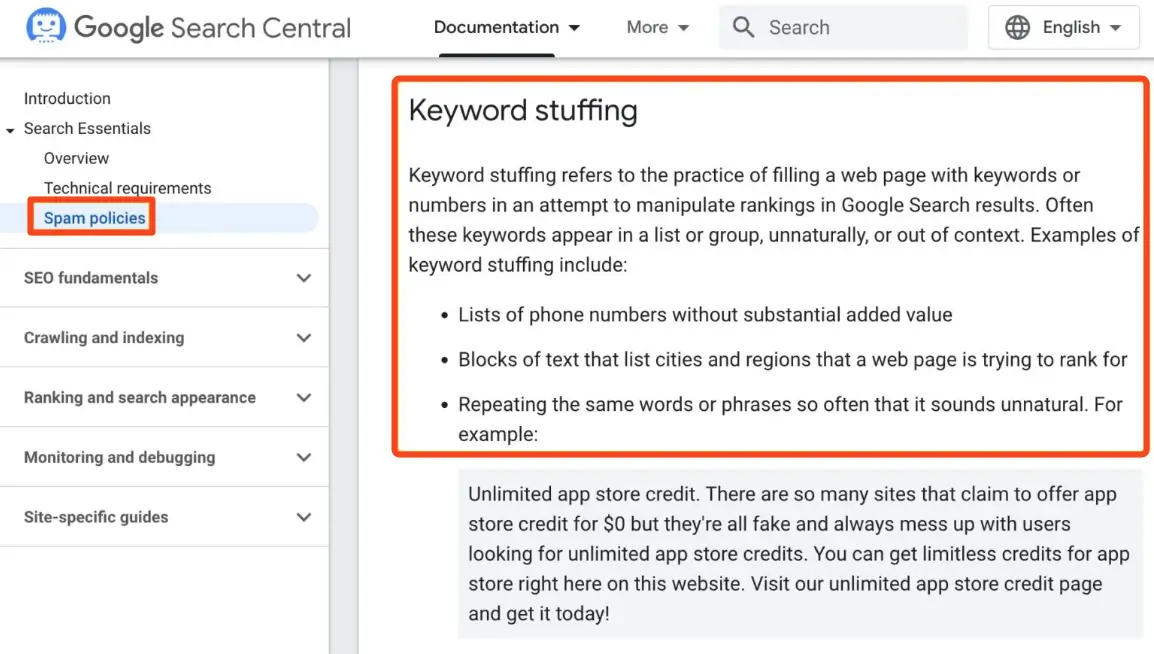
When a web post or page uses too many keywords very frequently in an abnormal way to rank high in search engine result pages, it is called keyword stuffing. But this is spamming, according to Google, which can lead you to various panels. Besides, overusing keywords damages your content’s quality and makes it read poorly.
To avoid this, focus on writing naturally while incorporating keywords strategically and adding them to your content naturally. In addition to focus keywords, include semantic keywords as well, which can further beautify and make your content meaningful.
3. Overlooking Content Marketing
Better content is outweighing more content.
– Rand Fishkin
In 1996, Microsoft founder Bill Gates wrote the phrase, Content is King, and now it’s one of the popular phrases.

A content or blog can be an asset to your website as well as to your company. It shows that you are trustworthy. A long time ago, people just worked to gather as much content as they could put on a single website. But after a new Google algorithm update, the scenario changed in a night.
What You Can Do for Better Content Marketing
- Find out the pain point of your customers
- Write more informative & useful content
- Try to write in a storytelling mode
- Post blogs regularly (Example: 2 blogs in a week)
- Use CTA (Call to Action) buttons
Some Effective Content Marketing Tools to Avoid SEO Mistakes
- Buzzsumo- Analyze your topic and competitors
- ClickFunnels– Convert your visitors into leads, and then customers
- EVERNOTE- Organize, save, and share your notes
- Canva- Create outstanding images and infographics for your content
- weMail– For effective email marketing
- Grammarly- Check your content readability, spelling, and grammar mistakes
- Plagiarism Checker – It checks if your content is unique or copied from any source
Thus, webmasters now search for the quality content creator. You don’t need 100 middle-range content; 25 quality blogs can increase your Alexa ranking significantly.
4. Forgetting to Make the Website Mobile-friendly

You are designing content, posting, and all other developing staff on a computer or laptop. Do you think all of your visitors use a desktop to browse or insight your website? If so, then you are wrong.
55% of online users use mobile devices nowadays. If your site is not tablet or mobile-friendly, then the bounce rate will increase, like Usain Bolt’s speed.
Before making a mobile-friendly site you should consider what you want to show to your audience. Because it’s not essential to display everything to your mobile users. Moreover, it can discourage them from continuing on your site.
Tools for Checking the Mobile-Friendliness of Your Site
- Google Developers Mobile-Friendly Test tool
- Google – Page Speed Insights
- Bing Mobile Friendliness Test Tool
- RankWatch
- W3C Mobile Checker
Therefore, now check out your website on your phone. If it is not mobile-friendly yet, then immediately optimize your site for mobile users. In new updates, Google is encouraging mobile-friendly web pages. So check it right now!
Tools for Making Your Website Mobile-friendly
- Elementor
- Squarespace
- Jimdo
- Wix
- Shopify
- Weebly
- Duda
With these tools, you can make your site mobile-friendly within a few minutes. You can even check how your site looks after editing.
Related- eCommerce SEO: The Ultimate Guide for Startups
5. Poor Social Marketing for Your Content

In business, the company owner invests in production as much as they can, but doesn’t take a look at content promotion or social marketing. The most amazing factor of content is that it can generate authentic and lifetime traffic on your site if you promote it in the right way.
Why Social Marketing is Essential
- Personalized customer relationships
- Build trust by increasing transparency
- Engage in collaborative selling
- Get sell-through blogs
- Gather organic traffic
The communication through your content is very important to promote your site. There are lots of ways to reach your expected audience.
Tools for Reaching Your Customer
Viral Content Bee – A Social promotion tool where everyone supports sharing your content automatically.
BuzzStream – It’s one of the best local SEO tools to drive local customers to your online business.
Buffer – Connect to multiple social accounts where you can schedule when to post it in which social media. Also, the date and time can be edited.
Quuu – Submit your content for strict individual review and approval by an excellent editorial team.
Venngage – Helps to create perfect infographic or presentation slides.
Animoto – Provides a huge number of beautiful templates, themes, and a collection of stock music so that you can create attractive videos.
6. Forgetting Tags & Meta Description

Your quality content may not get the rank in Google because of ignoring Tags and Meta descriptions. These two are essential parts of SEO, and an SEO editor should not forget about them. Jumping over them means you will miss a large potential for your content.
Optimizing the tags and meta descriptions of your content leads to improved performance in search engines.
Besides that, content marketers don’t prioritize the image tags, which is another great mistake. Though it is a small element and takes a few minutes to edit the whole image’s tags and content, it marks a large sign for your content. Alt tags of content are a sign of how the author or marketer is targeting it in Search engines.
The search bots cannot view the images, but they can read the alt tags very well. So it helps the content get indexed that way.
However, there are some free tools for creating meta descriptions, but it is wise to craft them with your own thoughts.
7. Ignoring Anchor Texts for Internal Links
Both users and search engines need anchor text. And, this is not our words, Google has prioritized the anchor text in its latest updates.
Our advice is not to over-optimize the content to match anchor texts. Google can penalize you, and you can lose your rankings anytime.
When adding internal links, try to link to relevant words. Avoid using Click here, Read the article, or Read more. Actually, it’s a waste from an SEO perspective.
Tools for Checking Your Both External and Internal Links
- Google Webmaster Tools
- Google Keyword Planner
- SEOWorkers Tool
- Woorank
- Mozbar Anchor Text Generator
Moreover, if you see that the anchor text does not sound natural, then it’s better to leave. Naturally and relevance are the key points of an anchor text.
8. Overlooking the Site Auditing
To run a website, a marketer may have to go through-
- Keyword Researching
- Writing Article
- Making it SEO Optimized
- Editing Images
- Posting it from the backend
- And many more.
So, after doing all of them, it’s really common to forget about site auditing on a weekly or monthly basis. But building this habit can improve your site performance. Also, you can save your content from getting a Google penalty.
Why It Is Important to Audit Your Site
- Track top referrals and build strategies
- Know your visitors and improve user experience
- Find out previous SEO mistakes
- Focus on your best content
- Check the eCommerce metrics to increase your sales
- Check the image quality and size to speed up the website
- Find out the unoptimized meta descriptions
Tools for Auditing a Site
- Google Analytics
- MySiteAuditor
- Google Search Console
- Web CEO
- SEO Site Checkup
- Seomator
- Moz Crawl Test
- And many more.
A site audit is very important after every Google update. Besides that, monthly auditing is good for site performance.
You can also check this article regarding Semantic SEO to know how the Search Engine (Google) processes the search results against our queries.
9. Not Enough Backlinks
Lack of backlinks can harm your website’s SEO performance. Search engines use backlinks as proof that other websites find your content trustworthy and valuable. Your website, especially if it’s new, will struggle to achieve higher search rankings without enough backlinks.
Backlinks also help bring in referral traffic. When an established website links to your content, its visitors can find your page through that connection. People who visit the linked sites will discover your page and spend time on it.
So, if your site lacks enough backlinks but your competitors take it seriously, there is no way to beat the competition, no matter how good your content is. Identifying your competitors’ backlink sources requires sophisticated web scraping.
Using a tool like Puppeteer to automate this process, combined with a Puppeteer proxy, allows you to gather a complete and accurate list of backlink opportunities at scale without getting your IP address blocked.
Fix All SEO Mistakes and Ensure Your Desired Ranking
The digital world is changing every day. If you want to win the game with search engines, you must avoid the common SEO mistakes we listed above.
We know it’s challenging to cover all the sectors at once, but don’t forget to check your Content Marketing, Site Auditing, and Anchor Texts. These are a must-have check for now.
After fixing those mistakes, you will surely see that your site is trending in the right direction. Moreover, you don’t need to fear any search engine updates.
Do you make any of these SEO mistakes on your site? How do you fix them anyway? Please share your experience with us in the comment section below.


![Black Friday and Cyber Monday are around the corner, and people are waiting for these festivals to grab the best product deals. That is why giving an attractive look to your website during this festive season is very necessary. But, creating a whole new landing page might be difficult in a short period of time. Don't worry. By using Happy Elementor Addons Black Friday and Cyber Monday Landing Page templates, you can easily develop a whole new landing page in a few minutes. In this today's blog, we are going to show how to boost your website design using HappyAddons templates during this festival season. Before that, we'll talk a bit about these two festivals and why they are important to online business communities. What are Black Friday and Cyber Monday? Black Friday is the immediate following of the famous Thanksgiving day. This is when people start shopping to celebrate the Christmas festival. Since the late 1980s, retail sales on this day have constantly been suppressing the past volumes. See the graph below. Source: Salecycle.com The first Monday following Thanksgiving day each year is called Cyber Monday. It was first introduced in 2005 by the USA National Retail Federation to encourage people to buy online. Though this festival originated in the USA, it is celebrated globally today. See the stats below. Source: Salecycle.com It indicates customers' buying behavior around this day is growing up over time. Many customers today keep a budget to buy products on these two days. So, why won’t you prepare a Cyber Monday landing page if you have an online store? Importance of Designing Landing Pages for Black Friday and Cyber Monday Festival Having a well-design website is one of the major checklists if you are running an online business. Most importantly, you have to make sure that your website remains up-to-date to boost your sales. That is why you need to redesign your website or make a new landing page during the Black Friday and Cyber Monday festivals. Because most online product & service-based businesses promote special deals during these two festivals. Here are some remarkable ways dedicated landing pages during these festivals can positively impact the performance of your online business. Boosts your product salesIncreases conversion rateOpportunity to collect potential email leadsGrabs users' attention toward your siteReduces bounce rateIncreases website visitors. Elementor Black Friday New Seasonal Kit is Already Here! Source: Elementor To make this Black Friday more enjoyable, Elementor has launched a New Seasonal Kit that includes landing pages, sections, pop-ups, and vector assets. All these design elements are made by the Elementor team so that one can easily use them on their website to ensure more sales and conversions. New Elementor Black Friday Seasonal Kit offers: 3 Landing pages6 Sections 6 Popups A collection of stickers & animations You can only get these ready-made Black Friday landing pages and sections if you have Installed Elementor Pro on your site. However, if you are looking for templates that are outside of the box, you can go with Happy Addons, the fastest Elementor Addons on the market. It's very easy to use, flexible and has tons of advanced features and widgets that can ease your website design journey. Also, you'll get several festival landing page templates & blocks. Moreover, you can use free Black Friday and Cyber Monday design blocks and templates to decorate your site. Most importantly, these templates and blocks are easy to customize and can be used for multiple purposes. Now let's see how you can use the Happy Addons templates to design your website according to the Black Friday theme. Pre-Requisites to Use HappyAddons Templates to Design Black Friday and Cyber Monday Landing Pages You must have the following plugins installed on your site to get access to the HappyAddons Template library. Make sure you’ve installed and activated the Happy Addons Free & Premium version of your website. Elementor (Free)Happy Addons (Free)Happy Addons Pro If you are new to Elementor, check this Step By Step Guide For Beginners. If you want to explore the readymade templates of HappyAddons before installing these plugins, you may visit by clicking on the button below. Check out Happy Addons Templates How to Design Black Friday Landing Page on Your Website Once you have the plugins (mentioned above) installed, your website is ready to follow the tutorial guide explained in this section. Get ready now! Step 1: Open a New Page with Elementor Create a new page or open the existing page with Elementor. Next, you have to select the Elementor Canvas option.Unless you select Elementor Canvas, you may watch the header, footer, and unnecessary other texts on the page. These might be irritating to you.Once you open the page with Elementor Canvas, your page will be completely clean. Watch the video below on how to do it. Step 02: Go to HappyAddons Library Click on the HappyAddons Library Icon. It will open up a modal popup. Here you'll find numerous stunning premade Blocks and Pages created by the Happy Addons team. Kindly explore them to create a list of your favorite items. Step 03: Import a HappyAddons Black Friday Template Go to the Page tab on the modal popup.Select Black Friday from the left-side filter option.You will several good-looking templates on your screen.Take your cursor on the one you like and hit on the INSERT button. Wait for a while to finish the installation process. You will get the template on your screen with editable sections and options. Step 04: Set the Black Friday Campaign Deadline A deadline creates a sense of urgency in customers' minds. So, better if you add a deadline section on the page to show your Black Friday deals. The good thing is that if you select the template as we did, you will automatically get a deadline or countdown option. You have to customize it as you want. Step 05: Show Image Carousel Slider on Your Black Friday Landing Page Using the Image Carousel, you can slide show demonstrating discounts on your product categories. Drag and drop the Image Carousel widget on any landing page section. Next, from the Elementor panel, you can add photos and text to the widget. Do it accordingly. Thus, you can add more sections and options on the landing page. Hope you can do it yourself. Step 06: Make the Black Friday Landing Page Mobile Responsive Making a web page mobile responsive with Elementor is super easy. You'll get the mobile responsive option on the Elementor footer section. Clicking on it will open up the option to view your landing page on different device screens. We have explained the process in the video below. Note: Don't delete any widget or section while customizing your landing page for any particular device. Because if you delete a widget or section on any device screen, it will also be applied on other devices. However, you may change their position or alignment or hide them. It won't make any impact on other devices. Step 07: Final Preview of Our Landing Page Here is the final interface of our Elementor Black Friday landing page that we've designed using the Happy Addons' ready-made Template. Get Happy Addons to Add a Black Friday Theme Landing Page on Your Website How to Design Cyber Monday Landing Page on Your Website You will require the same prerequisites (Elementor and HappyAddons Plugins) to design the Cyber Monday landing page on your website. Hope you have them ready on your website. Now, let's get into the tutorial part. Step 01: Import a Cyber Monday Readymade Landing Page Template Go to the HappyAddons Template library.Choose the Cyber Monday template you like.Click on the INSERT button. Wait for a while to finish the installation process. You'll get a page design like the following image below. Step 02: Edit Different Sections of the Page In the first tutorial, you saw the deadline/countdown option was already embedded in the template. But this template doesn't have it. So, you can bring it to your page? Very simple. Create a new section by clicking on the plus icon.Type Countdown on the Elementor search bar.Drag and drop the widget on the section. Customize the Countdown section from the Content and Style tabs of the Elementor panel. Using the Heading widget, we have added the FLASH DEALS text next to the countdown to make it more meaningful. Thus, you can use other exciting widgets on the template to make your landing page super gorgeous. Step 03: Promote Products on the Landing Page Promotional landing pages usually include a section to showcase some hot-selling products to generate instant sales. Using the Image and Button widgets, we have created this section under the FLASH DEALS.You may customize it more as you wish. Step 04: Make it Mobile Responsive We already showed you the process in the first tutorial on making a mobile web landing page responsive. Hope you can do it here as well, following the same guideline. Click on the Responsive Mode icon and do the rest yourself. Bonus: Black Friday and Cyber Monday Landing Page Design Key Considerations Whenever you design a landing page, you need to consider why you need to design this page and what elements they should keep on the page. Because if you are not adding all the necessary features to your page, it will not serve its purpose. This is why you need to focus on a few things before designing your Black Friday landing page. Here are some points you must consider in designing Black Friday and Cyber Monday landing pages. Add Black Friday textSet deals deadlineShow your best-discounted productsAdd coupon code Focus on responsive page designMake your page visually appealingImprove your page user experience or page structureSet a proper website navigation FAQ on Black Friday and Cyber Monday Landing Page Design Now, we'll answer some common questions on Black Friday and Cyber Monday Landing page designs commonly found online. How much does it cost to design a landing page?The cost of designing a landing page varies depending on the complexity of the design, the level of customization required, and whom to hire for the page. A simple landing page can be designed for as little as $25, while a more complex design with multiple customizations can cost upwards of $2,00.However, if you have Elementor and HappyAddons installed, you can design unlimited landing pages at a minimal cost. But like any other tool, you must have a kind of enterprise on them. As they are drag-and-drop builders and their numerous tutorials and documentation are available, they won't take you more than a month to be used to. Check out some wonderful YouTube tutorials on these two plugins. Hope you will enjoy them.How many hours does it take to design a landing page?It mainly depends on the level of design complexity and your web design skill. However, both in Elementor and HappyAddons, you will get countless readymade templates and block sections. You can design a beautiful landing page in 3-5 hours by making a proper combination of them.Can I design Black Friday and Cyber Monday Landing pages with Elementor and HappyAddons free versions?Surely, you can design Black Friday and Cyber Monday Landing pages with Elementor and HappyAddons free versions. But only with the pro versions, you can't add too many exciting features to your pages. For example, free versions will give you access to only a limited number of readymade templates.If you are just a beginner-level designer, free versions are enough. But if you are a professional designer or have a web designing agency, pro versions are a must. Are You Ready To Design Your Black Friday and Cyber Monday Landing Page? Customers look forward to this kind of occasion to buy their favorite products at a minimum price. Naturally, they are drawn to websites that look good and give a festive vibe. That is why adding a Black Friday and Cyber Monday landing page during the festival season will give you an extra edge over the competitors. The above guide shows how to design your Elementor Black Friday Landing page using the Happy Addons' Black Friday Templates and how it can help boost your holiday sales. So if you have any queries regarding this blog, you can comment on us in the below box. If you like this post, then share it on your social channel. Don't forget to subscribe to our newsletter. Also, follow our Facebook and Twitter channels for regular updates. Subscribe to our newsletter Get latest news & updates on Elementor [yikes-mailchimp form="1"] ":36560} /--](https://happyaddons.com/wp-content/uploads/2021/11/How-to-Design-Black-Friday-and-Cyber-Monday-Landing-Page-300x188.png)

14 Responses
I can relate to the mistakes. They have saved me a lot. Can you write on more SEO mistakes that most of the people do? Also, don’t forget to write a blog on new SEO strategies.
We are glad that you have got some help from this blog. We will try to write on more SEO mistakes and the latest SEO strategies soon.
Thank you and have a great day!
I am impressed. You have cover all the common mistake and lead the traffic how to avoid those.
Thank you author. ?
Thank you for your appreciation Ayon. Let us know what do you want to hear from us.
Onpage SEO is the most vital step of search engine optimization. We have ranked tons of sites without backlink and simply with onpage SEO. Focusing on longtail keywords and local search is the secret to win the SEO game. Thanks for sharing the good read.
Hi Andy,
Thanks for stopping by, we are happy that you find it helpful.
Regards,
Gobinda,
Team HappyAddons.
I appreciate what you have written to your website about common SEO mistakes, tips and tools. Thank you!
Thanks for stopping by and inspiring us.
Regards,
Team HappyAddons.
Great post! Many people don’t realize how small SEO mistakes can affect their website ranking. I liked how you explained each point in simple words. Thanks for sharing this useful info!
Thank you for the kind words! We’re glad you found the post helpful and easy to follow.
Must say the content is insightful & effective too. But from my concern, I want to share that there is a numbering mistake. Will you kindly recheck it?
Thank you so much for your helpful feedback. We have fixed the numbering issue. Thanks again for bringing it to our attention.