








2025 has been another great year for HappyAddons. The plugin continued to grow in users, features, and community trust. This year showed how far HappyAddons has come as a reliable Elementor addon for WordPress users around the world.
Throughout 2025, the team focused on making website building easier and faster. Many new widgets and features were added to the plugin. Besides, several existing features were improved. At the same time, strong effort was given to performance, design, and user experience.
This year-in-review post looks back at everything we achieved in 2025. We will share key numbers, new features, design work, and future plans. It is a simple way to celebrate the journey and say thank you to everyone who supports HappyAddons.
HappyAddons by the Numbers: A Quick Look Back at 2025
Nothing great is built overnight, and HappyAddons is no different. We have moved forward step by step every year, taking both small and big actions to improve the plugin. This steady journey has helped HappyAddons grow stronger with time.
The numbers clearly show this growth and reflect the deep trust and support we receive from our users and community.
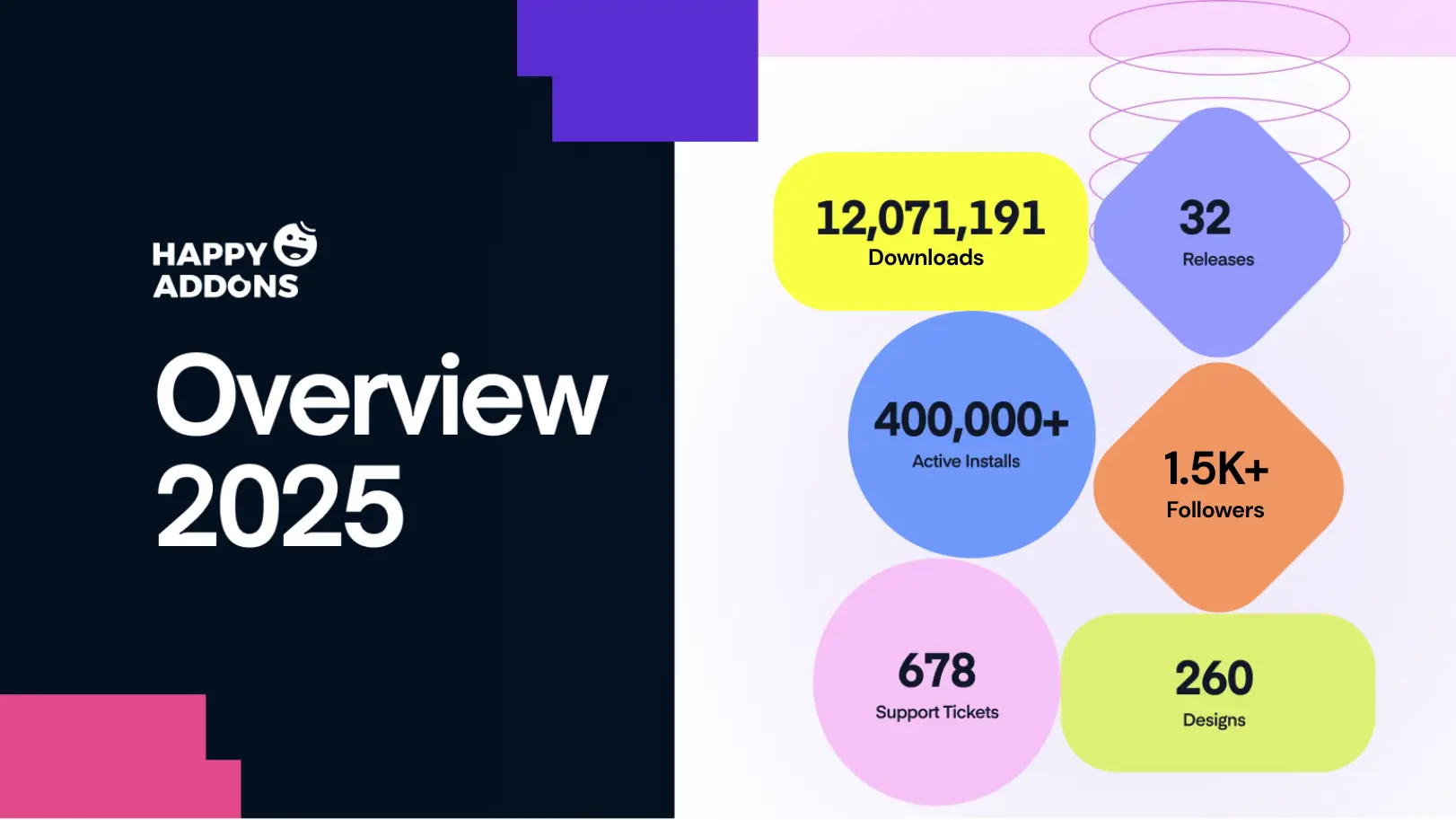
a. Downloads and Active Installs
HappyAddons surpassed a total of 12,071,191 downloads in 2025. This number shows that millions of users explored the plugin to build their Elementor websites. It also proves that the plugin solves real problems for real users.
HappyAddons now has 400,000+ active installs. These are not just downloads. These are live websites that are using HappyAddons every day. This shows long-term trust and satisfaction from users. HappyAddons has a free and premium version. Click the buttons below to get them.
b. Releases and Product Development
In 2025, our developers released 15 updates for the Free version and 17 updates for the Pro version. These releases were not rushed. Each update focused on new features, improvements, and better performance. Related docs were quickly updated after the releases.
The development team made 172 commits during the year. This shows regular work behind the scenes. It also proves that HappyAddons is actively maintained and constantly improved. Check our Changelog page.
c. Reliable Support and User Trust
The support team handled 657 support tickets. Along with this, 21 ORG tickets were handled with care and responsibility. Each ticket helped real users solve real problems. This shows a strong commitment to user success.
HappyAddons also received 22 five-star reviews on WordPress.org. These reviews reflect user happiness and positive experiences.
Content Published and Knowledge Base Updated in 2025
HappyAddons focused heavily on sharing knowledge and helping users through various content, like blog posts, video tutorials, and documentation posts. These focus on education, guidance, and making learning easier for everyone.
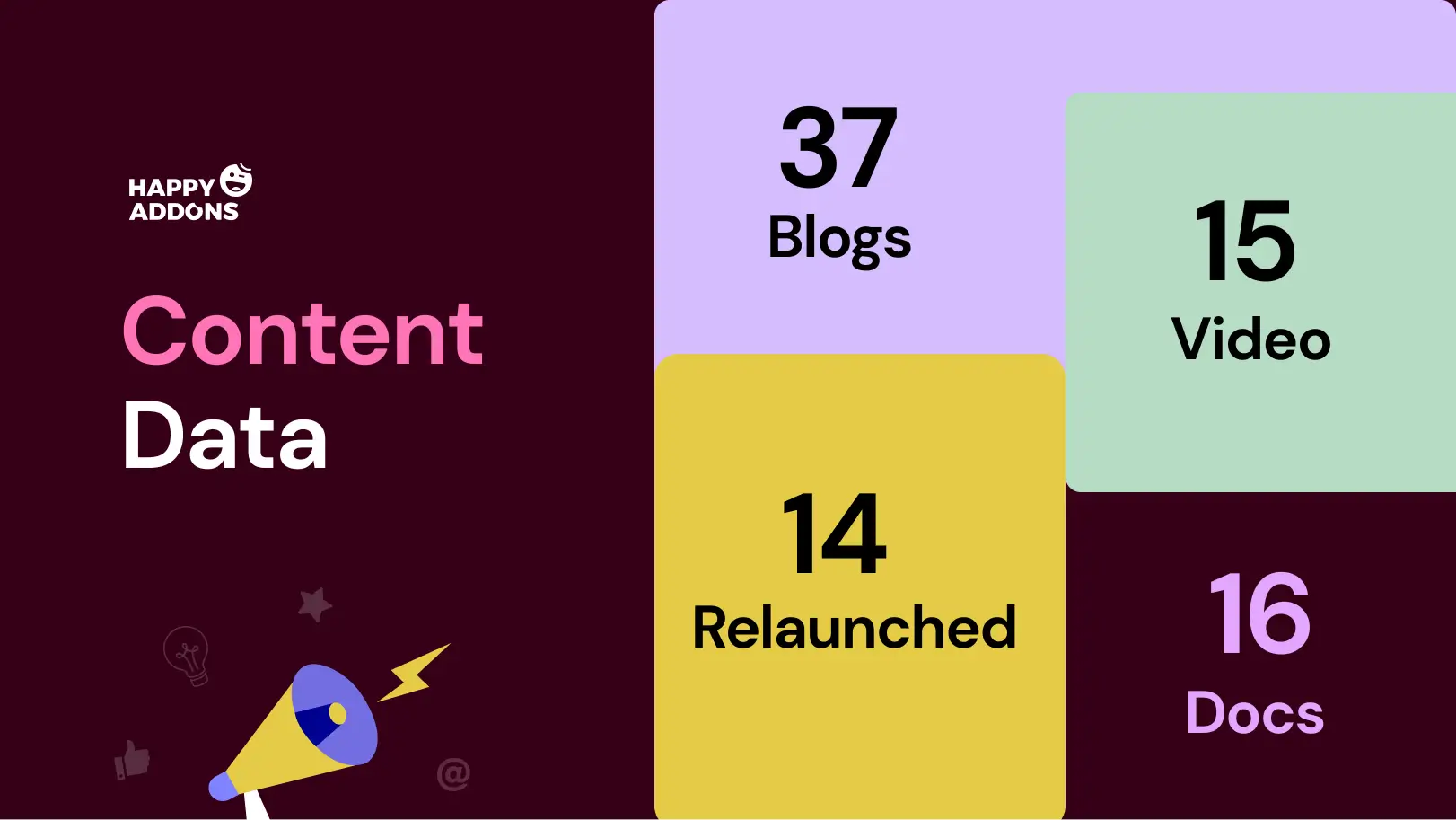
a. Blog Posts Published
We published 37 blog posts in 2025. These blogs covered a wide range of topics, including tutorials, guides, tips, and deep explanations of new and existing features. Users could learn how to create beautiful websites, use widgets effectively, and optimize their workflow with Elementor.
Every blog aimed to make complex ideas simple. Whether you were a beginner or an advanced user, the posts helped you understand how to build professional websites faster.
b. Video Content Performance
We published 15 new videos last year. These videos received 53.2k+ total views and over 1,000+ total watch hours. Videos are a great way to learn because they show exactly how to use the tools, step by step. People who prefer video content to blog posts benefited a lot from these.
Videos helped speed up learning, reduced confusion, and gave users confidence to try new features themselves. Check the tutorial videos of HappyAddons on YouTube.
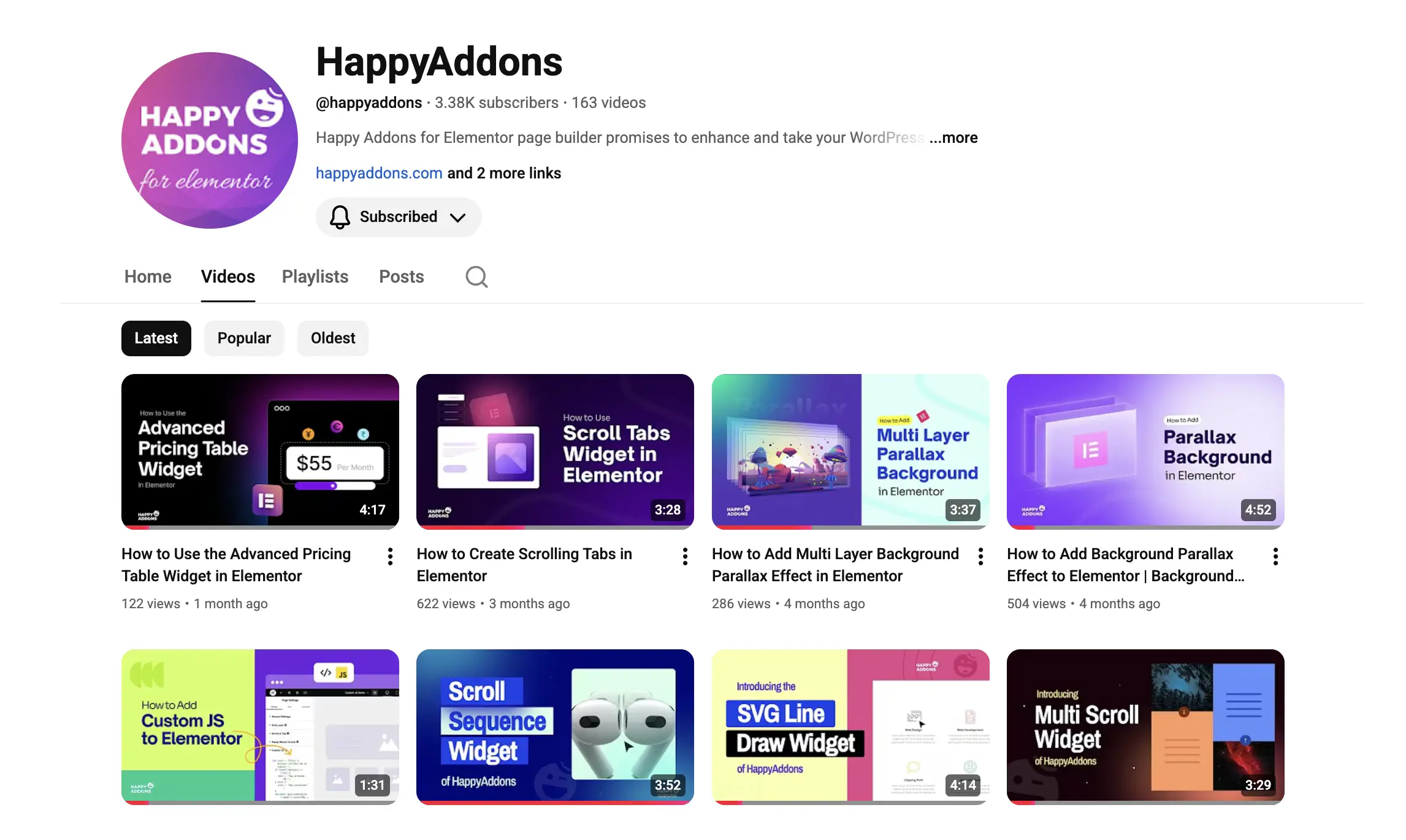
c. Knowledge Base Documentation Posts
Our 24/7 active support team strengthened the Knowledge Base in many ways. They added 16 new documentation posts and updated 5 existing ones. This made it easier for users to find solutions, troubleshoot issues, and understand every widget in detail.
This ensures users can get answers quickly without waiting for support, making HappyAddons a more reliable and user-friendly plugin. Check the Knowledge Base page of HappyAddons.
Design, Creativity, and Brand Efforts in 2025
It’s impossible to explain our content better without the support of proper visualization. So, our design team played a crucial role not only in general graphic design but also in creating wireframes and designs for product widgets, landing pages, promotional efforts, and more.

a. Website Design
Our design team completed 19 website design projects. These included creating new landing pages, updating existing pages, engaging popups, and anything related to web pages. These efforts also helped make HappyAddons’ website look modern, professional, and trustworthy.
b. Product Design
The product design team worked on 26 projects focused on widget interfaces and features. They designed new widget interfaces and updated existing ones to make them more intuitive and easier to use. With these improvements, users could interact with widgets smoothly, customize layouts faster, and enjoy a better overall Elementor experience.
c. Graphic Design
The team created 260 graphics, covering everything from social media posts, email banners, and campaign graphics to blog featured images and promotional material. Every design was created to attract attention, communicate clearly, and reflect the professional and creative spirit.
Social Media and Community Presence in 2025
We worked hard to stay close to its community in many ways. Social media was a key part of sharing updates, tips, and inspiration with users around the world. Not only promotional content, but we’ve also shared blog posts and video tutorial links through social media.

a. Consistent Social Media Activity
Throughout the year, we published 350+ posts on Facebook and X (formerly Twitter). These posts included feature updates, tutorials, design tips, and announcements about new releases. By staying active, we ensured users always had fresh content and helpful guidance at their fingertips.
b. Expanding Reach and Impressions
The social media posts achieved a total of 74,977 impressions. This means thousands of people saw HappyAddons’ updates, almost every day. Regular updates and engaging content helped users discover features, learn new tricks, and feel part of a growing community.
c. Growing the Community
HappyAddons’ social media presence also helped grow the community, reaching 1.5K+ followers on Facebook by the end of the year. Each follower represents someone who trusts the plugin and wants to stay informed. The community also provides feedback, shares experiences, and spreads the word.
A Proud Moment: HappyAddons Wins TemplateMonster Award
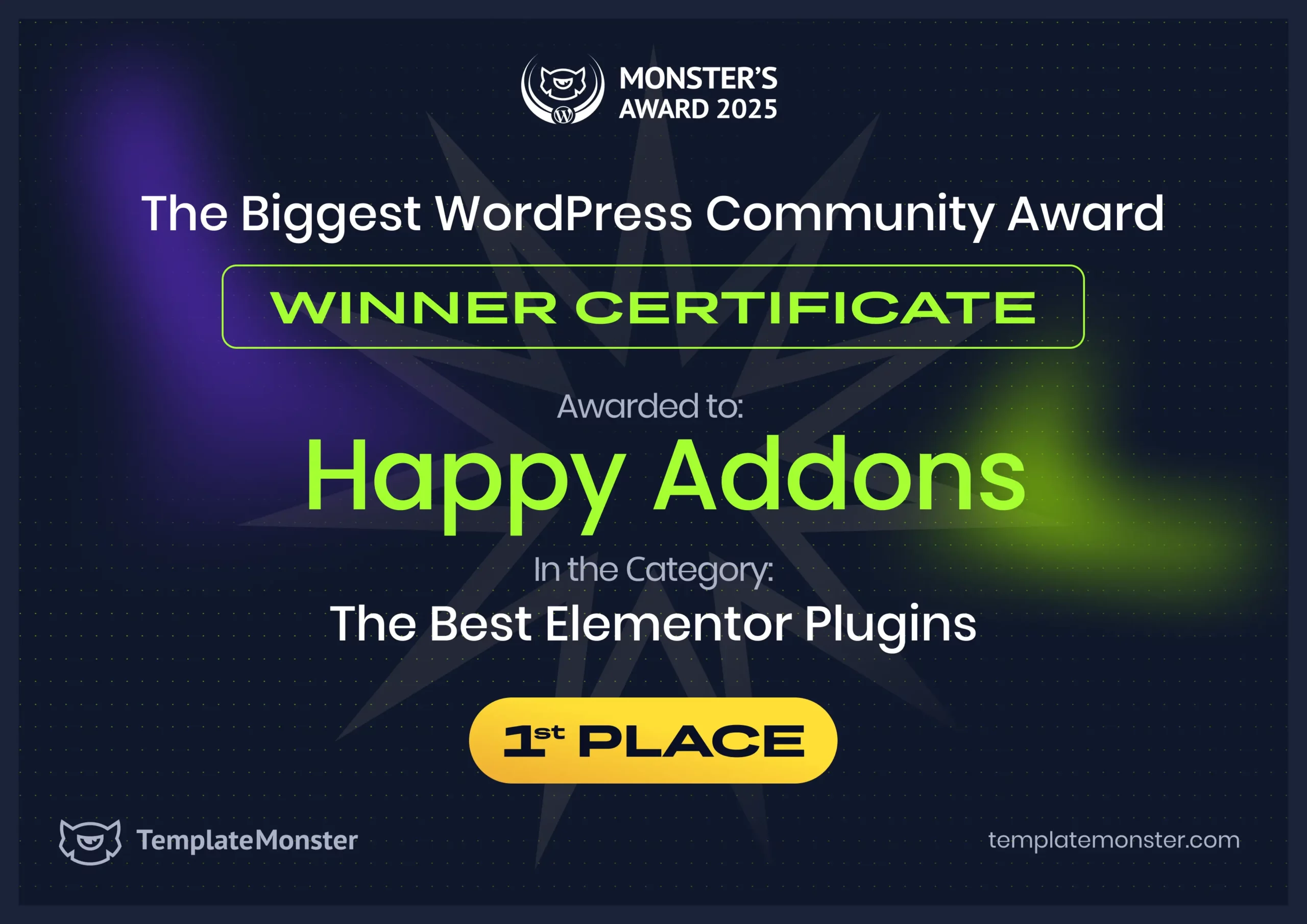
One of the biggest achievements of the year was winning the 1st place at the TemplateMonster Award in the category of Best Elementor Plugin. This recognition is not just a trophy. It is a celebration of hard work, innovation, and community trust.
Winning this award shows that HappyAddons is recognized globally for its quality, creativity, and usefulness. It proves that the plugin is not only popular among users but also respected in the professional WordPress and Elementor community.
New Features and Widgets Added to HappyAddons
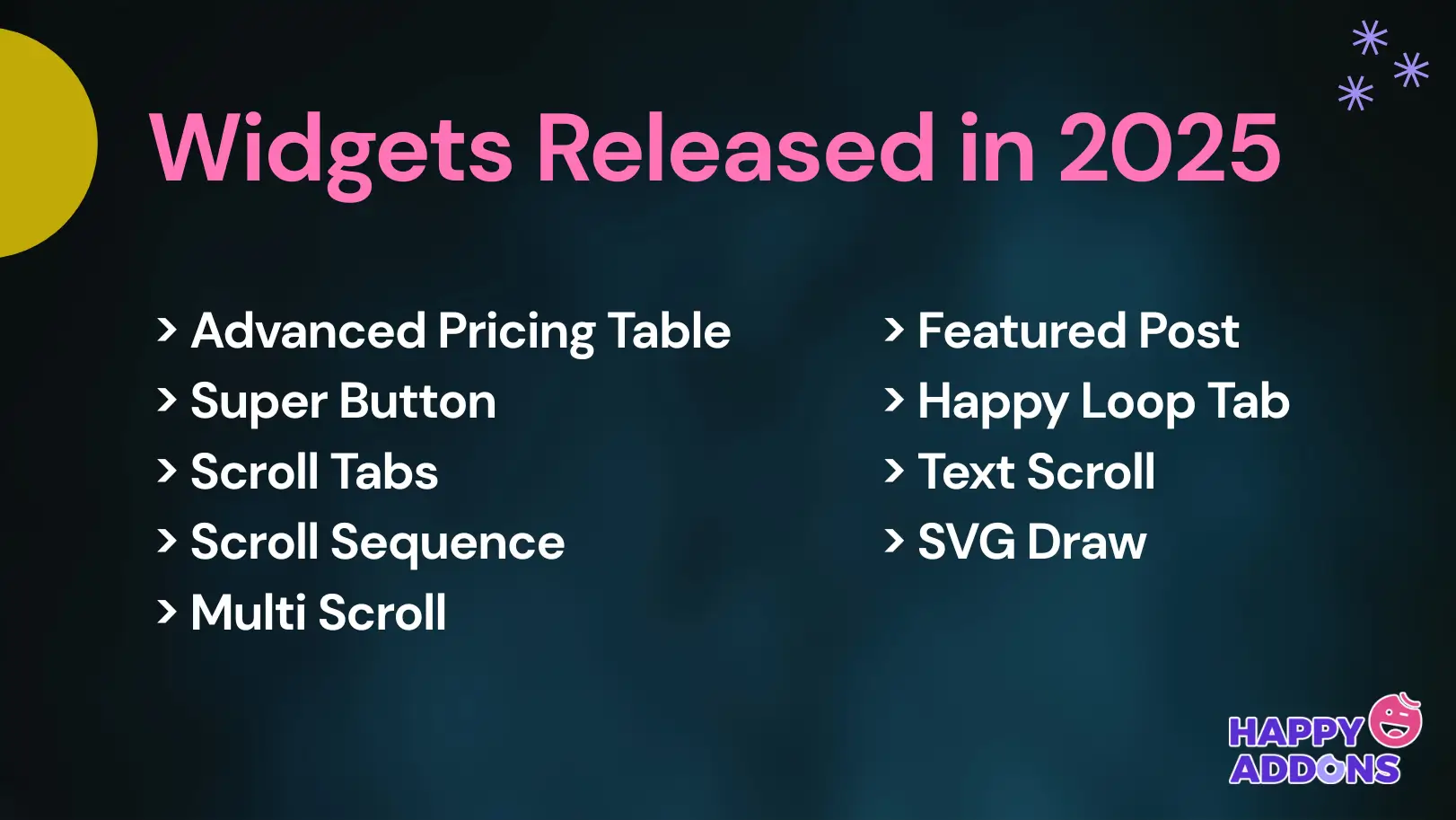
Our development team worked tirelessly to create many powerful new widgets and features to enhance the HappyAddons product. Take a quick look below at the features and widgets we released last year.
1. Advanced Pricing Table Widget
The Advanced Pricing Table Widget allows users to create modern and customizable pricing tables. You can display features, pricing plans, and call-to-action buttons clearly. This widget is perfect for businesses, freelancers, and online stores to showcase services professionally.
2. Super Button Widget
The Super Button Widget is more than a regular button. It comes with advanced styling, hover effects, and animations. Users can create eye-catching buttons with the widget to improve clicks and engagement on their websites.
3. Scroll Tabs Widget
The Scroll Tabs Widget lets users organize content in scrollable tabs. This keeps the website layout clean and allows users to show more information in less space. It is ideal for displaying FAQs, services, product features, product catalog, and similar types of things.
4. Scroll Sequence Widget
The Scroll Sequence Widget adds dynamic animation while scrolling. Users can create engaging stories, step-by-step guides, or product showcases that move as visitors scroll. This widget makes websites feel interactive and modern.
5. Multi Scroll Widget
The Multi Scroll Widget allows splitting content into multiple scrollable sections. Visitors can scroll side by side or vertically for a unique browsing experience. When users scroll, the content on the left and right sides moves in opposite directions simultaneously.
6. Featured Post Widget
The Featured Post Widget highlights important blog posts or news articles. Users can showcase top content on homepages or sidebars. It helps increase engagement and directs readers to valuable content quickly.
7. Happy Loop Tab Widget
The Happy Loop Tab Widget lets users display posts, products, or custom content in looping tabs. This is a great way to keep content dynamic and organized without overwhelming the visitor.
8. Text Scroll Widget
The Text Scroll Widget allows animated scrolling text anywhere on the website. Users can share announcements, news, or promotions in a stylish and attention-grabbing way.
9. SVG Draw Widget
The SVG Draw Widget brings creative line animations using SVG graphics. Users can add custom illustrations, logos, or designs that draw themselves as visitors scroll. It adds a professional and modern visual effect.
10. Background Parallax Feature
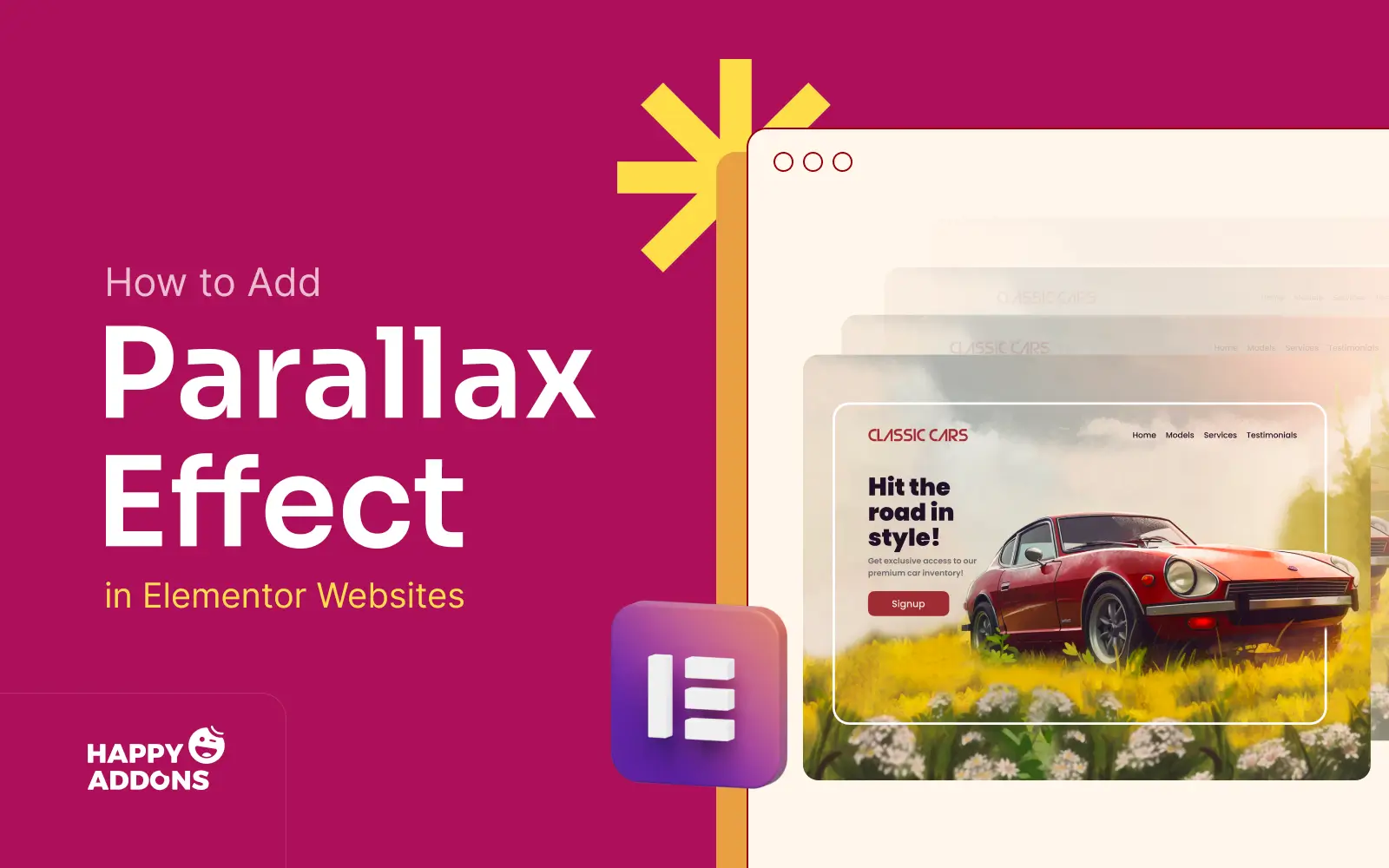
The Background Parallax Feature adds depth and motion to page backgrounds. Users can create a sense of movement while visitors scroll. This makes websites more engaging and visually appealing.
11. Multi Layer Parallax Feature
The Multi Layer Parallax Feature gives users the ability to create multiple layers of movement in sections. It adds a rich, 3D-like visual effect that makes websites feel lively and immersive.
12. Custom JS Feature
The Custom JS Feature allows users to add custom JavaScript directly inside widgets or sections. Advanced users can enhance interactivity, integrate third-party tools, or add unique effects easily.
What’s Next for HappyAddons in 2026
As 2025 comes to a close, the HappyAddons team is already looking forward to 2026 with big plans. The focus for the coming year is on innovation, better compatibility, and more powerful tools to help users build websites faster and easier.

a. Full Compatibility with Elementor v4
In 2026, one of the top priorities is to make HappyAddons fully compatible with Elementor v4. This will ensure all widgets, templates, and features work smoothly on the latest Elementor version. Users will be able to update HappyAddons without worrying about any plugin issues.
b. New Widgets for More Functionality
HappyAddons plans to add exciting new widgets in 2026. One of the most requested features is a Poll/Survey Widget, which will allow users to create interactive polls directly on their websites. More WooCommerce widgets are also coming, helping online stores customize product pages and boost sales effortlessly.
c. Enhanced Theme Builder Features
The Theme Builder of HappyAddons will become even stronger in 2026. Users will get more flexibility and control over headers, footers, archive pages, single posts, and conditional logics. This will make it easier to create unique websites without writing any code.
Continuous Performance and Usability Improvements
The team will keep improving performance, speed, and user-friendliness. Widgets will become more optimized, easier to use, and compatible with a wider range of themes and plugins. HappyAddons will continue focusing on making web design smooth and enjoyable for everyone.
Final Words!
Since its first release in September 2019, HappyAddons has grown steadily, learning from every update, user feedback, and challenge along the way. Over these six years, it has moved from a simple plugin to a versatile tool that helps thousands of users create websites with confidence.
This journey shows that progress comes step by step, with a focus on solving real problems and empowering creators to explore new possibilities. Looking ahead to 2026, the foundation built over the past years gives the team the confidence to take bigger steps.
New widgets, enhanced features, and smarter tools will not only make website building easier but also encourage users to experiment and innovate. HappyAddons’ story reminds us that persistence, learning, and thoughtful improvement can create tools that truly grow with their community.

![Black Friday and Cyber Monday are around the corner, and people are waiting for these festivals to grab the best product deals. That is why giving an attractive look to your website during this festive season is very necessary. But, creating a whole new landing page might be difficult in a short period of time. Don't worry. By using Happy Elementor Addons Black Friday and Cyber Monday Landing Page templates, you can easily develop a whole new landing page in a few minutes. In this today's blog, we are going to show how to boost your website design using HappyAddons templates during this festival season. Before that, we'll talk a bit about these two festivals and why they are important to online business communities. What are Black Friday and Cyber Monday? Black Friday is the immediate following of the famous Thanksgiving day. This is when people start shopping to celebrate the Christmas festival. Since the late 1980s, retail sales on this day have constantly been suppressing the past volumes. See the graph below. Source: Salecycle.com The first Monday following Thanksgiving day each year is called Cyber Monday. It was first introduced in 2005 by the USA National Retail Federation to encourage people to buy online. Though this festival originated in the USA, it is celebrated globally today. See the stats below. Source: Salecycle.com It indicates customers' buying behavior around this day is growing up over time. Many customers today keep a budget to buy products on these two days. So, why won’t you prepare a Cyber Monday landing page if you have an online store? Importance of Designing Landing Pages for Black Friday and Cyber Monday Festival Having a well-design website is one of the major checklists if you are running an online business. Most importantly, you have to make sure that your website remains up-to-date to boost your sales. That is why you need to redesign your website or make a new landing page during the Black Friday and Cyber Monday festivals. Because most online product & service-based businesses promote special deals during these two festivals. Here are some remarkable ways dedicated landing pages during these festivals can positively impact the performance of your online business. Boosts your product salesIncreases conversion rateOpportunity to collect potential email leadsGrabs users' attention toward your siteReduces bounce rateIncreases website visitors. Elementor Black Friday New Seasonal Kit is Already Here! Source: Elementor To make this Black Friday more enjoyable, Elementor has launched a New Seasonal Kit that includes landing pages, sections, pop-ups, and vector assets. All these design elements are made by the Elementor team so that one can easily use them on their website to ensure more sales and conversions. New Elementor Black Friday Seasonal Kit offers: 3 Landing pages6 Sections 6 Popups A collection of stickers & animations You can only get these ready-made Black Friday landing pages and sections if you have Installed Elementor Pro on your site. However, if you are looking for templates that are outside of the box, you can go with Happy Addons, the fastest Elementor Addons on the market. It's very easy to use, flexible and has tons of advanced features and widgets that can ease your website design journey. Also, you'll get several festival landing page templates & blocks. Moreover, you can use free Black Friday and Cyber Monday design blocks and templates to decorate your site. Most importantly, these templates and blocks are easy to customize and can be used for multiple purposes. Now let's see how you can use the Happy Addons templates to design your website according to the Black Friday theme. Pre-Requisites to Use HappyAddons Templates to Design Black Friday and Cyber Monday Landing Pages You must have the following plugins installed on your site to get access to the HappyAddons Template library. Make sure you’ve installed and activated the Happy Addons Free & Premium version of your website. Elementor (Free)Happy Addons (Free)Happy Addons Pro If you are new to Elementor, check this Step By Step Guide For Beginners. If you want to explore the readymade templates of HappyAddons before installing these plugins, you may visit by clicking on the button below. Check out Happy Addons Templates How to Design Black Friday Landing Page on Your Website Once you have the plugins (mentioned above) installed, your website is ready to follow the tutorial guide explained in this section. Get ready now! Step 1: Open a New Page with Elementor Create a new page or open the existing page with Elementor. Next, you have to select the Elementor Canvas option.Unless you select Elementor Canvas, you may watch the header, footer, and unnecessary other texts on the page. These might be irritating to you.Once you open the page with Elementor Canvas, your page will be completely clean. Watch the video below on how to do it. Step 02: Go to HappyAddons Library Click on the HappyAddons Library Icon. It will open up a modal popup. Here you'll find numerous stunning premade Blocks and Pages created by the Happy Addons team. Kindly explore them to create a list of your favorite items. Step 03: Import a HappyAddons Black Friday Template Go to the Page tab on the modal popup.Select Black Friday from the left-side filter option.You will several good-looking templates on your screen.Take your cursor on the one you like and hit on the INSERT button. Wait for a while to finish the installation process. You will get the template on your screen with editable sections and options. Step 04: Set the Black Friday Campaign Deadline A deadline creates a sense of urgency in customers' minds. So, better if you add a deadline section on the page to show your Black Friday deals. The good thing is that if you select the template as we did, you will automatically get a deadline or countdown option. You have to customize it as you want. Step 05: Show Image Carousel Slider on Your Black Friday Landing Page Using the Image Carousel, you can slide show demonstrating discounts on your product categories. Drag and drop the Image Carousel widget on any landing page section. Next, from the Elementor panel, you can add photos and text to the widget. Do it accordingly. Thus, you can add more sections and options on the landing page. Hope you can do it yourself. Step 06: Make the Black Friday Landing Page Mobile Responsive Making a web page mobile responsive with Elementor is super easy. You'll get the mobile responsive option on the Elementor footer section. Clicking on it will open up the option to view your landing page on different device screens. We have explained the process in the video below. Note: Don't delete any widget or section while customizing your landing page for any particular device. Because if you delete a widget or section on any device screen, it will also be applied on other devices. However, you may change their position or alignment or hide them. It won't make any impact on other devices. Step 07: Final Preview of Our Landing Page Here is the final interface of our Elementor Black Friday landing page that we've designed using the Happy Addons' ready-made Template. Get Happy Addons to Add a Black Friday Theme Landing Page on Your Website How to Design Cyber Monday Landing Page on Your Website You will require the same prerequisites (Elementor and HappyAddons Plugins) to design the Cyber Monday landing page on your website. Hope you have them ready on your website. Now, let's get into the tutorial part. Step 01: Import a Cyber Monday Readymade Landing Page Template Go to the HappyAddons Template library.Choose the Cyber Monday template you like.Click on the INSERT button. Wait for a while to finish the installation process. You'll get a page design like the following image below. Step 02: Edit Different Sections of the Page In the first tutorial, you saw the deadline/countdown option was already embedded in the template. But this template doesn't have it. So, you can bring it to your page? Very simple. Create a new section by clicking on the plus icon.Type Countdown on the Elementor search bar.Drag and drop the widget on the section. Customize the Countdown section from the Content and Style tabs of the Elementor panel. Using the Heading widget, we have added the FLASH DEALS text next to the countdown to make it more meaningful. Thus, you can use other exciting widgets on the template to make your landing page super gorgeous. Step 03: Promote Products on the Landing Page Promotional landing pages usually include a section to showcase some hot-selling products to generate instant sales. Using the Image and Button widgets, we have created this section under the FLASH DEALS.You may customize it more as you wish. Step 04: Make it Mobile Responsive We already showed you the process in the first tutorial on making a mobile web landing page responsive. Hope you can do it here as well, following the same guideline. Click on the Responsive Mode icon and do the rest yourself. Bonus: Black Friday and Cyber Monday Landing Page Design Key Considerations Whenever you design a landing page, you need to consider why you need to design this page and what elements they should keep on the page. Because if you are not adding all the necessary features to your page, it will not serve its purpose. This is why you need to focus on a few things before designing your Black Friday landing page. Here are some points you must consider in designing Black Friday and Cyber Monday landing pages. Add Black Friday textSet deals deadlineShow your best-discounted productsAdd coupon code Focus on responsive page designMake your page visually appealingImprove your page user experience or page structureSet a proper website navigation FAQ on Black Friday and Cyber Monday Landing Page Design Now, we'll answer some common questions on Black Friday and Cyber Monday Landing page designs commonly found online. How much does it cost to design a landing page?The cost of designing a landing page varies depending on the complexity of the design, the level of customization required, and whom to hire for the page. A simple landing page can be designed for as little as $25, while a more complex design with multiple customizations can cost upwards of $2,00.However, if you have Elementor and HappyAddons installed, you can design unlimited landing pages at a minimal cost. But like any other tool, you must have a kind of enterprise on them. As they are drag-and-drop builders and their numerous tutorials and documentation are available, they won't take you more than a month to be used to. Check out some wonderful YouTube tutorials on these two plugins. Hope you will enjoy them.How many hours does it take to design a landing page?It mainly depends on the level of design complexity and your web design skill. However, both in Elementor and HappyAddons, you will get countless readymade templates and block sections. You can design a beautiful landing page in 3-5 hours by making a proper combination of them.Can I design Black Friday and Cyber Monday Landing pages with Elementor and HappyAddons free versions?Surely, you can design Black Friday and Cyber Monday Landing pages with Elementor and HappyAddons free versions. But only with the pro versions, you can't add too many exciting features to your pages. For example, free versions will give you access to only a limited number of readymade templates.If you are just a beginner-level designer, free versions are enough. But if you are a professional designer or have a web designing agency, pro versions are a must. Are You Ready To Design Your Black Friday and Cyber Monday Landing Page? Customers look forward to this kind of occasion to buy their favorite products at a minimum price. Naturally, they are drawn to websites that look good and give a festive vibe. That is why adding a Black Friday and Cyber Monday landing page during the festival season will give you an extra edge over the competitors. The above guide shows how to design your Elementor Black Friday Landing page using the Happy Addons' Black Friday Templates and how it can help boost your holiday sales. So if you have any queries regarding this blog, you can comment on us in the below box. If you like this post, then share it on your social channel. Don't forget to subscribe to our newsletter. Also, follow our Facebook and Twitter channels for regular updates. Subscribe to our newsletter Get latest news & updates on Elementor [yikes-mailchimp form="1"] ":36560} /--](https://happyaddons.com/wp-content/uploads/2021/11/How-to-Design-Black-Friday-and-Cyber-Monday-Landing-Page-300x188.png)
