








If you have an online store or membership site, you should send countless emails daily. However, the WordPress PHP mail function cannot support this bulk email transaction. This default system isn’t dedicatedly to doing this.
Besides, many hosting providers disable this function due to security reasons. This is why you need an SMTP service. It can improve your email deliverability overnight. Otherwise, most of your emails will end up in the spam section of your audience.
This article is going to cover the 9+ best WordPress SMTP plugins in the following write-up. Before that, we will present you with some elementary knowledge about the services of SMTP plugins.
What is SMTP?
SMTP stands for Simple Mail Transfer Protocol. It helps you send bulk emails to a number of audiences at once. Most newbie users fail to understand how this protocol works. This protocol requires two things at a time: an SMTP plugin and an SMTP server.
Once you install an SMTP plugin, it takes full control of your WP_mail function. Then, it connects your website to an SMTP server (also known as an SMTP gateway). When you plan to send bulk emails, first, your plugin will pass all the emails to your connected server.
The server then authenticates each of your emails and breaks them into relevant parts. Right after completing the authentication, the SMTP server sends all your emails to the recipients’ inboxes following their email addresses.
Let’s know why you need an SMTP Plugin.
Why Do You Need A WordPress SMTP Plugin

Your web hosting server can’t handle multiple objectives. They are usually dedicated to completing one objective at a time. This is why most hosting providers don’t support bulk emailing services. But if you have a commercial website, you need to send or receive hundreds of emails every day.
Having an SMTP plugin can help connect your website to an SMTP server, enabling you to track email status and delivery reports. You can manage email notifications and find out the causes of failed emails. In addition, you can test if there is any configuration error.
Why Should You Consider an SMTP Server As Well
You may ask why you need an SMTP protocol to send emails. You can do it manually from your website. But the fact is, you can do it manually when your email volume is low. If you think of sending thousands of emails every day, the wp_mail function cannot support you anyway.
An SMTP server can make it easy for you to send countless emails quickly. You can improve the email delivery rate and email blasting. It maximizes user engagement, safeguarding your IP reputation.
9+ Best WordPress SMTP Plugins to Improve Email Deliverability And IP Reputation
The WordPress SMTP plugin takes full control of your WP_Mail function. It tracks all your email statuses, keeps a record of your email transaction, and scrutinizes the errors of your failed emails. Our analysis shows the following are the best-performing SMTP plugins for WordPress users.
- WP Mail SMTP
- Easy WP SMTP
- Post SMTP Mailer
- Mailgun SMTP
- FluentSMTP
- Mail Bank SMTP
- Gmail SMTP
- Mailjet SMTPFluentSMTP
- SMTP Mailer
We will now highlight their pros and cons in the discussion below. We have sorted them based on their installation number. But as a bonus, we’ll introduce weMail at the beginning, a compact solution for email marketing and SMTP services.
Introducing weMail: An Easy and Reliable Email Marketing Tool at a Low Cost
If you are looking for an affordable SMTP plugin that can provide email marketing solutions as well, weMail must be on your checklist. With 20,000+ active installations, it is one of the top-performing SMTP plugins for small to large organizations online.
It helps you focus more on growing your subscriber list, sending beautiful emails, and creating engagement from your WordPress dashboard. You can easily display subscription forms, automate emails, collect leads, and add subscribers to your list.
weMail Features
- Compatible with multiple email gateways (Amazon SES, Mailgun, SparkPost, SendGrid, etc.)
- A cloud-based solution that can handle unlimited emails
- Supports transactional emails, subscription form builders, email campaigns, and more
- Lets you add email subscription forms to your WordPress site to grow leads for inbound marketing
- Availability of email analytics to check the success rate of your email campaigns
What weMail is Better for
If you are a small business owner looking for an affordable SMTP plugin to grow the subscriber list, then weMail is incomparable to others. Its free version allows you to manage up to 3,000 subscribers, which is enough if you have a small audience.
Now, we will cover the top WordPress SMTP plugins according to their number of installations.
1. WP Mail SMTP
With 2+ million active installations, WP Mail SMTP is probably the most SMTP plugin for WordPress users. This is very easy to set up. In case you face any trouble, you can upgrade to the Elite plan. An expert from their team will do the setup process for you.
The free version of the plugin allows you to integrate some major email gateways. Such as SendGrid, Mailgun, and Gmail. But to integrate Amazon SES and Microsoft SMTP, you need to upgrade to the pro version.
Pros of WP Mail SMTP
- Easy to integrate with all the best email gateways
- In-depth email reports with graphs, tracking, and deliverability statistics
- Keep a record of every email detail sent from your website
- Takes full control of your website’s notification emails
- You can enable or disable the SMTP authentication manually
- Supported by the WPForms team
Cons of WP Mail SMTP
- Only developer and agency plan users can use the same API key on multiple sites
- You can’t have Microsoft and Amazon SES support unless you are a pro user
Our Verdict on WP Mail SMTP
WP Mail SMTP can give you a stress-free life. You can send all sorts of transactional emails using this plugin. It has 24-hour premium support available.
2. Easy WP SMTP
Easy WP SMTP avoids all the conflicting issues with the PHP mail () function and can reach all your emails to the inbox section of your users. With 600,000+ active installations, this is also in high demand among WordPress users.
The Easy WP SMTP plugin is inspired by WP Mail SMTP. It has a debug logging feature by which you can track if your emails are hitting the users’ inboxes or not. You can use its import and export features to place the same configuration on multiple websites.
Pros of Easy WP SMTP
- A 100% free WordPress SMTP plugin
- Supports Hotmail, Yahoo, and Gmail/GSuite servers
- Integratable to multiple websites
- Option to specify a reply-to email address
- Easy to check the success rate of email delivery
- Top-notch user interface
Cons of Easy WP SMTP
- Doesn’t offer direct pathways to integrate the email gateways
- Very limited service is available for Amazon SES and Microsoft SMTP
Our Verdict on Easy WP SMTP
If you are a beginner and new to WordPress, you can use this plugin to grow your skillset in email marketing. Because this plugin is completely free. You need to bear the subscription fee for your SMTP server
3. Post SMTP Mailer
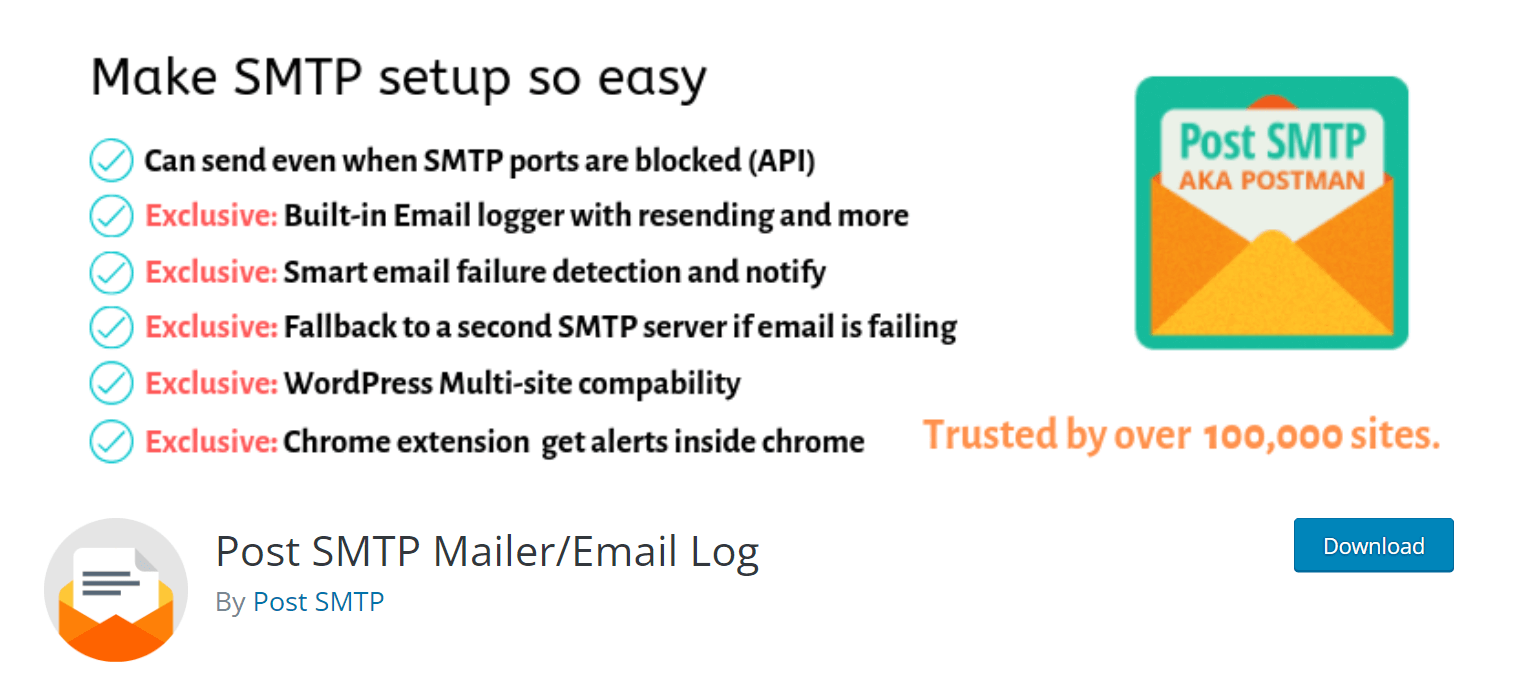
With 300,000+ active installations, Post SMTP Mailer is another free and feature-rich WordPress SMTP plugin. After you install the plugin, it connects Zend_Mail to your website and replaces the default PHP Mailer and WordPress SMTP library. Chrome extension instantly notifies if any email fails to hit the inbox.
It has an intelligent Setup Wizard and Connectivity Tester. Using them, you can scan your SMTP server to check if there is any configuration mistake or firewall blockade.
Pros of Post SMTP Mailer
- The connectivity tester and Setup Wizard ensure there is no configuration error
- Scrutinizes the causes of failed emails and resends them
- Backs custom email headers and forced recipients (cc, bcc, to)
- As it replaces the WordPress library, you will never lose another PHP mail again
- Backs up HTML Mail, Multipart, and International alphabets
Cons of Post SMTP Mailer
- Since this plugin is free, it’s difficult to get instant support.
- Without a third-party SMTP service provider, you can’t use this plugin.
Our Verdict on Post SMTP Mailer
You will get no premium support from this plugin as it is free. Integrating Mailgun API into this plugin allows you to send 10,000 emails for free per month. You can also freely send 100 emails daily by integrating the SendGrid API.
4. Mailgun SMTP

If you are looking for a developer-friendly SMTP plugin, check out Mailgun SMTP. It has a RESTful API, making sending transactional emails in bulk easy. Using its API, you can check the current status of all your emails anytime.
Mailgun has a 24-hour support facility for its premium users. It saves your email data for up to 15 days. Active installations of the plugin are 90,000+.
Pros of Mailgun SMTP
- Offers email address validation and email tracking
- 24/7 support, including detailed documentation
- You can optimize the email-sending schedule
- It supports all the powerful languages (C#, Java, Python, PHP, and Ruby)
- Gives you an email log to retrieve information in need
Cons of Mailgun SMTP
- The free plan allows sending 5000 emails/per month for up to the first three months
- You cannot create a custom domain
Our Verdict on Mailgun SMTP
The configuration of Mailgun SMTP is kinda difficult for general users. This plugin is much more suitable for developers. You can maximize your ROI using this plugin if you are a developer. Technical support is available for premium users.
5. FluentSMTP
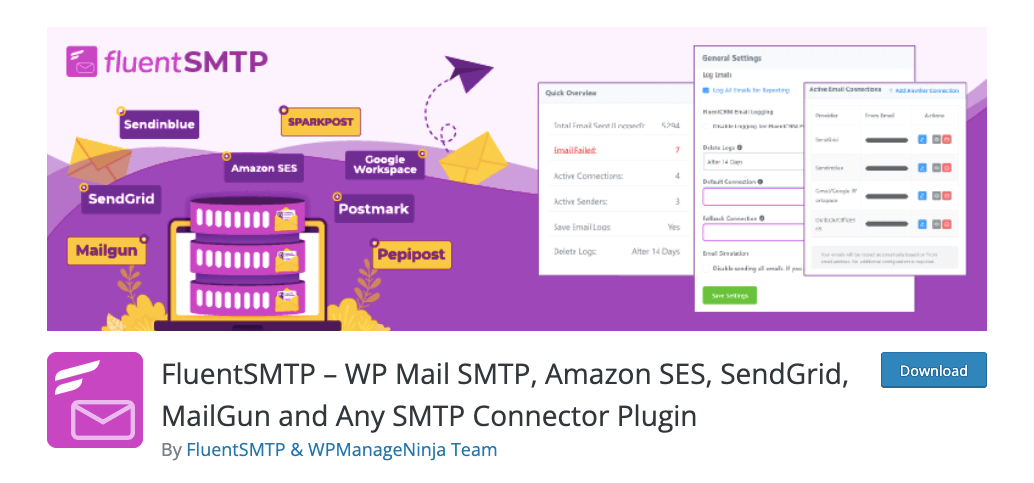
FluentSMTP is a powerful plugin offering you optimum control over your email deliverability. It helps you seamlessly integrate your WordPress site into Gmail, AmazonSES, SendGrid, Mailgun, Sendinblue, Sparkpost, Postmark, Pepipost, Outlook, and more.
FluentSMTP provides detailed logs, real-time analytics, and valuable insights into your email campaigns. You can keep track of the emails you are sending and how they are performing. This detailed information lets you fine-tune your emailing strategies for more conversions.
Pros of FluentSMTP
- Comes with an intuitive interface for quick setup and configuration
- It uses native REST API with the available connection to fasten and secure emails
- Easy to route emails through different email-sending services based on different conditions
- You can resend any email, whether it fails or reaches successfully on the first attempt
Cons of FluentSMTP
- You’ll fail to send emails if the configured email servers are down
- Limited support is available for free users
Our Verdict on FluentSMTP
FluentSMTP seamlessly works with multisite. You need to configure it with each of your WordPress sites based on your requirements. Plus, if you have no issue with depending on third-party email providers, you can use the FluentSMTP plugin.
6. Mail Bank SMTP
Mail Bank SMTP allows you to send emails using an existing Yahoo, Outlook, or Gmail. It harnesses the Zend framework to maximize the functionality of your WordPress site. It has an email logger that records every email you send. It allows you to delete unnecessary emails individually or in bulk.
You will find different authentication methods in this plugin. Mail Bank SMTP is highly compatible with other email and contact form plugins. It offers a free plan to check its prospects alongside the premium versions. The number of active installations of the plugin is 40,000+.
Pros of Mail Bank SMTP
- Offers you different SMTP services (Google SMTP, Sendgrid, Mailgun)
- Its email logger and analytics give you a comprehensive email report
- You can either encrypt (TLS/SSL) or non-encrypt your emails
- Using the debugging report, you can fix deliverability errors
- You can choose an authentication type from OAuth 2.0, Lain Authentication, Cram-MD5, etc.
Cons of Mail Bank SMTP
- Most of the exciting features are reserved only for premium users
- Premium plans are a bit expensive compared to the available services
Our Verdict on Mail Bank SMTP
Tech Banker develops Mail Bank SMTP. They have another SMTP plugin named WP Mail Booster, which is completely free. If you find the Mail Bank SMTP is expensive, you can use this free plugin to meet your basic needs.
7. Gmail SMTP

Gmail SMTP has been designed and developed specifically for Gmail users. If you have no SMTP server and want to use Gmail as the server, this plugin is the best fit for you. All you need is a Gmail API to use this plugin.
Gmail SMTP uses OAuth 2.0 protocol for authentication. It doesn’t require storing your username and password, which ensures more security for the users. Right now, this plugin has 20,000+ active installations.
Pros of Gmail SMTP
- Utilizes PHPMailer library to send emails via PHP’s mail functionality
- Website admin can set a redirect to a web URL
- Utilizes TLS/SSL to encrypt while sending an email
- You don’t need to enable less-secure apps to solve SMTP connection errors
Cons of Gmail SMTP
- Uses the WordPress default wp_mail(), which is an old technology
- You can send only 150 emails daily in the free plan
Our Verdict on Gmail SMTP
You cannot integrate or switch to other SMTP servers using this plugin. You can use this plugin if you are ready to stay just with the Gmail SMTP server. No premium support is available with this plugin.
8. Mailjet SMTP

Mailjet is currently a popular SMTP plugin among the online commercial community. Business websites can customize their marketing campaigns and send transaction emails in bulk using this plugin. It has a template gallery from which you can choose the right one for your campaigns.
Mailjet has analytics that give you real-time reports on email deliverability. With 20,000+ active installations, DHL, Kia, Microsoft, American Express, and many prominent giants use this plugin.
Pros of Mailjet SMTP
- Offers a number of email templates to let you design your email campaign
- Has a real-time dashboard to monitor email performance
- Offers you a drag-and-drop builder to design your emails
- Let you choose from a variety of ports to enjoy greater flexibility
Cons of Mailjet SMTP
- By default, you can send only 200 emails per day
- Doesn’t have the same price plan for all the countries around the world
Our Verdict on Mailjet SMTP
Right now, Mailjet is one of the most affordable WordPress SMTP plugins available on the web. But its pricing varies according to users’ location. Take a look at the price list before you purchase it.
9. SMTP Mailer
SMTP Mailer is a relatively new but promising SMTP plugin for WordPress. It offers you a handy feature that allows you to send test emails through the SMTP server so you can ensure all the settings are perfectly carried out. Though it isn’t a new feature, this plugin can be a valuable tool.
The plugin also lets you configure the type of encryption and SMTP port you want to use for your emails. SMTP Mailer works well with numerous email service providers.
Pros of SMTP Mailer
- Has integrations with many popular email service providers
- Easy to enable/disable SMTP authentication while sending emails
- Offers a handful of guides and documentation
- Advanced encryption protects sensitive information
Cons of SMTP Mailer
- It may take time for non-technical people to understand how to operate the plugin
- Some email service providers may ask you for additional fees
Our Verdict on SMTP Mailer
SMTP Mailer is highly beneficial for marketers and online business owners who depend heavily on email campaigns. Because it not only improves deliverability but also offers real-time analytics.
A Guide on How to Set Up An SMTP Plugin for WordPress
You might be thinking of how to Set Up your desired SMTP plugin on your WordPress site. This is very easy to do. Since WP Mail SMTP is the number one and most used plugin on the web, we will show you how to configure this plugin on your website.
Step 01: Install and Activate the WP Mail SMTP Plugin
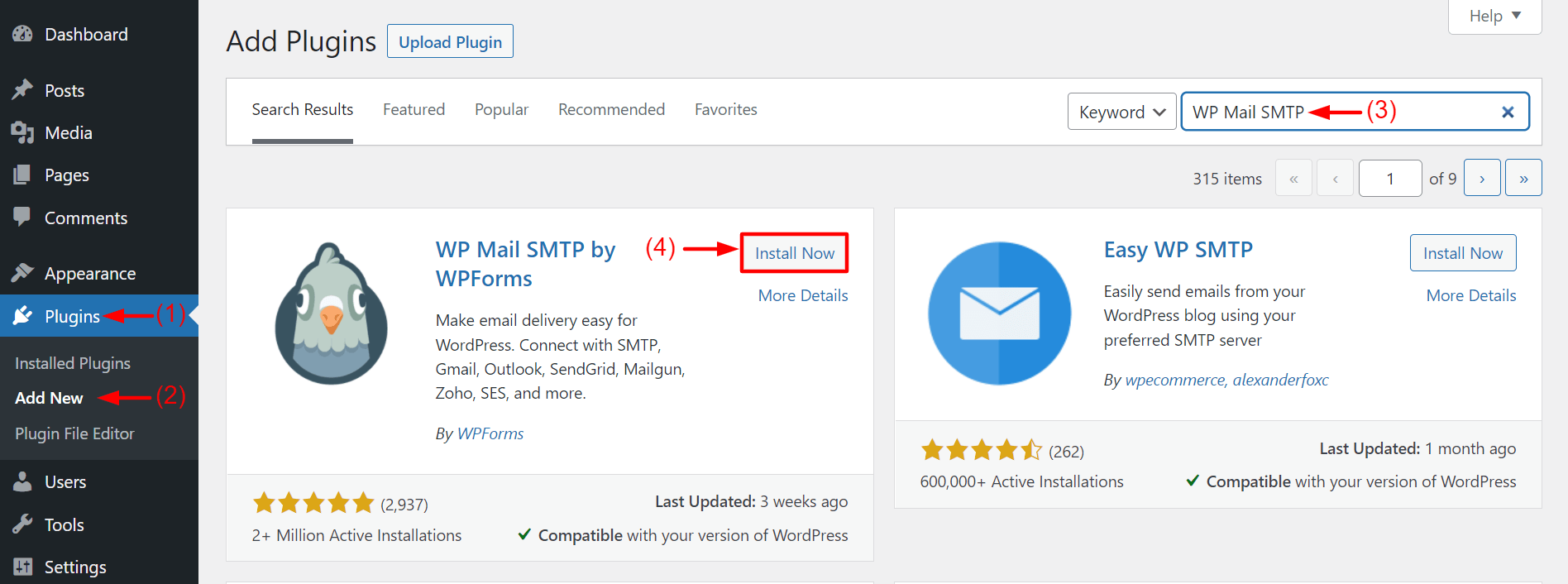
Open your WordPress Dashboard. Navigate to Plugins > Add New. Type WP Mail SMTP in the top-right search box. Install and Activate the plugin once it appears below.
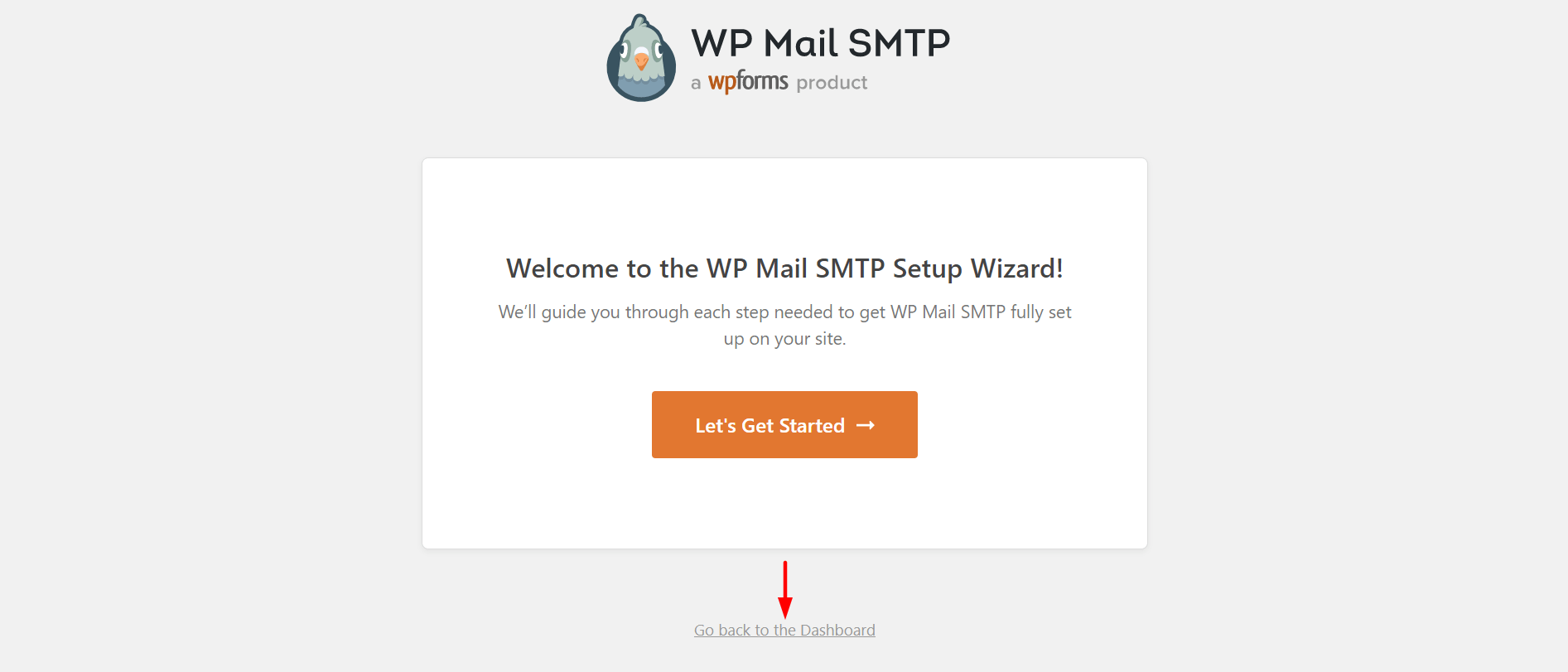
Click on Go back to the Dashboard.
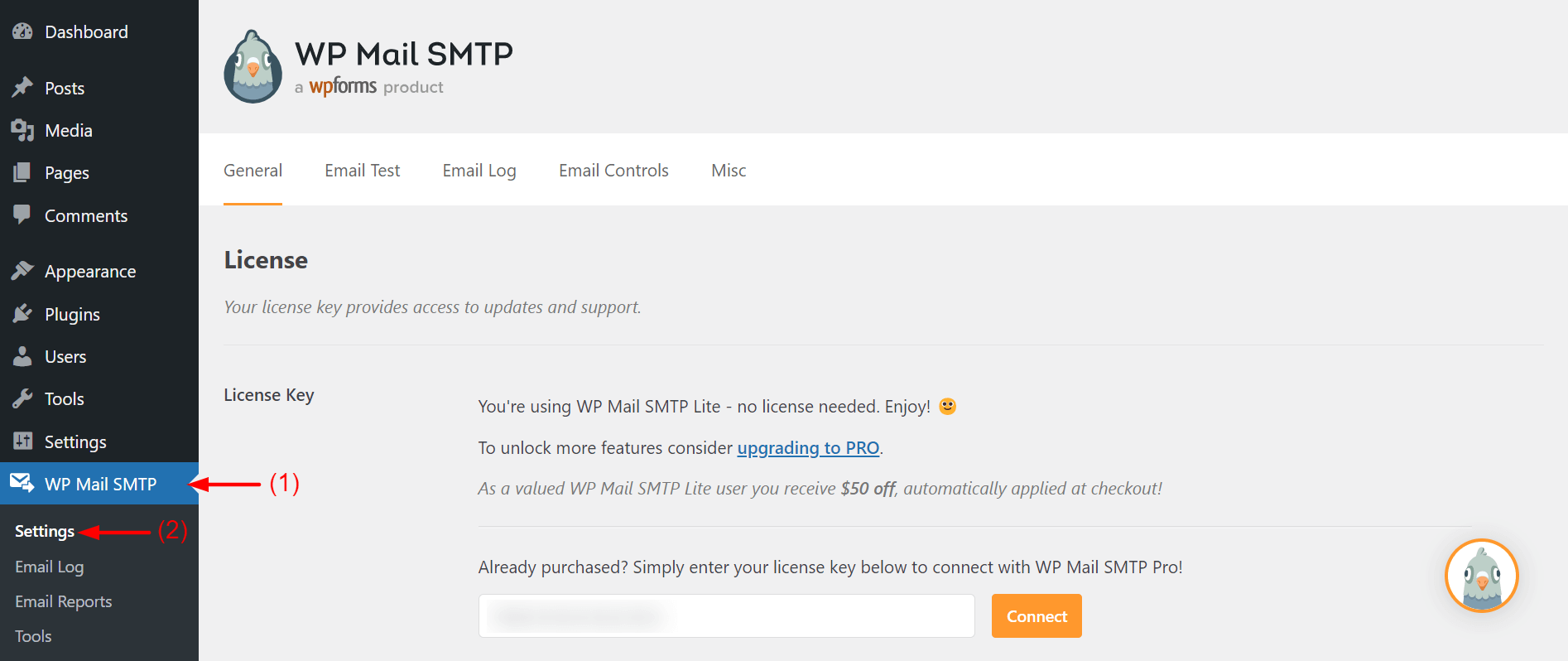
Go to WP Mail SMTP > Settings. You will get into the General section.
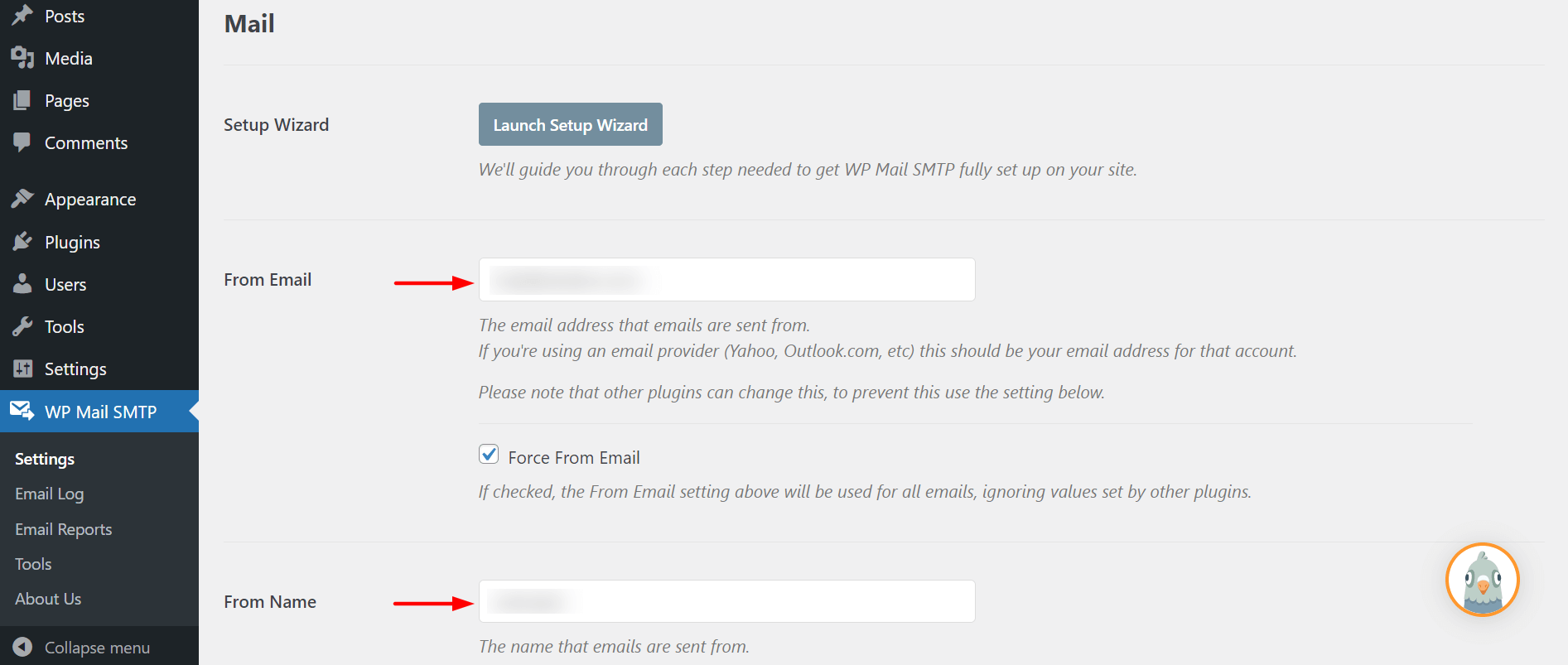
Type the email address in From Email. All your WordPress emails will be sent from this email ID. Then, give a name in the From Name box. Try to keep this name the same as the email address.
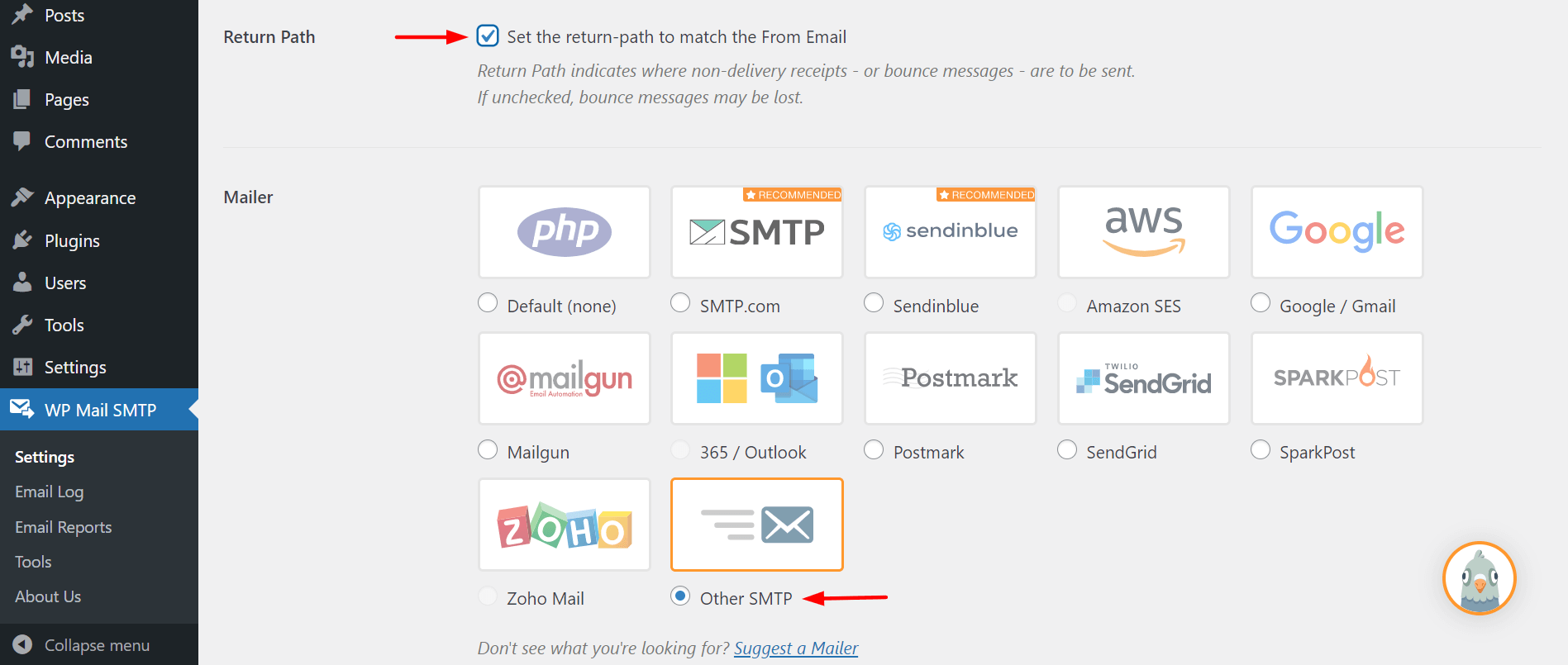
Scrolling a bit down, come to the Return Path section. Check the box to receive bounced and received email notifications. Then, from the Mailer section, choose your preferred gateway. For now, here we are choosing Other SMTP.
Keep scrolling down. Type your SMTP Host on the particular box. Then choose TSL encryption.
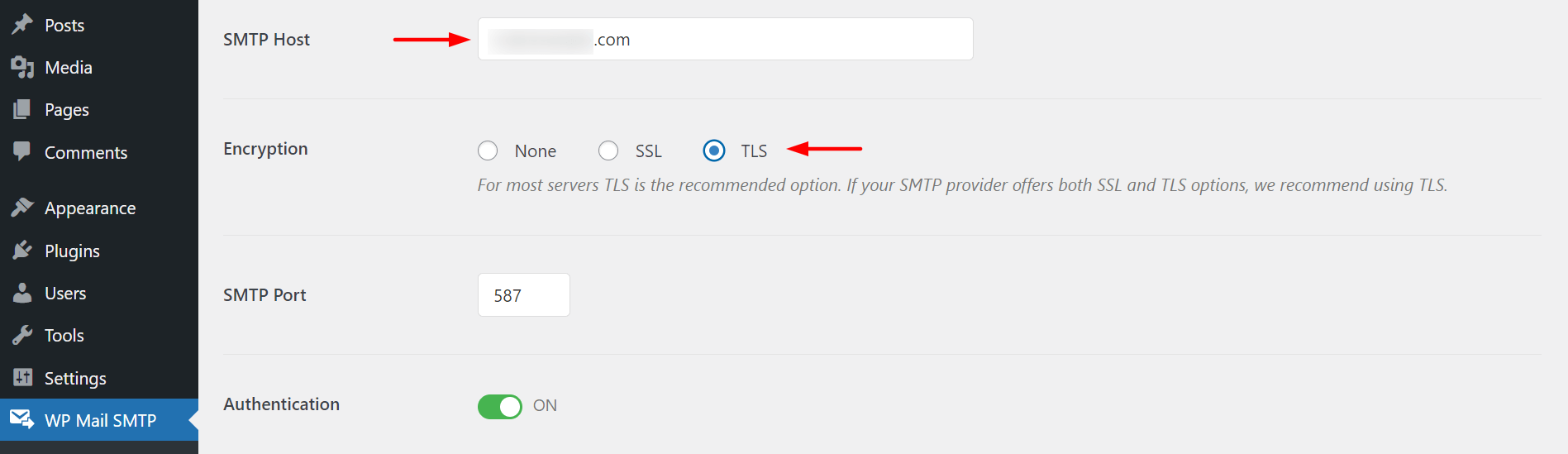
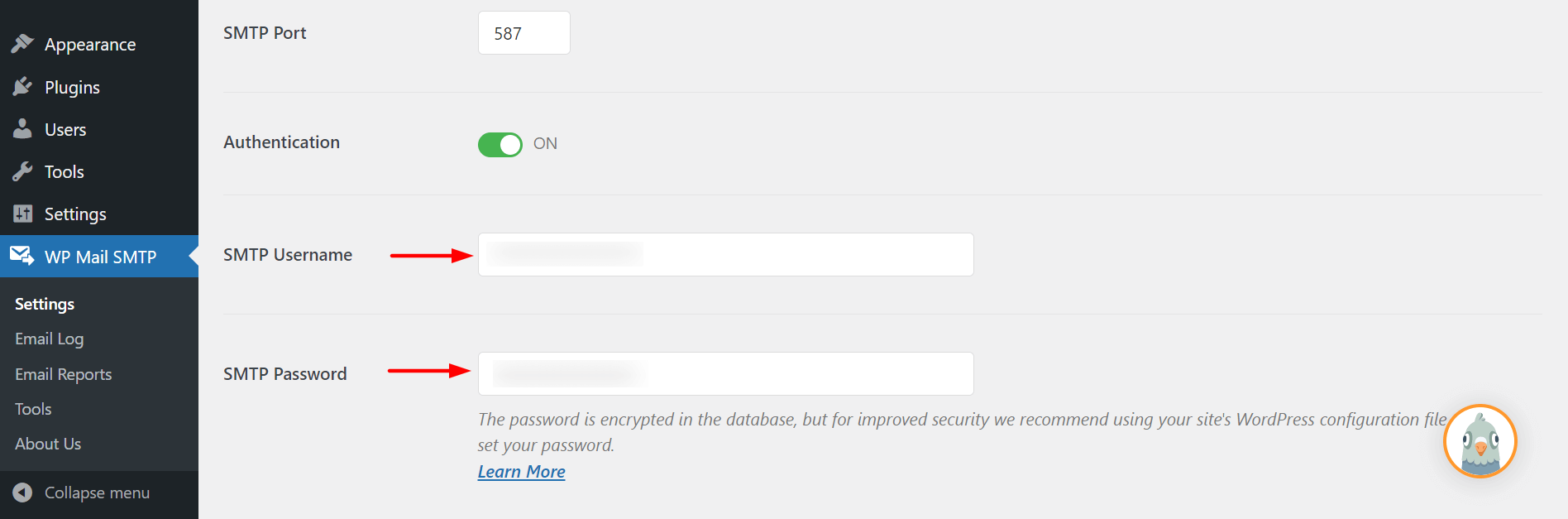
Just a few more options left. Keep scrolling down again. Complete the SMTP Username and Password section. Better not to save your SMTP password here. Rather do it in the wp-config.php file.
Now, you must choose an SMTP server and configure it according to the settings you have set in the WP SMTP plugin.
FAQ on WordPress SMTP Plugins
Here, we will answer some common questions on SMTP plugins that frequently come from WordPress users.
-
What is SMTP Plugin in WordPress?
SMTP plugin connects and configures a website to a mail server and manages all the outgoing emails to ensure better deliverability.
-
Is Post SMTP Mailer free?
Yes. The Post SMTP Mailer is a completely free plugin for WordPress users.
-
Is WP SMTP Plugin free?
No. The WP SMTP Plugin is a freemium plugin.
-
What is wp_mail in WordPress?
wp_mail is a built-in function in PHP that allows users to send emails.
-
Do I need SMTP for WordPress?
WordPress uses the PHP mail function by default to send emails. WordPress will continue to provide this support as long as your email volume is low. But if you think of email blasting, there is no alternative to SMTP services.
Scale Up Your Email Deliverability with SMTP
Email is not just about sending text messages. You can send all kinds of electronic data through this medium. Email marketing is the fastest, cheapest, and easiest way to communicate directly with customers and users.
If you are determined to have only a limited number of users, you don’t need any additional WordPress tools. But if you plan to increase users, take new members, or start eCommerce, there is no alternative to using an SMTP plugin.
The choice is yours. Using an SMTP plugin can significantly mitigate your risks and email bounce rate. It will make sure all your emails are landing in the inbox section of your users.
Don’t forget to mention in the comment section which plugin you have loved most. If you love this article and want to get more like this one, follow our Facebook and Twitter channels.

![Black Friday and Cyber Monday are around the corner, and people are waiting for these festivals to grab the best product deals. That is why giving an attractive look to your website during this festive season is very necessary. But, creating a whole new landing page might be difficult in a short period of time. Don't worry. By using Happy Elementor Addons Black Friday and Cyber Monday Landing Page templates, you can easily develop a whole new landing page in a few minutes. In this today's blog, we are going to show how to boost your website design using HappyAddons templates during this festival season. Before that, we'll talk a bit about these two festivals and why they are important to online business communities. What are Black Friday and Cyber Monday? Black Friday is the immediate following of the famous Thanksgiving day. This is when people start shopping to celebrate the Christmas festival. Since the late 1980s, retail sales on this day have constantly been suppressing the past volumes. See the graph below. Source: Salecycle.com The first Monday following Thanksgiving day each year is called Cyber Monday. It was first introduced in 2005 by the USA National Retail Federation to encourage people to buy online. Though this festival originated in the USA, it is celebrated globally today. See the stats below. Source: Salecycle.com It indicates customers' buying behavior around this day is growing up over time. Many customers today keep a budget to buy products on these two days. So, why won’t you prepare a Cyber Monday landing page if you have an online store? Importance of Designing Landing Pages for Black Friday and Cyber Monday Festival Having a well-design website is one of the major checklists if you are running an online business. Most importantly, you have to make sure that your website remains up-to-date to boost your sales. That is why you need to redesign your website or make a new landing page during the Black Friday and Cyber Monday festivals. Because most online product & service-based businesses promote special deals during these two festivals. Here are some remarkable ways dedicated landing pages during these festivals can positively impact the performance of your online business. Boosts your product salesIncreases conversion rateOpportunity to collect potential email leadsGrabs users' attention toward your siteReduces bounce rateIncreases website visitors. Elementor Black Friday New Seasonal Kit is Already Here! Source: Elementor To make this Black Friday more enjoyable, Elementor has launched a New Seasonal Kit that includes landing pages, sections, pop-ups, and vector assets. All these design elements are made by the Elementor team so that one can easily use them on their website to ensure more sales and conversions. New Elementor Black Friday Seasonal Kit offers: 3 Landing pages6 Sections 6 Popups A collection of stickers & animations You can only get these ready-made Black Friday landing pages and sections if you have Installed Elementor Pro on your site. However, if you are looking for templates that are outside of the box, you can go with Happy Addons, the fastest Elementor Addons on the market. It's very easy to use, flexible and has tons of advanced features and widgets that can ease your website design journey. Also, you'll get several festival landing page templates & blocks. Moreover, you can use free Black Friday and Cyber Monday design blocks and templates to decorate your site. Most importantly, these templates and blocks are easy to customize and can be used for multiple purposes. Now let's see how you can use the Happy Addons templates to design your website according to the Black Friday theme. Pre-Requisites to Use HappyAddons Templates to Design Black Friday and Cyber Monday Landing Pages You must have the following plugins installed on your site to get access to the HappyAddons Template library. Make sure you’ve installed and activated the Happy Addons Free & Premium version of your website. Elementor (Free)Happy Addons (Free)Happy Addons Pro If you are new to Elementor, check this Step By Step Guide For Beginners. If you want to explore the readymade templates of HappyAddons before installing these plugins, you may visit by clicking on the button below. Check out Happy Addons Templates How to Design Black Friday Landing Page on Your Website Once you have the plugins (mentioned above) installed, your website is ready to follow the tutorial guide explained in this section. Get ready now! Step 1: Open a New Page with Elementor Create a new page or open the existing page with Elementor. Next, you have to select the Elementor Canvas option.Unless you select Elementor Canvas, you may watch the header, footer, and unnecessary other texts on the page. These might be irritating to you.Once you open the page with Elementor Canvas, your page will be completely clean. Watch the video below on how to do it. Step 02: Go to HappyAddons Library Click on the HappyAddons Library Icon. It will open up a modal popup. Here you'll find numerous stunning premade Blocks and Pages created by the Happy Addons team. Kindly explore them to create a list of your favorite items. Step 03: Import a HappyAddons Black Friday Template Go to the Page tab on the modal popup.Select Black Friday from the left-side filter option.You will several good-looking templates on your screen.Take your cursor on the one you like and hit on the INSERT button. Wait for a while to finish the installation process. You will get the template on your screen with editable sections and options. Step 04: Set the Black Friday Campaign Deadline A deadline creates a sense of urgency in customers' minds. So, better if you add a deadline section on the page to show your Black Friday deals. The good thing is that if you select the template as we did, you will automatically get a deadline or countdown option. You have to customize it as you want. Step 05: Show Image Carousel Slider on Your Black Friday Landing Page Using the Image Carousel, you can slide show demonstrating discounts on your product categories. Drag and drop the Image Carousel widget on any landing page section. Next, from the Elementor panel, you can add photos and text to the widget. Do it accordingly. Thus, you can add more sections and options on the landing page. Hope you can do it yourself. Step 06: Make the Black Friday Landing Page Mobile Responsive Making a web page mobile responsive with Elementor is super easy. You'll get the mobile responsive option on the Elementor footer section. Clicking on it will open up the option to view your landing page on different device screens. We have explained the process in the video below. Note: Don't delete any widget or section while customizing your landing page for any particular device. Because if you delete a widget or section on any device screen, it will also be applied on other devices. However, you may change their position or alignment or hide them. It won't make any impact on other devices. Step 07: Final Preview of Our Landing Page Here is the final interface of our Elementor Black Friday landing page that we've designed using the Happy Addons' ready-made Template. Get Happy Addons to Add a Black Friday Theme Landing Page on Your Website How to Design Cyber Monday Landing Page on Your Website You will require the same prerequisites (Elementor and HappyAddons Plugins) to design the Cyber Monday landing page on your website. Hope you have them ready on your website. Now, let's get into the tutorial part. Step 01: Import a Cyber Monday Readymade Landing Page Template Go to the HappyAddons Template library.Choose the Cyber Monday template you like.Click on the INSERT button. Wait for a while to finish the installation process. You'll get a page design like the following image below. Step 02: Edit Different Sections of the Page In the first tutorial, you saw the deadline/countdown option was already embedded in the template. But this template doesn't have it. So, you can bring it to your page? Very simple. Create a new section by clicking on the plus icon.Type Countdown on the Elementor search bar.Drag and drop the widget on the section. Customize the Countdown section from the Content and Style tabs of the Elementor panel. Using the Heading widget, we have added the FLASH DEALS text next to the countdown to make it more meaningful. Thus, you can use other exciting widgets on the template to make your landing page super gorgeous. Step 03: Promote Products on the Landing Page Promotional landing pages usually include a section to showcase some hot-selling products to generate instant sales. Using the Image and Button widgets, we have created this section under the FLASH DEALS.You may customize it more as you wish. Step 04: Make it Mobile Responsive We already showed you the process in the first tutorial on making a mobile web landing page responsive. Hope you can do it here as well, following the same guideline. Click on the Responsive Mode icon and do the rest yourself. Bonus: Black Friday and Cyber Monday Landing Page Design Key Considerations Whenever you design a landing page, you need to consider why you need to design this page and what elements they should keep on the page. Because if you are not adding all the necessary features to your page, it will not serve its purpose. This is why you need to focus on a few things before designing your Black Friday landing page. Here are some points you must consider in designing Black Friday and Cyber Monday landing pages. Add Black Friday textSet deals deadlineShow your best-discounted productsAdd coupon code Focus on responsive page designMake your page visually appealingImprove your page user experience or page structureSet a proper website navigation FAQ on Black Friday and Cyber Monday Landing Page Design Now, we'll answer some common questions on Black Friday and Cyber Monday Landing page designs commonly found online. How much does it cost to design a landing page?The cost of designing a landing page varies depending on the complexity of the design, the level of customization required, and whom to hire for the page. A simple landing page can be designed for as little as $25, while a more complex design with multiple customizations can cost upwards of $2,00.However, if you have Elementor and HappyAddons installed, you can design unlimited landing pages at a minimal cost. But like any other tool, you must have a kind of enterprise on them. As they are drag-and-drop builders and their numerous tutorials and documentation are available, they won't take you more than a month to be used to. Check out some wonderful YouTube tutorials on these two plugins. Hope you will enjoy them.How many hours does it take to design a landing page?It mainly depends on the level of design complexity and your web design skill. However, both in Elementor and HappyAddons, you will get countless readymade templates and block sections. You can design a beautiful landing page in 3-5 hours by making a proper combination of them.Can I design Black Friday and Cyber Monday Landing pages with Elementor and HappyAddons free versions?Surely, you can design Black Friday and Cyber Monday Landing pages with Elementor and HappyAddons free versions. But only with the pro versions, you can't add too many exciting features to your pages. For example, free versions will give you access to only a limited number of readymade templates.If you are just a beginner-level designer, free versions are enough. But if you are a professional designer or have a web designing agency, pro versions are a must. Are You Ready To Design Your Black Friday and Cyber Monday Landing Page? Customers look forward to this kind of occasion to buy their favorite products at a minimum price. Naturally, they are drawn to websites that look good and give a festive vibe. That is why adding a Black Friday and Cyber Monday landing page during the festival season will give you an extra edge over the competitors. The above guide shows how to design your Elementor Black Friday Landing page using the Happy Addons' Black Friday Templates and how it can help boost your holiday sales. So if you have any queries regarding this blog, you can comment on us in the below box. If you like this post, then share it on your social channel. Don't forget to subscribe to our newsletter. Also, follow our Facebook and Twitter channels for regular updates. Subscribe to our newsletter Get latest news & updates on Elementor [yikes-mailchimp form="1"] ":36560} /--](https://happyaddons.com/wp-content/uploads/2021/11/How-to-Design-Black-Friday-and-Cyber-Monday-Landing-Page-300x188.png)

2 Responses
Hi, thanks for sharing this informative article on the best WordPress SMTP plugins. I agree that using an SMTP plugin can improve the deliverability and security of your emails. I have been using WP Mail SMTP for a while and I’m very satisfied with its features and performance. It’s easy to set up and works with most email providers. I also like that it has a free version and a premium version with more advanced options. Another plugin that I have heard good things about is Postman SMTP. It claims to be the most popular and reliable SMTP plugin for WordPress, with over 100,000 active installations. It supports OAuth 2.0, API keys, and other authentication methods. It also has a built-in email log and a debug mode to troubleshoot any issues. I haven’t tried it myself, but it sounds like a solid option for anyone who needs more flexibility and control over their email settings. Thanks again for the great post! 😊
Thanks a lot, Lindsey, for stopping by and sharing your thoughts and real-life experience on using SMTP plugins. We are happy that our content meets your expectation. In October 2017, popular SMTP plugin Postman SMTP, with 100k+ active installs, was removed from the WordPress repository due to an XSS vulnerability. It’s now Post SMTP. Yehuda Hassine forked the plugin to continue the project as Jason Hendriks, the man behind the plugin, had created an excellent tool for WordPress users, was unable to maintain the plugin later.
It’s a super tool; you should try it.
Thanks and regards,
Gobinda,
Team HappyAddons.