







Today, we’re thrilled to announce the general availability of our Dokan Cloud. It is a dynamic eCommerce platform to build and run your multivendor marketplace.
We’ve been working on this project for the last 2 years. And we were determined to bring something truly effective that can help accelerate your eCommerce business growth.
As a pioneer and industry leader in WordPress marketplace plugins, Dokan Multivendor has empowered more than 60k online businesses. We just wanted to make the development process more versatile and serve more people. For this cause, we’re introducing our new eCommerce solution, Dokan Cloud.
If you are a WordPress user, use the Dokan plugin to turn your WooCommerce single store into a multivendor marketplace. But if you plan to build your online business out of the WordPress ecosystem, Dokan Cloud is your perfect partner.
What is Dokan Cloud?
Dokan Cloud is a cloud-based eCommerce platform that helps you create and run a multivendor marketplace with ease.
The platform offers a wide range of benefits for businesses looking to establish or enhance their online presence. One of the key advantages is its ease of use. With Dokan Cloud, you don’t need to be a tech expert to create and manage your eCommerce marketplace.
The platform provides a simple and intuitive interface that allows you to easily customize your website, onboard vendors, add products, and manage orders.
Another major benefit of Dokan Cloud is its scalability. Whether you are a small business just starting out or a large enterprise with a high volume of sales, Dokan Cloud can accommodate your needs.
This cloud based platform is built to handle high traffic and can scale up as your business grows. So you don’t have to worry about outgrowing your eCommerce solution as your sales increase.
Dokan Cloud’s Amazing Features
In the first version of Dokan Cloud, we’ve included the most necessary features so our users can easily get habituated to this new platform.
Our dedicated team is continuously working to introduce more exciting features for Dokan. Therefore, it can accelerate the growth of your online business.
Let’s go through the key features of Dokan Cloud:
1. Page Builder
As we’ve said above, the main objective of Dokan Cloud is to introduce a complete yet simple solution to run your online business.
That’s why Dokan Cloud comes with a built-in page builder. This feature makes the site customization process more robust and easier. Here, you’ll get many amazing widgets and features to design your marketplace as you want.
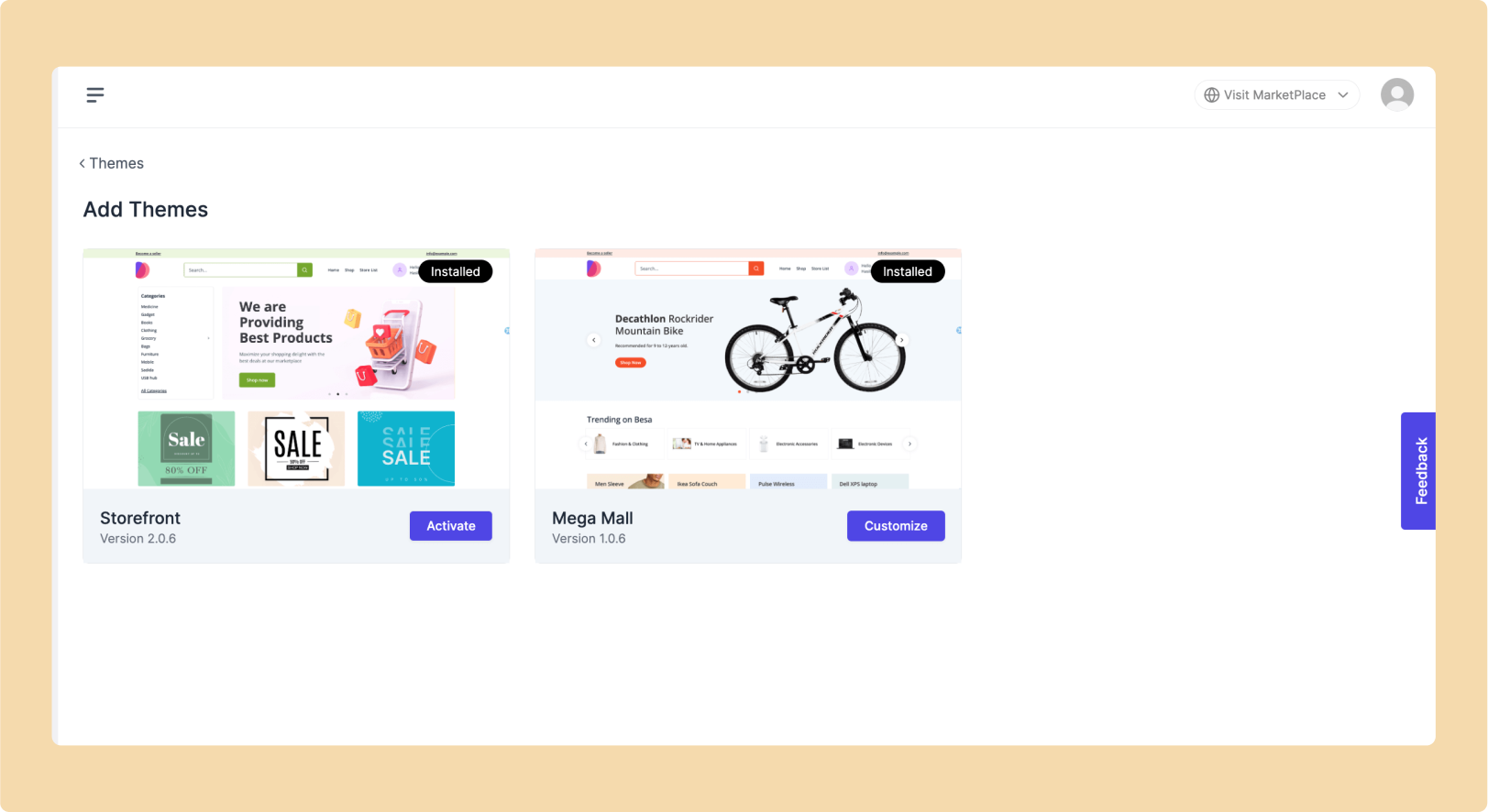
Moreover, Dokan Cloud supports 2 pre-built themes for its users. You can use any of them to give your online store a sleek and modern look.
Very soon, there will be more themes available in the library for different niches.
2. Detailed Dashboard and Report Filtering
Dokan Cloud empowers admins with a central hub for marketplace insights. Using Dokan Dashboard, you can monitor your site’s key metrics like earnings, customer base, order volume, product sales, and even refunds. It includes a graphical view explaining the current status of your online store. So you can get valuable insights instantly.
For deeper analysis, admins can leverage Dokan Cloud’s dedicated reporting section. This feature allows for data filtering by day, month, or year.
By analyzing this data, you can get deeper insights into the latest trends and patterns. It also enables you to make more data-driven decisions, optimize performance, and maximize profitability.
3. User-friendly Product Management
With Dokan Cloud, you can sell both physical and digital products seamlessly. It gives you all the required functionalities associated with selling both types of products.
Both admins and vendors will have the flexibility to create and upload products and showcase all the items attractively. Additionally, they can add attributes and variations to a product in different brands and categories. So customers can easily find their desired products on the site.
Additionally, there is a dedicated SEO section that empowers admins and vendors to optimize product listings.
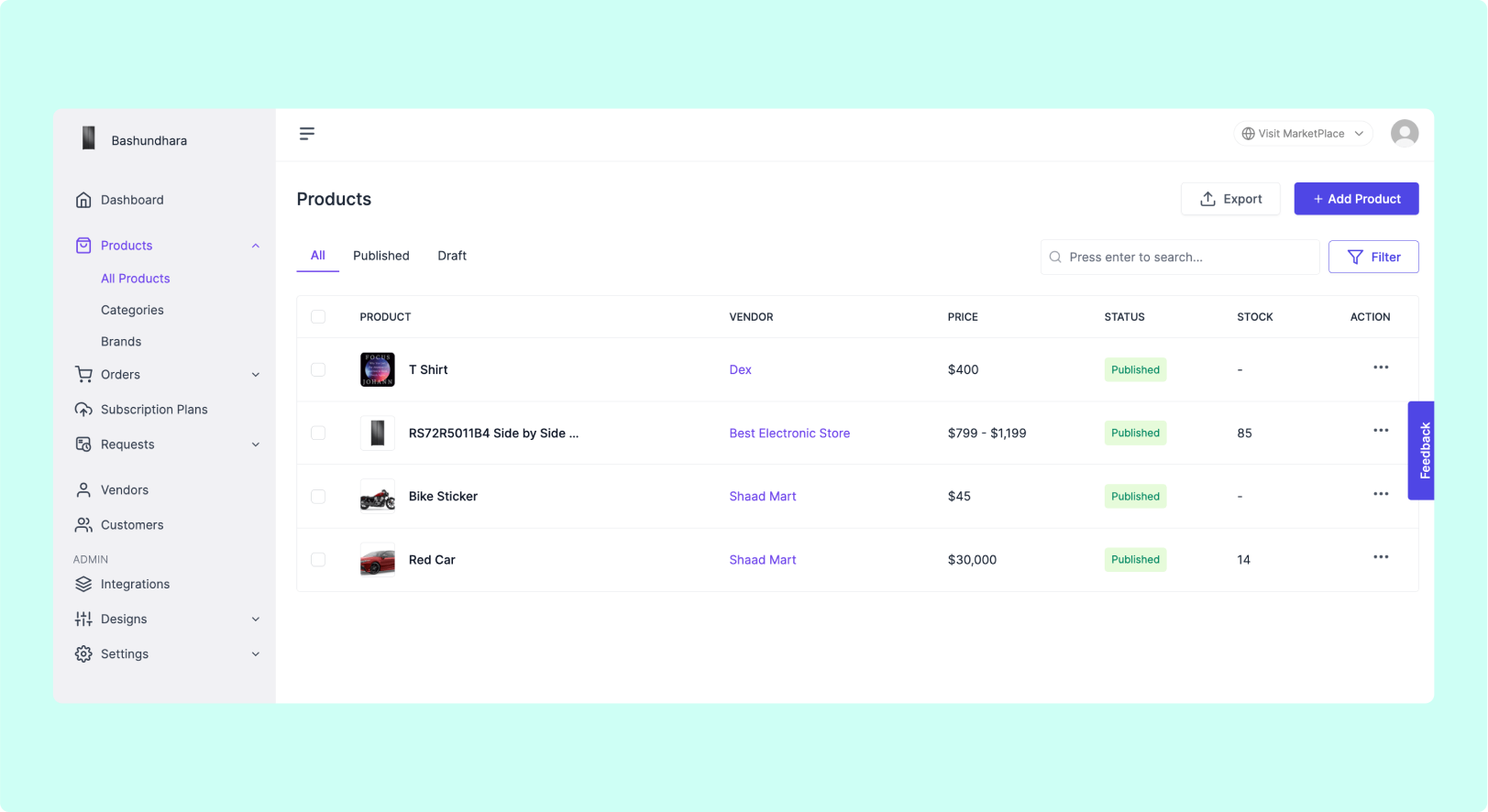
By incorporating relevant keywords, descriptions, and meta tags, sellers can significantly improve their search engine ranking and drive more organic traffic to their products. Dokan Cloud equips users with the tools they need to showcase their products effectively and reach their target audience.
4. Subscription Plans
Dokan Cloud lets you create subscription plans according to vendors’ preferences. Each plan will include unique levels of access and permissions.
Vendors can choose a subscription plan that perfectly suits their business needs and budget. Plans offer varying levels of access to features and functionalities within the marketplace.
Admins can define different subscription tiers, each granting specific permissions based on a vendor’s needs. This allows vendors to choose a plan that aligns perfectly with their business goals.
With different types of subscription options, admins can target more vendors with different needs and preferences. This feature not only improves the overall user experience for vendors but also gives administrators extended flexibility to manage their online businesses effectively.
5. User-Friendly Shipping and Tax Management
With Dokan Cloud, you can enjoy a robust and user-friendly shipping and tax system. For shipping management, vendors can easily create shipping profiles according to their specific needs. They also have the flexibility to set up various conditions to apply to shipping.
These features simplify the overall shipping methods and ensure a smooth experience for both vendors and customers.
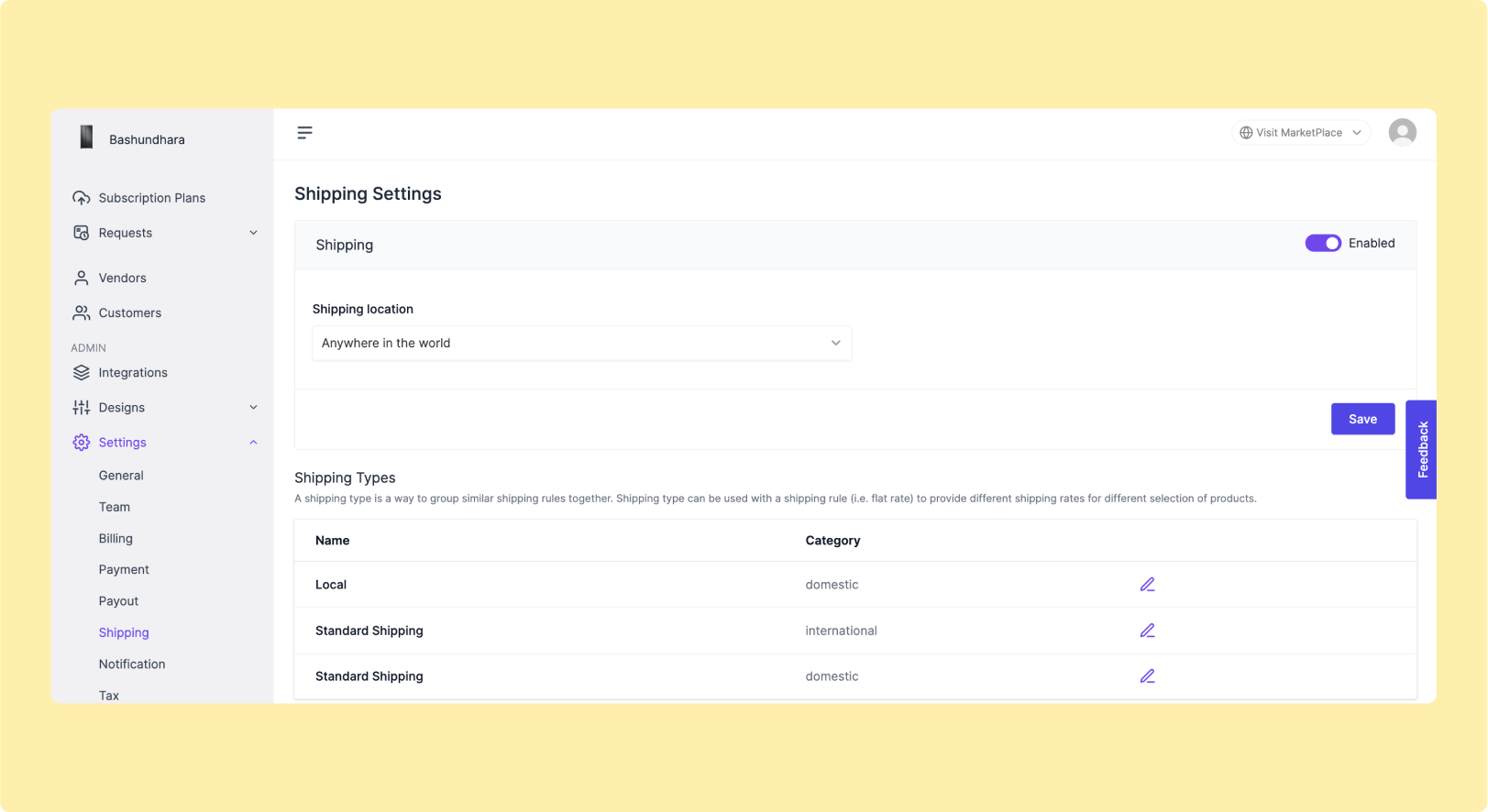
Dokan Cloud simplifies tax management for admins with a straightforward tax system. This system allows admins to effortlessly create tax rules based on specific countries and states. This ensures compliance with regional tax regulations, saving you time and reducing the risk of errors.
Furthermore, Dokan Cloud offers advanced tax management features like compound tax, zip tax, shipping tax, and digital product tax.
By offering effective tools for managing shipping and tax settings, Dokan Cloud enables administrators and vendors to navigate these complexities with ease.
6. Live Chat Integration
Dokan Cloud empowers vendors to connect and convert like never before. By integrating Facebook and WhatsApp, vendors can establish direct communication channels to connect with their customers in real time.
Vendors can reply to customer inquiries, provide support, and offer assistance instantly. This will create a more responsive shopping experience and boost customer satisfaction and loyalty.
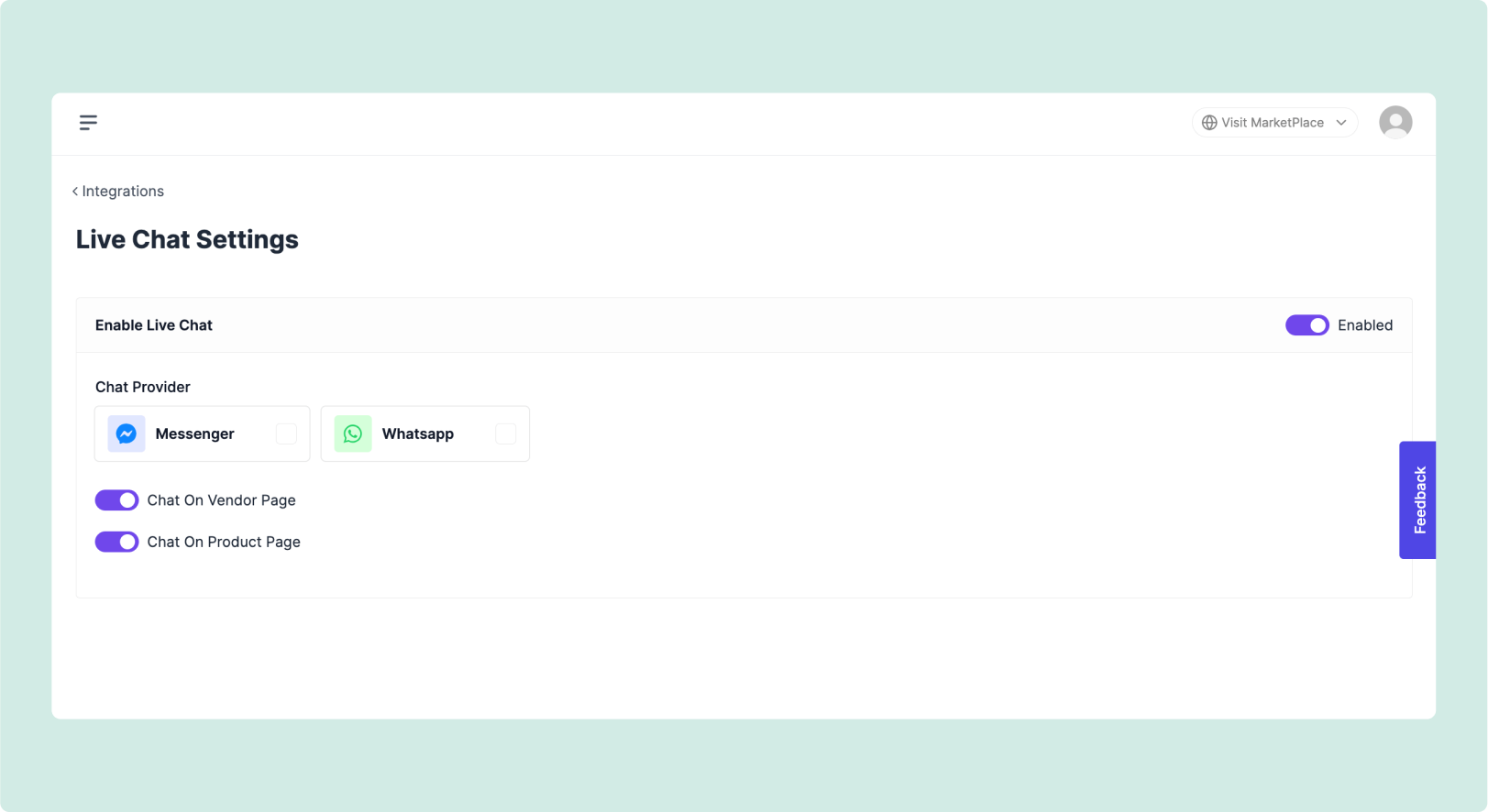
These integrations could be great ways to build personal relationships with customers and convince them to make purchases. Vendors can also leverage the vast user base of Facebook to promote their products and drive traffic directly to their Dokan Cloud storefronts.
7. Email Integration
Dokan Cloud takes vendor communication to the next level with seamless Mailchimp integration. This powerhouse duo streamlines processes and personalizes outreach.
With this integration, vendors can utilize Mailchimp’s robust email automation system. It enables vendors to deliver timely and personalized messages to their customers.
Dokan Cloud automatically sends order confirmation emails so customers can get prompt notification of their purchases. Also, Mailchimp’s tools allow vendors to craft personalised welcome emails for new signups or any pre-defined action. These activities create positive impressions on customers and encourage them to continue with your eCommerce shop.
Overall, vendors get the chance to provide a more personalized shopping experience. They can also create targeted email campaigns, segment their audience, and track the performance of their email marketing efforts.
8. SMS Integration
Dokan also has seamless integration with Twilio. Twilio is a renowned SMS platform that enables vendors to directly connect with customers.
With Twilio integration, vendors can send various types of SMS messages to customers, including:
- Order Updates: Informing customers about the status of their orders, such as order confirmation, processing, and shipping updates.
- Delivery Notifications: Notifying customers when their orders are out for delivery or have been delivered.
- Promotional Offers: Sending promotional messages and discount codes to encourage purchases and engagement.
Vendors can personalize SMS messages based on customer preferences and behaviors. This might include addressing customers by name, referencing their past purchases, or recommending products based on their browsing history.
By combining SMS messaging with email communication through platforms like Mailchimp, Dokan Cloud provides vendors with multiple channels to engage customers effectively. This omnichannel approach enhances customer satisfaction and loyalty.
9. Store Analytics
To optimize your online store’s performance, it’s crucial to understand your customers behavior deeply. That’s why Dokan Cloud offers seamless integration with Google Analytics 4, so admins and vendors can track various metrics and KPIs related to customer interactions with your online single store or marketplace.
You can track key metrics like page views, session duration, bounce rates, and conversion rates. By analyzing these metrics, administrators and vendors gain insights into how customers navigate the website, interact with products, and engage with various features.
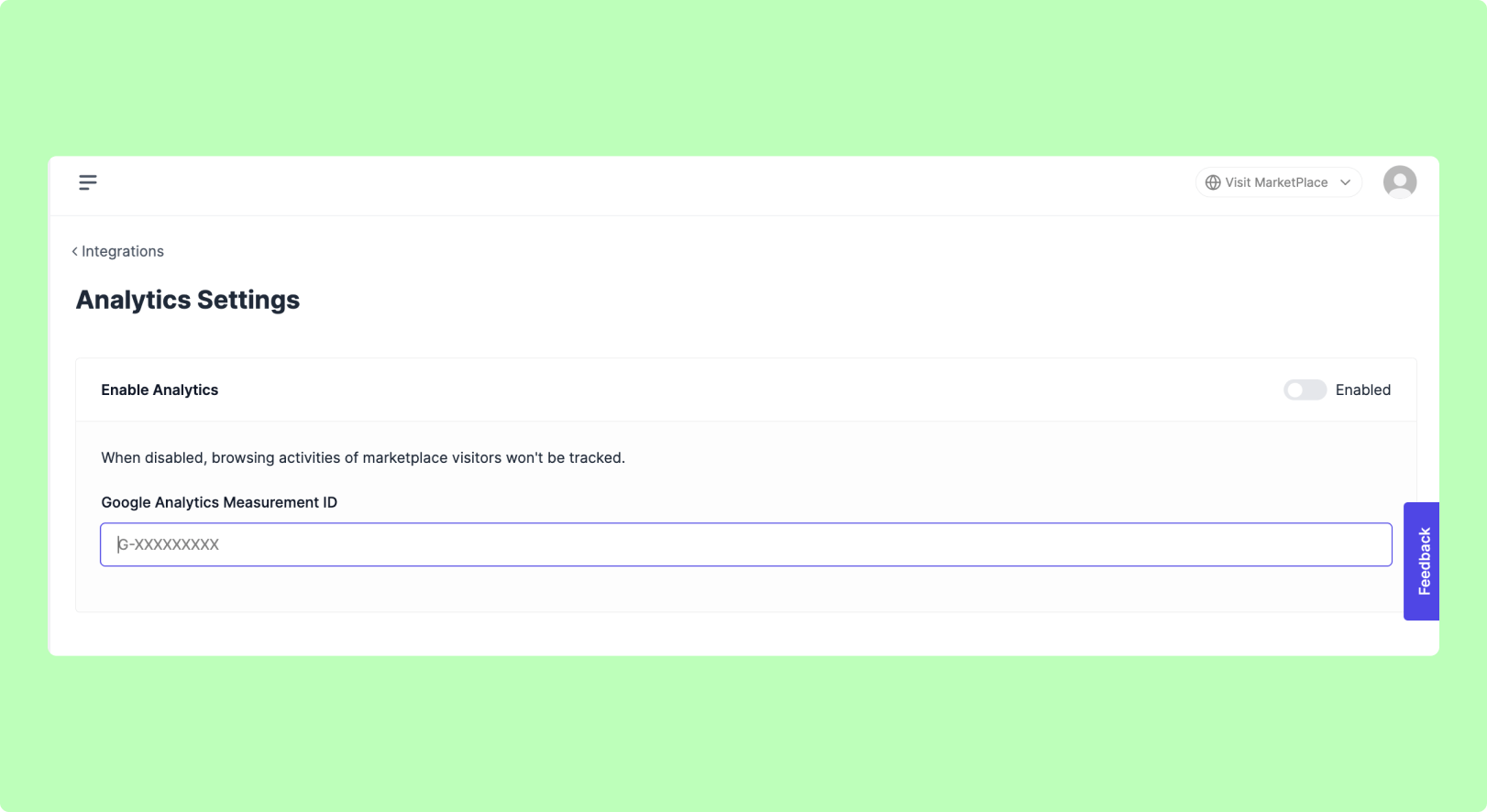
Moreover, Google Analytics 4 includes advanced features such as event tracking, user segmentation, funnel analysis, and many more. Armed with these insights, Dokan cloud users will be able to make data-driven decisions. It helps them to optimize the user experience, improve website functionality, and refine marketing strategies.
10. Payment Integration
Dokan Cloud ensures smooth transactions by supporting multiple payment methods. So customers can choose the payment option that best suits their preferences and needs.
Dokan Cloud supports various payment methods, including PayPal, Stripe, and Cash on Delivery (COD). Both PayPal and Stripe provide robust security measures to safeguard customer payment information. With these integrations, you can also ensure a smooth checkout experience for users that will minimize friction and enhance the overall shopping experience.
Dokan Cloud empowers vendors by allowing them to make withdrawal requests through PayPal. This feature enables vendors to conveniently access their earnings and manage their finances directly within the platform.
Check our official Dokan Cloud documentation to implement these features on your online marketplace.
Dokan Cloud Upcoming Features
The first release of Dokan Cloud is now live, and we’re actively refining it to ensure maximum effectiveness and user convenience. Stay tuned for upcoming feature expansions on Dokan Cloud.
In the pipeline, we’re gearing up to introduce these new enhancements very soon:
- Multilingual Feature
- Braintree Integration
- Frequently Bought Together Option for Customers
- Standalone Store Creation Feature
- Subscription Product
- Blogging Feature
- And many more.
Pricing and plans for Dokan Cloud
Dokan Cloud offers 4 different pricing plans to suit businesses of all sizes. You can pick the plan that suits your needs and budget best.
Here are the available pricing plans:
- Basic ($69/month)
- Growth ($129/month)
- Scale ($399/month)
- Enterprise
How much you pay depends on things like how many products you have and the level of support you need.
Dokan Cloud comes with a 14-day trial period. This means you’ll get the chance to check out all the features of Dokan Cloud without paying a penny.
Try Out the Dokan Cloud eCommerce Platform to Make Your Online Presence Stronger
To sum it all up, Dokan Cloud is a hassle-free solution for launching your dream online business.
Dokan Cloud offers a complete solution for modern entrepreneurs to create, manage, and run a successful eCommerce business with great profits. Dokan Cloud makes the process easier with:
- Seamless Integration: Dokan Cloud works seamlessly with popular tools like Mailchimp, Twilio, and Google Analytics 4. This helps you get valuable insights to optimize your marketplace.
- Wide Range of Customization Options: Dokan Cloud gives you options to customize your marketplace according to your requirements.
- Availability of Popular Payment Methods: Dokan Cloud integrates with all the popular payment gateways, ensuring a smooth checkout experience for your customers.
- Built-in Page Builder: Dokan Cloud includes a user-friendly page builder, similar to Elementor. It allows you to design any page on your marketplace with ease.
- Easy Vendor Management: Dokan Cloud simplifies managing your vendors with customizable subscription plans and intuitive payout options.
With Dokan Cloud, building and managing your online business has never been easier.
Do you have any further questions regarding Dokan Cloud eCommerce platform? Drop us a comment below.

![Black Friday and Cyber Monday are around the corner, and people are waiting for these festivals to grab the best product deals. That is why giving an attractive look to your website during this festive season is very necessary. But, creating a whole new landing page might be difficult in a short period of time. Don't worry. By using Happy Elementor Addons Black Friday and Cyber Monday Landing Page templates, you can easily develop a whole new landing page in a few minutes. In this today's blog, we are going to show how to boost your website design using HappyAddons templates during this festival season. Before that, we'll talk a bit about these two festivals and why they are important to online business communities. What are Black Friday and Cyber Monday? Black Friday is the immediate following of the famous Thanksgiving day. This is when people start shopping to celebrate the Christmas festival. Since the late 1980s, retail sales on this day have constantly been suppressing the past volumes. See the graph below. Source: Salecycle.com The first Monday following Thanksgiving day each year is called Cyber Monday. It was first introduced in 2005 by the USA National Retail Federation to encourage people to buy online. Though this festival originated in the USA, it is celebrated globally today. See the stats below. Source: Salecycle.com It indicates customers' buying behavior around this day is growing up over time. Many customers today keep a budget to buy products on these two days. So, why won’t you prepare a Cyber Monday landing page if you have an online store? Importance of Designing Landing Pages for Black Friday and Cyber Monday Festival Having a well-design website is one of the major checklists if you are running an online business. Most importantly, you have to make sure that your website remains up-to-date to boost your sales. That is why you need to redesign your website or make a new landing page during the Black Friday and Cyber Monday festivals. Because most online product & service-based businesses promote special deals during these two festivals. Here are some remarkable ways dedicated landing pages during these festivals can positively impact the performance of your online business. Boosts your product salesIncreases conversion rateOpportunity to collect potential email leadsGrabs users' attention toward your siteReduces bounce rateIncreases website visitors. Elementor Black Friday New Seasonal Kit is Already Here! Source: Elementor To make this Black Friday more enjoyable, Elementor has launched a New Seasonal Kit that includes landing pages, sections, pop-ups, and vector assets. All these design elements are made by the Elementor team so that one can easily use them on their website to ensure more sales and conversions. New Elementor Black Friday Seasonal Kit offers: 3 Landing pages6 Sections 6 Popups A collection of stickers & animations You can only get these ready-made Black Friday landing pages and sections if you have Installed Elementor Pro on your site. However, if you are looking for templates that are outside of the box, you can go with Happy Addons, the fastest Elementor Addons on the market. It's very easy to use, flexible and has tons of advanced features and widgets that can ease your website design journey. Also, you'll get several festival landing page templates & blocks. Moreover, you can use free Black Friday and Cyber Monday design blocks and templates to decorate your site. Most importantly, these templates and blocks are easy to customize and can be used for multiple purposes. Now let's see how you can use the Happy Addons templates to design your website according to the Black Friday theme. Pre-Requisites to Use HappyAddons Templates to Design Black Friday and Cyber Monday Landing Pages You must have the following plugins installed on your site to get access to the HappyAddons Template library. Make sure you’ve installed and activated the Happy Addons Free & Premium version of your website. Elementor (Free)Happy Addons (Free)Happy Addons Pro If you are new to Elementor, check this Step By Step Guide For Beginners. If you want to explore the readymade templates of HappyAddons before installing these plugins, you may visit by clicking on the button below. Check out Happy Addons Templates How to Design Black Friday Landing Page on Your Website Once you have the plugins (mentioned above) installed, your website is ready to follow the tutorial guide explained in this section. Get ready now! Step 1: Open a New Page with Elementor Create a new page or open the existing page with Elementor. Next, you have to select the Elementor Canvas option.Unless you select Elementor Canvas, you may watch the header, footer, and unnecessary other texts on the page. These might be irritating to you.Once you open the page with Elementor Canvas, your page will be completely clean. Watch the video below on how to do it. Step 02: Go to HappyAddons Library Click on the HappyAddons Library Icon. It will open up a modal popup. Here you'll find numerous stunning premade Blocks and Pages created by the Happy Addons team. Kindly explore them to create a list of your favorite items. Step 03: Import a HappyAddons Black Friday Template Go to the Page tab on the modal popup.Select Black Friday from the left-side filter option.You will several good-looking templates on your screen.Take your cursor on the one you like and hit on the INSERT button. Wait for a while to finish the installation process. You will get the template on your screen with editable sections and options. Step 04: Set the Black Friday Campaign Deadline A deadline creates a sense of urgency in customers' minds. So, better if you add a deadline section on the page to show your Black Friday deals. The good thing is that if you select the template as we did, you will automatically get a deadline or countdown option. You have to customize it as you want. Step 05: Show Image Carousel Slider on Your Black Friday Landing Page Using the Image Carousel, you can slide show demonstrating discounts on your product categories. Drag and drop the Image Carousel widget on any landing page section. Next, from the Elementor panel, you can add photos and text to the widget. Do it accordingly. Thus, you can add more sections and options on the landing page. Hope you can do it yourself. Step 06: Make the Black Friday Landing Page Mobile Responsive Making a web page mobile responsive with Elementor is super easy. You'll get the mobile responsive option on the Elementor footer section. Clicking on it will open up the option to view your landing page on different device screens. We have explained the process in the video below. Note: Don't delete any widget or section while customizing your landing page for any particular device. Because if you delete a widget or section on any device screen, it will also be applied on other devices. However, you may change their position or alignment or hide them. It won't make any impact on other devices. Step 07: Final Preview of Our Landing Page Here is the final interface of our Elementor Black Friday landing page that we've designed using the Happy Addons' ready-made Template. Get Happy Addons to Add a Black Friday Theme Landing Page on Your Website How to Design Cyber Monday Landing Page on Your Website You will require the same prerequisites (Elementor and HappyAddons Plugins) to design the Cyber Monday landing page on your website. Hope you have them ready on your website. Now, let's get into the tutorial part. Step 01: Import a Cyber Monday Readymade Landing Page Template Go to the HappyAddons Template library.Choose the Cyber Monday template you like.Click on the INSERT button. Wait for a while to finish the installation process. You'll get a page design like the following image below. Step 02: Edit Different Sections of the Page In the first tutorial, you saw the deadline/countdown option was already embedded in the template. But this template doesn't have it. So, you can bring it to your page? Very simple. Create a new section by clicking on the plus icon.Type Countdown on the Elementor search bar.Drag and drop the widget on the section. Customize the Countdown section from the Content and Style tabs of the Elementor panel. Using the Heading widget, we have added the FLASH DEALS text next to the countdown to make it more meaningful. Thus, you can use other exciting widgets on the template to make your landing page super gorgeous. Step 03: Promote Products on the Landing Page Promotional landing pages usually include a section to showcase some hot-selling products to generate instant sales. Using the Image and Button widgets, we have created this section under the FLASH DEALS.You may customize it more as you wish. Step 04: Make it Mobile Responsive We already showed you the process in the first tutorial on making a mobile web landing page responsive. Hope you can do it here as well, following the same guideline. Click on the Responsive Mode icon and do the rest yourself. Bonus: Black Friday and Cyber Monday Landing Page Design Key Considerations Whenever you design a landing page, you need to consider why you need to design this page and what elements they should keep on the page. Because if you are not adding all the necessary features to your page, it will not serve its purpose. This is why you need to focus on a few things before designing your Black Friday landing page. Here are some points you must consider in designing Black Friday and Cyber Monday landing pages. Add Black Friday textSet deals deadlineShow your best-discounted productsAdd coupon code Focus on responsive page designMake your page visually appealingImprove your page user experience or page structureSet a proper website navigation FAQ on Black Friday and Cyber Monday Landing Page Design Now, we'll answer some common questions on Black Friday and Cyber Monday Landing page designs commonly found online. How much does it cost to design a landing page?The cost of designing a landing page varies depending on the complexity of the design, the level of customization required, and whom to hire for the page. A simple landing page can be designed for as little as $25, while a more complex design with multiple customizations can cost upwards of $2,00.However, if you have Elementor and HappyAddons installed, you can design unlimited landing pages at a minimal cost. But like any other tool, you must have a kind of enterprise on them. As they are drag-and-drop builders and their numerous tutorials and documentation are available, they won't take you more than a month to be used to. Check out some wonderful YouTube tutorials on these two plugins. Hope you will enjoy them.How many hours does it take to design a landing page?It mainly depends on the level of design complexity and your web design skill. However, both in Elementor and HappyAddons, you will get countless readymade templates and block sections. You can design a beautiful landing page in 3-5 hours by making a proper combination of them.Can I design Black Friday and Cyber Monday Landing pages with Elementor and HappyAddons free versions?Surely, you can design Black Friday and Cyber Monday Landing pages with Elementor and HappyAddons free versions. But only with the pro versions, you can't add too many exciting features to your pages. For example, free versions will give you access to only a limited number of readymade templates.If you are just a beginner-level designer, free versions are enough. But if you are a professional designer or have a web designing agency, pro versions are a must. Are You Ready To Design Your Black Friday and Cyber Monday Landing Page? Customers look forward to this kind of occasion to buy their favorite products at a minimum price. Naturally, they are drawn to websites that look good and give a festive vibe. That is why adding a Black Friday and Cyber Monday landing page during the festival season will give you an extra edge over the competitors. The above guide shows how to design your Elementor Black Friday Landing page using the Happy Addons' Black Friday Templates and how it can help boost your holiday sales. So if you have any queries regarding this blog, you can comment on us in the below box. If you like this post, then share it on your social channel. Don't forget to subscribe to our newsletter. Also, follow our Facebook and Twitter channels for regular updates. Subscribe to our newsletter Get latest news & updates on Elementor [yikes-mailchimp form="1"] ":36560} /--](https://happyaddons.com/wp-content/uploads/2021/11/How-to-Design-Black-Friday-and-Cyber-Monday-Landing-Page-300x188.png)
