









Photography doesn’t mean taking photos only, rather it means capturing feelings. At present, photography is not just a hobby only. It has turned into a profession. So, as a photographer, you must have a website to introduce your work to the world.
Especially if you’re a new photographer then you must create a personal photography website. Therefore, you can showcase your photographs to the world.
To make the path easier for new photographers, today we’ll introduce a full-fledged page builder and rich-featured addon to build your site professionally. In this article, we’ll show how you can easily create a photography website only using HappyAddons along with Elementor Plugin.
And at the end of this article, we’ll also discuss photography facts and its outgrowth in this current market.
What Makes Elementor The Best Website Builder

Elementor becomes popular with startup companies who intend to use WordPress for building their sites. It’s the leading page builder plugin having effective widgets which are quite enough to create stunning designs.
Basically, the Elementor page builder is unique for its easy use, cost-reducing, and drop-drag advantages. This plugin requires no coding knowledge for the users.
So it will be a great decision for new photographers to choose the Elementor page builder, especially those who like to create a website with WordPress. Therefore, you must know how to use Elementor and what is the outcome of it. Then you can create something special.
Furthermore, you can extend the power of this page builder by adding useful Elementor addons to make your designing journey easier yet more productive.
Let’s have a quick check about Elementor Plugin
Benefits of Elementor: Why You Should Build Your Site on Elementor
As a beginner, you may find it difficult to make a decision on which page builder will be suitable for you. So these facts speed up your decision in designing websites or web pages.
Firstly, the easy usability and cost-effective nature make WordPress popular over the last few years. In addition, Elementor extends the user experience better by providing an easy and interactive interface.
Let’s check the following benefits you will have using the Elementor plugin:
- Easy to drop and drag
- Quick editing facilities
- Unlimited widgets to utilize
- Easy to get unlimited templates
- Happy Addons will give you extra benefits
- Elementor Pro version extends more widget facilities
- And more (All about Elementor and its features)
How to Build a Photography Website Using Elementor?
To build a Photography Website with Elementor you will need the following-
- Elementor plugin
- Happy Addons Plugin
- Envato Elements (Optional)
- Photography Website Compatible Template
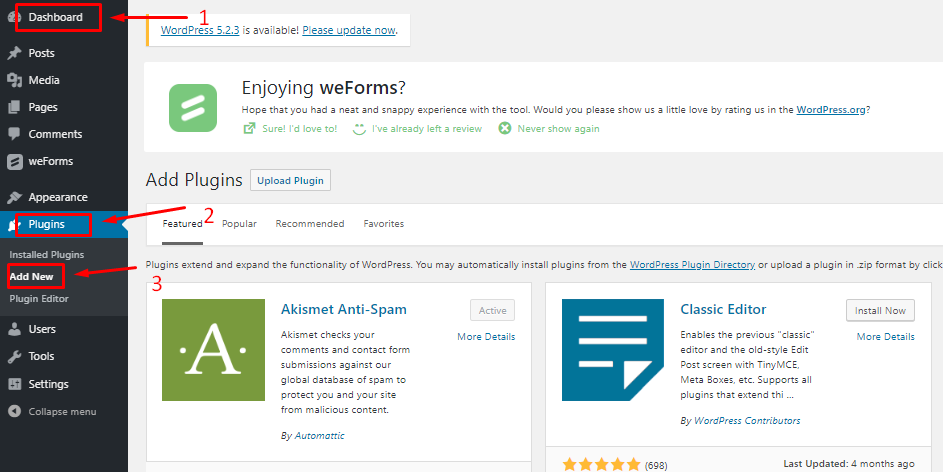
Let’s assume you have already configured your WordPress site and installed Elementor on your site. Now add the Happy addons plugin to your website with these 3-easy steps.
Step 01: Navigate WP-Admin Dashboard>Plugins>Add New Plugin.
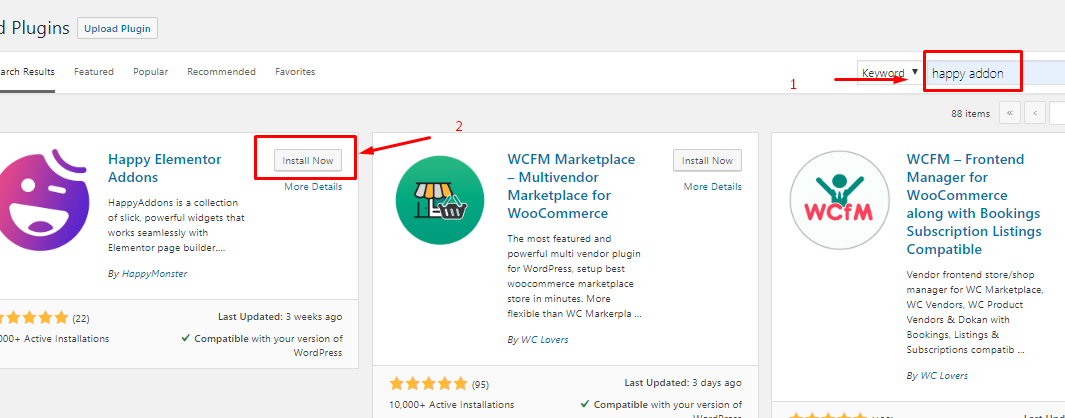
Step 02: Next, search for Happy Addons, then Click On Install Now.
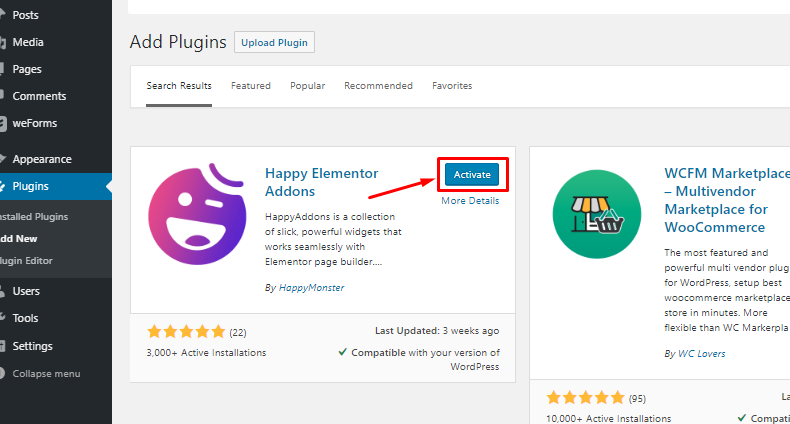
Step 03: Finally, hit the Activate button and get the addons on your board.
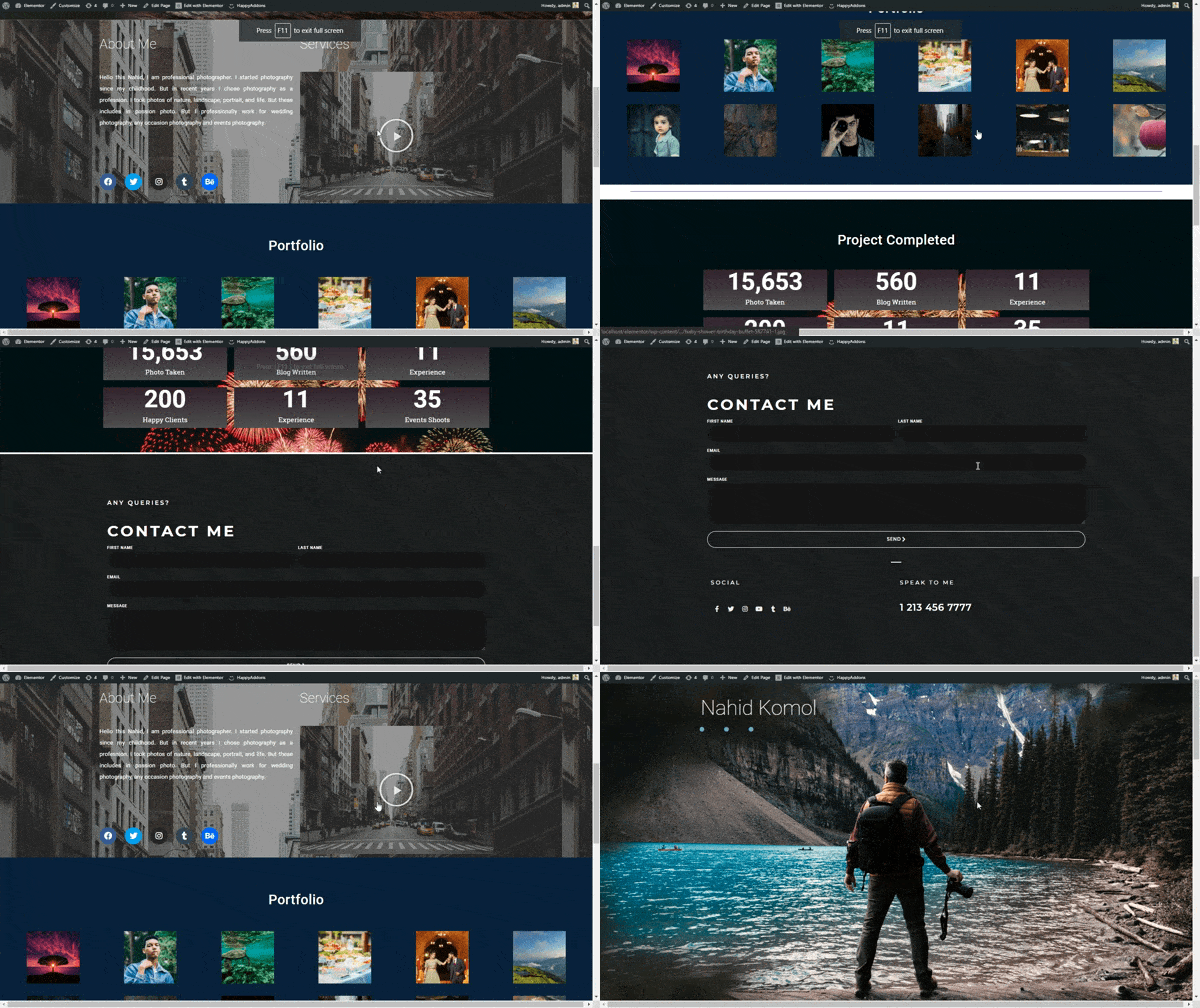
Okay, now you have all the tools in your hand to design a cool portfolio website. By completing this tutorial, you will be able to build a website like this:
Well, let’s get started building your first Photography Website with Happy Addons. Follow this simple 6-step tutorial accordingly:
Step 1: Adding Header
To start designing your site with Elementor, navigate WP-Admin>Pages>Add New Pages>Page Title
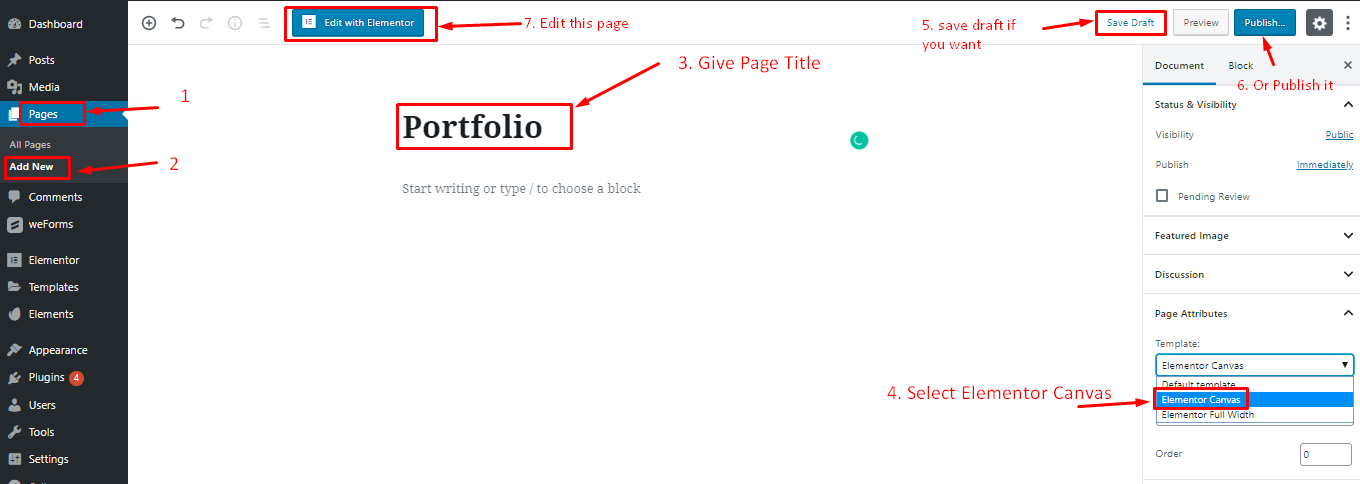
Then select “Elementor Canvas” to get a full empty page to start your design.
You can save it as a draft and publish it when you are done, or you can directly publish it.
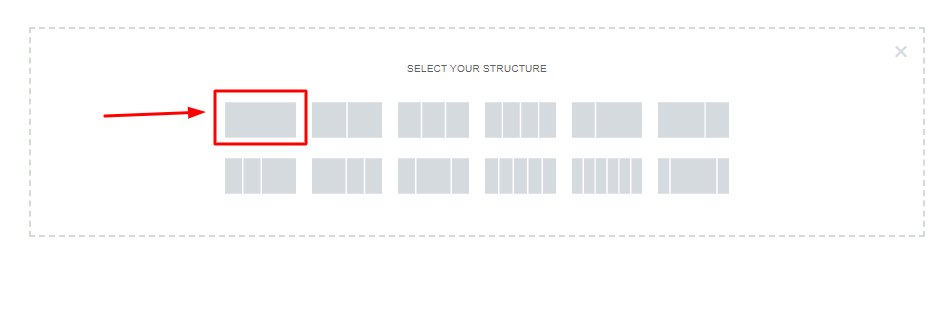
Now, select a single structure.
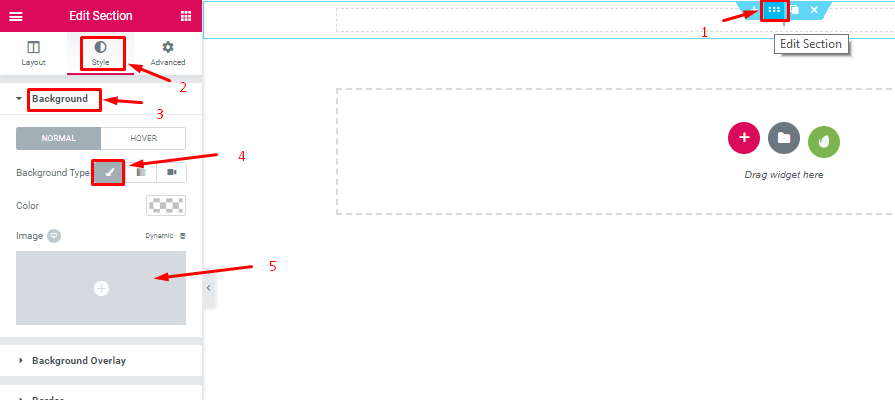
Then, select the DOT area and go to Style>Background>Background Icon>Select Images
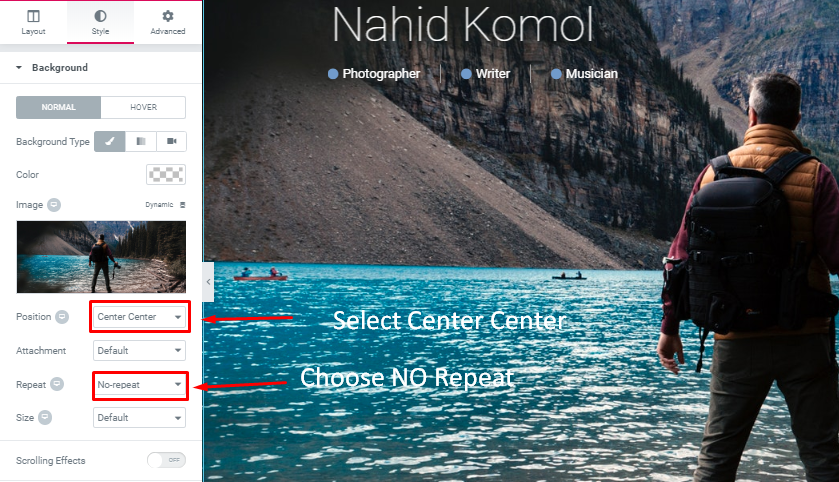
Now, go to the Style option, set the position as “center Center” and repeat as “no-repeat”
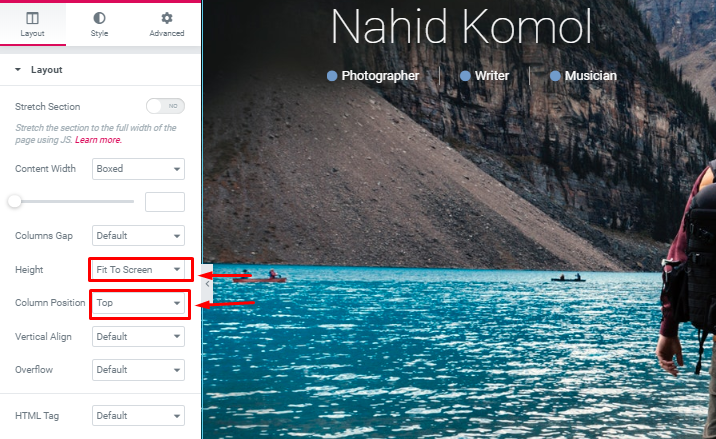
Select the height “Fit to screen” and column position as “Top”.
You can create a stunning sticky header using Elementor efficiently for your photography site.
Step 2: Adding Header Text & Icon
Now, you can add text to your header.
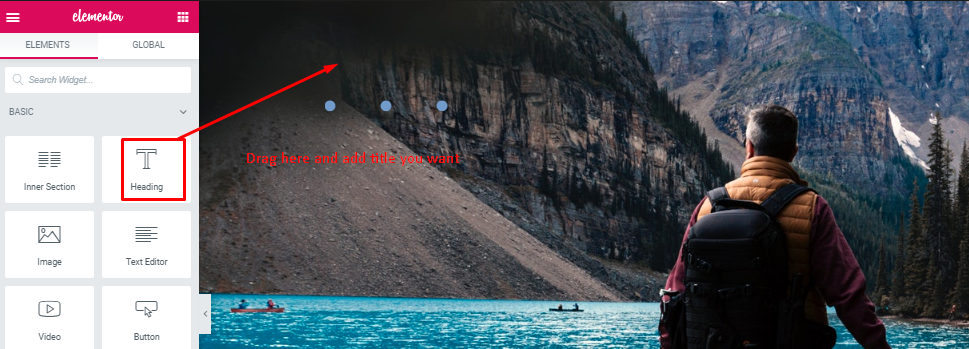
Select “Heading Widget” and you will get the same settings as other sections. So you can edit according to your design concept.
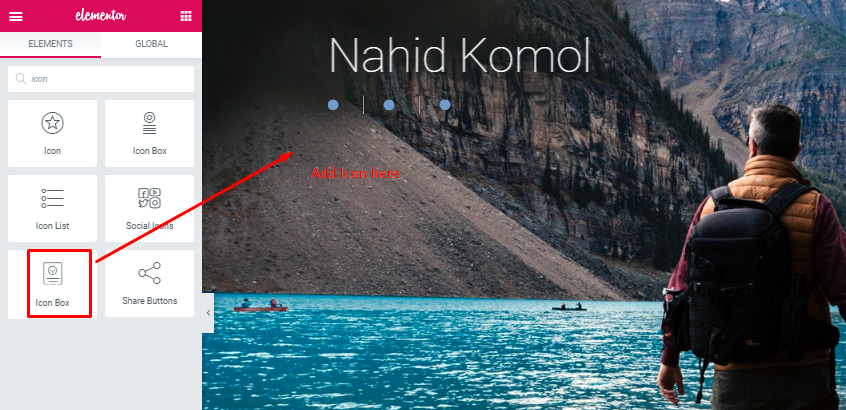
This is as similar to your added “Heading Widget”.
Step 3: Adding about me and the service section
Now, add the “About Me” & “Service” sections to your site.

As we have mentioned before add a single structure again.
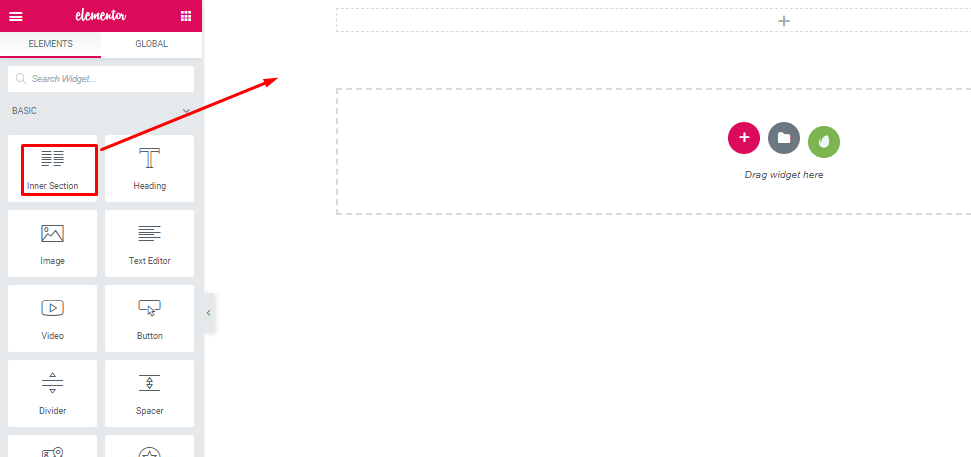
Drag the “Inner section widget” to the selected area. Two sections will appear in a single section.
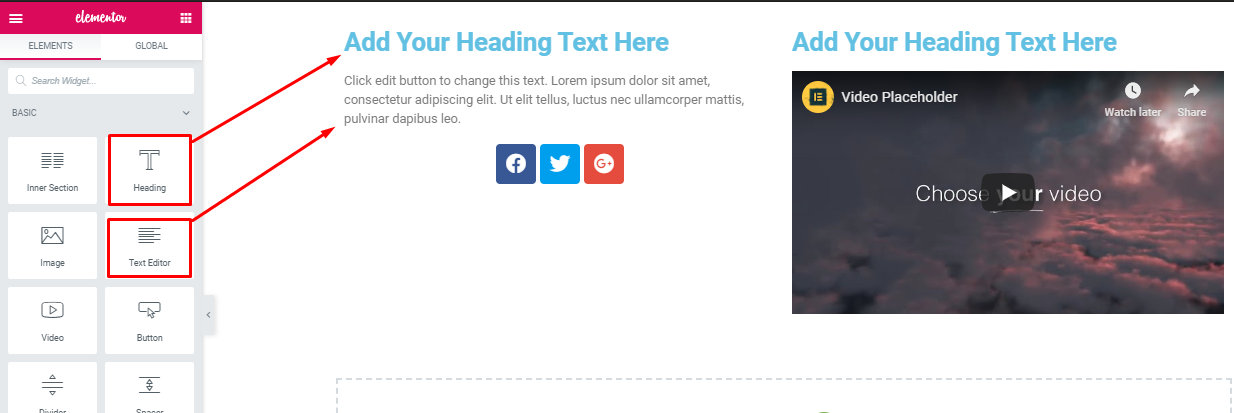
Then, select the “Heading Widget” and “Text Editor” widgets in the selected area.
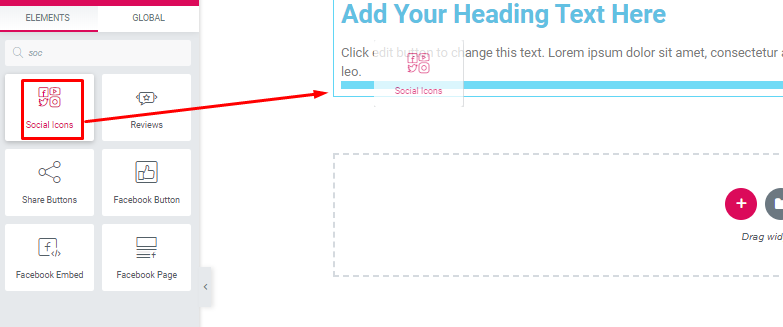
After that, drag “Social Widget” to the selected area.
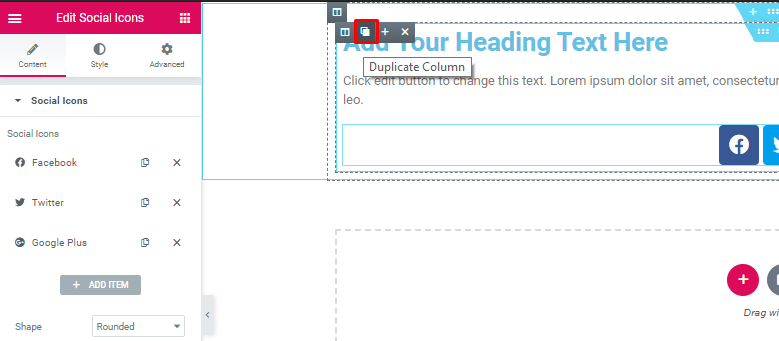
Next, duplicate the section.
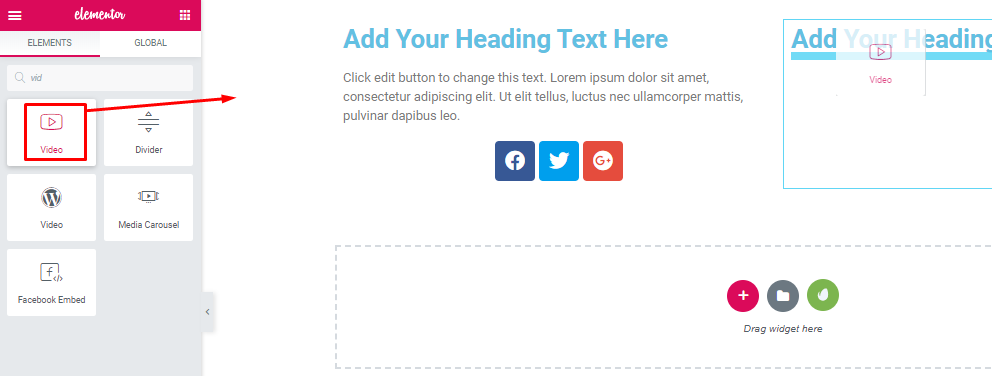
Then, select the “Video” widget in the selected area. Add the video that you want.
Step 4: Adding Portfolio
You can add this section following the same process as the header part.
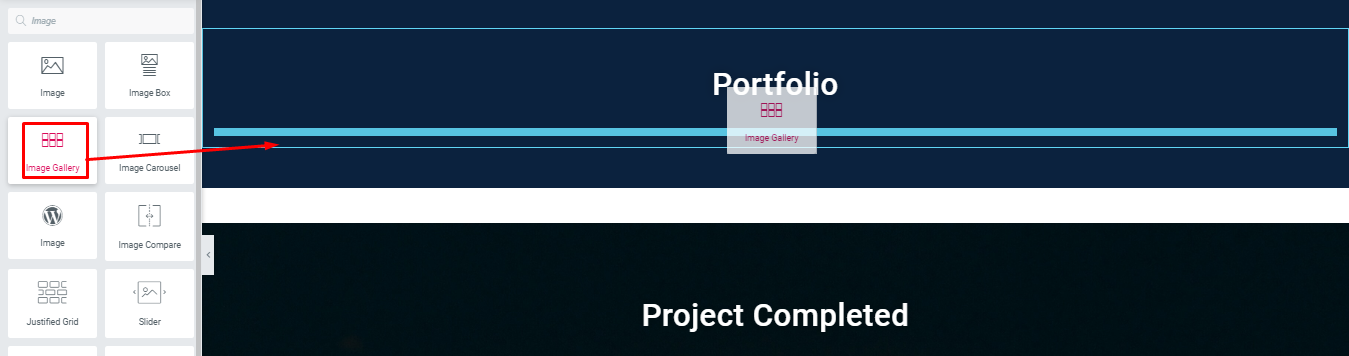
Drag “Images Gallery” to the selected area.
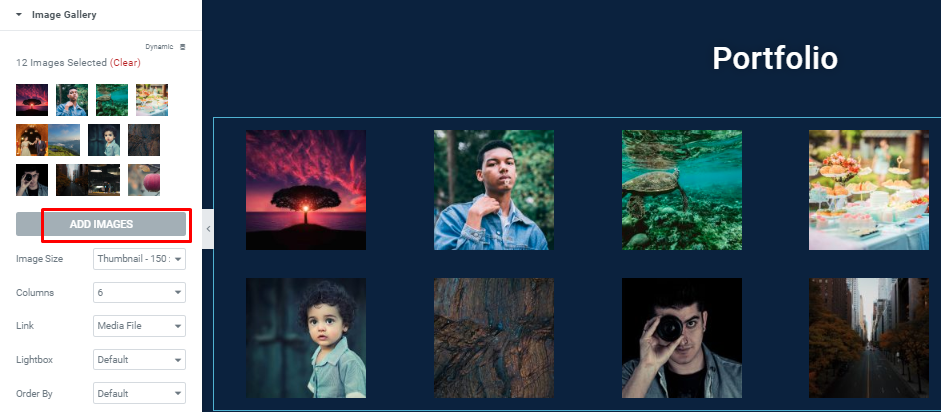
Here, you will be able to add images as you want. And also configure columns with other things.
Step 5: Adding ‘Project Completed’ Section
In this step, you can add the portfolio section.
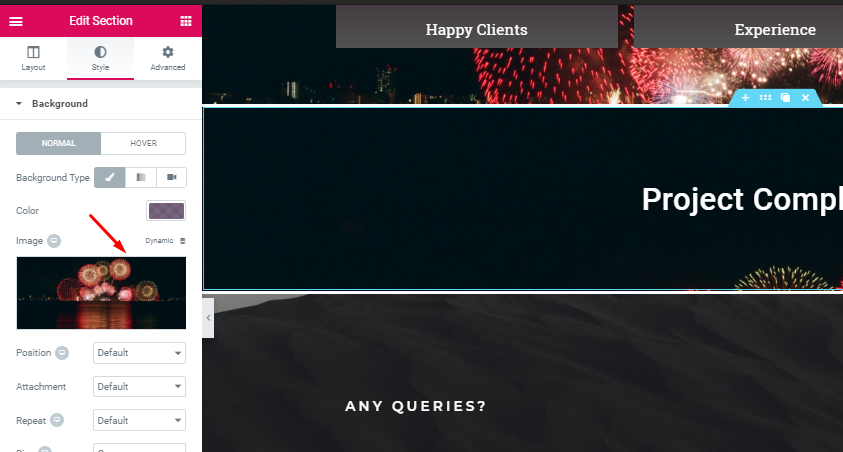
Choose a single section. And add “heading text” like the header part. Then select the style and add a background.
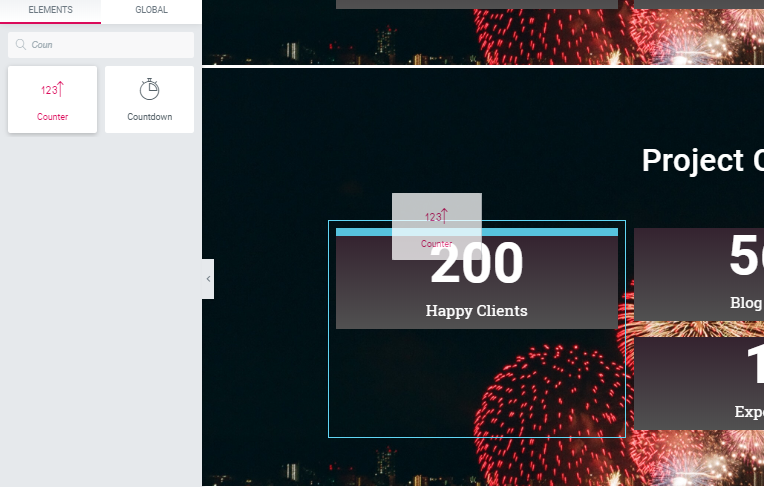
After adding the background, choose the counter widget.
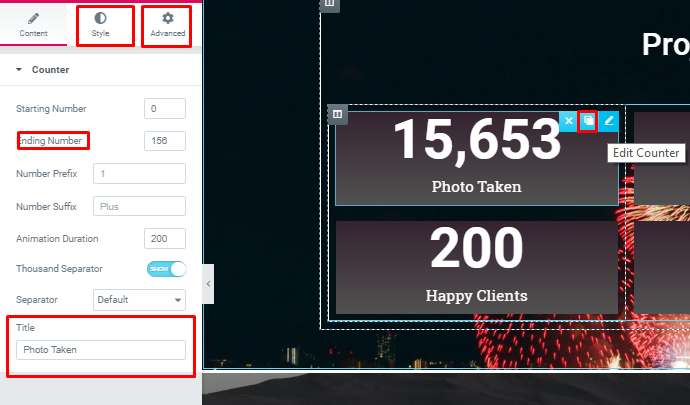
- You’ll have other options to add in this section. You can explore many options with the option.
Step 6: Adding a Contact Form
Now, add a contact form in your design.

Select the “Envato Elements” button.
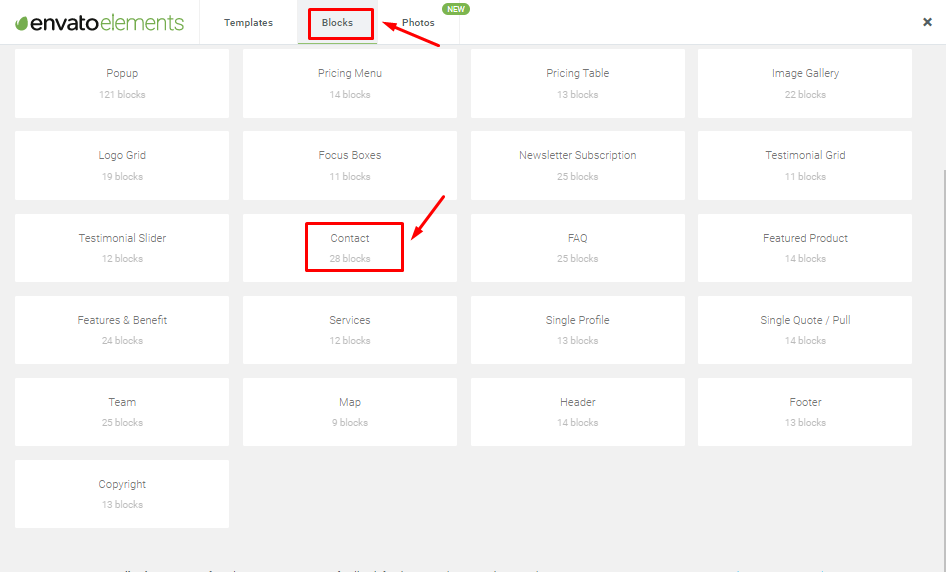
Now, select “Block” then “Contact”.
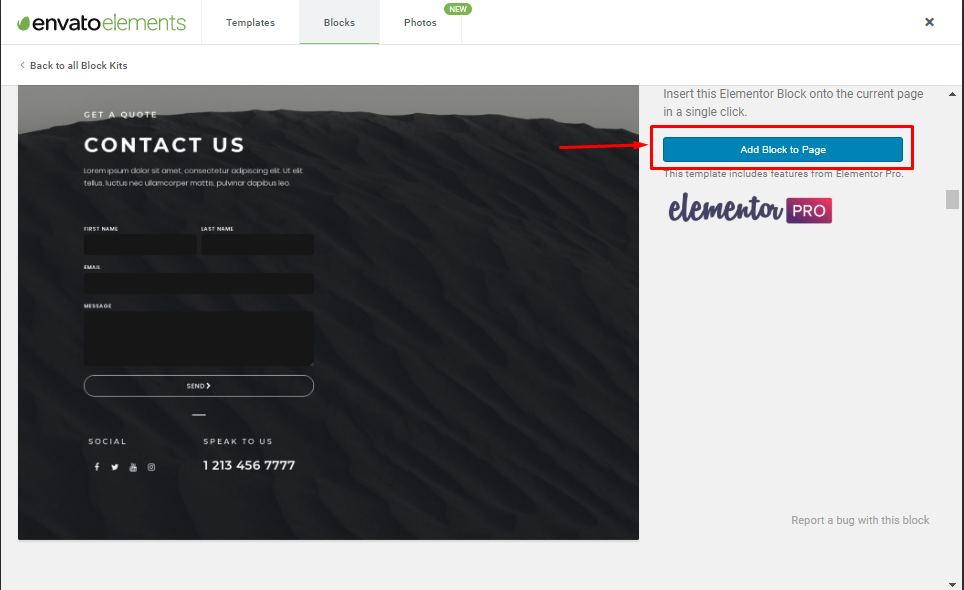
Then click the block to the page.
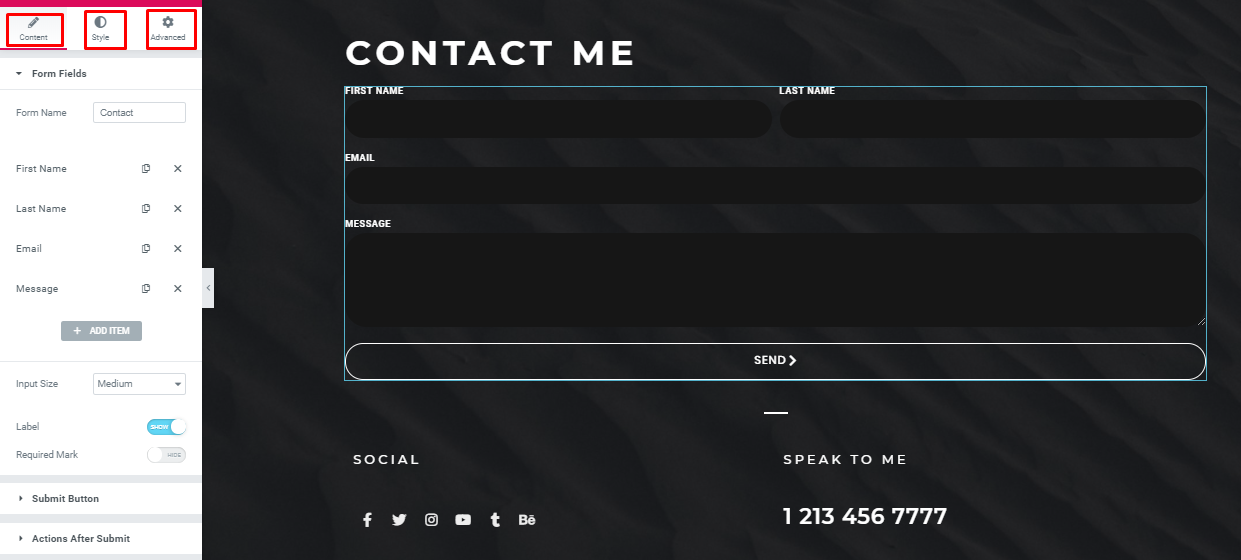
Here, you can add and edit as much as you want.
Therefore, by following these instructions, you can easily design a portfolio website or single page for your business or personal collection. In order to add some outstanding animation, you can insert Happy Effect into your site.
Why Photography Websites Builder Gets Popular Today

A professional photographer is a very desirable person on various occasions. The photographer is the real hero behind the scenes. Whatever we see in the movies or in television makes it more attractive and appealing.
So, in the near future, the demand for professional photographers will be increased. Though the world has appreciated this professional, the task is tough for the new photographer. They have to put a flag up among the professionals as they are new to this field.
In addition, you can develop a Multi-Seller Photography Business website like 500PX with WordPress by adding a multi-vendor marketplace plugin in WordPress.
So, a well-organized website can help a photographer show his portfolio to the world. You can get many popular photography website ideas from Google. Get ideas from those websites and make your site as per your imagination. Moreover, you can get global exposure by converting your site into a multilingual website with Elementor.
Final Thoughts
After the above discussion, you can assume that photography is an amazing profession now. And it has been creating a vibe among the young people.
Therefore, if you want to take photography as a serious profession, then you must have a website with a unique design and features. In that case, the Elementor page builder, along with the Happy Addon plugin can give you the opportunity to design your website by yourself.
So don’t miss the opportunity; get Happyaddon now.

![Black Friday and Cyber Monday are around the corner, and people are waiting for these festivals to grab the best product deals. That is why giving an attractive look to your website during this festive season is very necessary. But, creating a whole new landing page might be difficult in a short period of time. Don't worry. By using Happy Elementor Addons Black Friday and Cyber Monday Landing Page templates, you can easily develop a whole new landing page in a few minutes. In this today's blog, we are going to show how to boost your website design using HappyAddons templates during this festival season. Before that, we'll talk a bit about these two festivals and why they are important to online business communities. What are Black Friday and Cyber Monday? Black Friday is the immediate following of the famous Thanksgiving day. This is when people start shopping to celebrate the Christmas festival. Since the late 1980s, retail sales on this day have constantly been suppressing the past volumes. See the graph below. Source: Salecycle.com The first Monday following Thanksgiving day each year is called Cyber Monday. It was first introduced in 2005 by the USA National Retail Federation to encourage people to buy online. Though this festival originated in the USA, it is celebrated globally today. See the stats below. Source: Salecycle.com It indicates customers' buying behavior around this day is growing up over time. Many customers today keep a budget to buy products on these two days. So, why won’t you prepare a Cyber Monday landing page if you have an online store? Importance of Designing Landing Pages for Black Friday and Cyber Monday Festival Having a well-design website is one of the major checklists if you are running an online business. Most importantly, you have to make sure that your website remains up-to-date to boost your sales. That is why you need to redesign your website or make a new landing page during the Black Friday and Cyber Monday festivals. Because most online product & service-based businesses promote special deals during these two festivals. Here are some remarkable ways dedicated landing pages during these festivals can positively impact the performance of your online business. Boosts your product salesIncreases conversion rateOpportunity to collect potential email leadsGrabs users' attention toward your siteReduces bounce rateIncreases website visitors. Elementor Black Friday New Seasonal Kit is Already Here! Source: Elementor To make this Black Friday more enjoyable, Elementor has launched a New Seasonal Kit that includes landing pages, sections, pop-ups, and vector assets. All these design elements are made by the Elementor team so that one can easily use them on their website to ensure more sales and conversions. New Elementor Black Friday Seasonal Kit offers: 3 Landing pages6 Sections 6 Popups A collection of stickers & animations You can only get these ready-made Black Friday landing pages and sections if you have Installed Elementor Pro on your site. However, if you are looking for templates that are outside of the box, you can go with Happy Addons, the fastest Elementor Addons on the market. It's very easy to use, flexible and has tons of advanced features and widgets that can ease your website design journey. Also, you'll get several festival landing page templates & blocks. Moreover, you can use free Black Friday and Cyber Monday design blocks and templates to decorate your site. Most importantly, these templates and blocks are easy to customize and can be used for multiple purposes. Now let's see how you can use the Happy Addons templates to design your website according to the Black Friday theme. Pre-Requisites to Use HappyAddons Templates to Design Black Friday and Cyber Monday Landing Pages You must have the following plugins installed on your site to get access to the HappyAddons Template library. Make sure you’ve installed and activated the Happy Addons Free & Premium version of your website. Elementor (Free)Happy Addons (Free)Happy Addons Pro If you are new to Elementor, check this Step By Step Guide For Beginners. If you want to explore the readymade templates of HappyAddons before installing these plugins, you may visit by clicking on the button below. Check out Happy Addons Templates How to Design Black Friday Landing Page on Your Website Once you have the plugins (mentioned above) installed, your website is ready to follow the tutorial guide explained in this section. Get ready now! Step 1: Open a New Page with Elementor Create a new page or open the existing page with Elementor. Next, you have to select the Elementor Canvas option.Unless you select Elementor Canvas, you may watch the header, footer, and unnecessary other texts on the page. These might be irritating to you.Once you open the page with Elementor Canvas, your page will be completely clean. Watch the video below on how to do it. Step 02: Go to HappyAddons Library Click on the HappyAddons Library Icon. It will open up a modal popup. Here you'll find numerous stunning premade Blocks and Pages created by the Happy Addons team. Kindly explore them to create a list of your favorite items. Step 03: Import a HappyAddons Black Friday Template Go to the Page tab on the modal popup.Select Black Friday from the left-side filter option.You will several good-looking templates on your screen.Take your cursor on the one you like and hit on the INSERT button. Wait for a while to finish the installation process. You will get the template on your screen with editable sections and options. Step 04: Set the Black Friday Campaign Deadline A deadline creates a sense of urgency in customers' minds. So, better if you add a deadline section on the page to show your Black Friday deals. The good thing is that if you select the template as we did, you will automatically get a deadline or countdown option. You have to customize it as you want. Step 05: Show Image Carousel Slider on Your Black Friday Landing Page Using the Image Carousel, you can slide show demonstrating discounts on your product categories. Drag and drop the Image Carousel widget on any landing page section. Next, from the Elementor panel, you can add photos and text to the widget. Do it accordingly. Thus, you can add more sections and options on the landing page. Hope you can do it yourself. Step 06: Make the Black Friday Landing Page Mobile Responsive Making a web page mobile responsive with Elementor is super easy. You'll get the mobile responsive option on the Elementor footer section. Clicking on it will open up the option to view your landing page on different device screens. We have explained the process in the video below. Note: Don't delete any widget or section while customizing your landing page for any particular device. Because if you delete a widget or section on any device screen, it will also be applied on other devices. However, you may change their position or alignment or hide them. It won't make any impact on other devices. Step 07: Final Preview of Our Landing Page Here is the final interface of our Elementor Black Friday landing page that we've designed using the Happy Addons' ready-made Template. Get Happy Addons to Add a Black Friday Theme Landing Page on Your Website How to Design Cyber Monday Landing Page on Your Website You will require the same prerequisites (Elementor and HappyAddons Plugins) to design the Cyber Monday landing page on your website. Hope you have them ready on your website. Now, let's get into the tutorial part. Step 01: Import a Cyber Monday Readymade Landing Page Template Go to the HappyAddons Template library.Choose the Cyber Monday template you like.Click on the INSERT button. Wait for a while to finish the installation process. You'll get a page design like the following image below. Step 02: Edit Different Sections of the Page In the first tutorial, you saw the deadline/countdown option was already embedded in the template. But this template doesn't have it. So, you can bring it to your page? Very simple. Create a new section by clicking on the plus icon.Type Countdown on the Elementor search bar.Drag and drop the widget on the section. Customize the Countdown section from the Content and Style tabs of the Elementor panel. Using the Heading widget, we have added the FLASH DEALS text next to the countdown to make it more meaningful. Thus, you can use other exciting widgets on the template to make your landing page super gorgeous. Step 03: Promote Products on the Landing Page Promotional landing pages usually include a section to showcase some hot-selling products to generate instant sales. Using the Image and Button widgets, we have created this section under the FLASH DEALS.You may customize it more as you wish. Step 04: Make it Mobile Responsive We already showed you the process in the first tutorial on making a mobile web landing page responsive. Hope you can do it here as well, following the same guideline. Click on the Responsive Mode icon and do the rest yourself. Bonus: Black Friday and Cyber Monday Landing Page Design Key Considerations Whenever you design a landing page, you need to consider why you need to design this page and what elements they should keep on the page. Because if you are not adding all the necessary features to your page, it will not serve its purpose. This is why you need to focus on a few things before designing your Black Friday landing page. Here are some points you must consider in designing Black Friday and Cyber Monday landing pages. Add Black Friday textSet deals deadlineShow your best-discounted productsAdd coupon code Focus on responsive page designMake your page visually appealingImprove your page user experience or page structureSet a proper website navigation FAQ on Black Friday and Cyber Monday Landing Page Design Now, we'll answer some common questions on Black Friday and Cyber Monday Landing page designs commonly found online. How much does it cost to design a landing page?The cost of designing a landing page varies depending on the complexity of the design, the level of customization required, and whom to hire for the page. A simple landing page can be designed for as little as $25, while a more complex design with multiple customizations can cost upwards of $2,00.However, if you have Elementor and HappyAddons installed, you can design unlimited landing pages at a minimal cost. But like any other tool, you must have a kind of enterprise on them. As they are drag-and-drop builders and their numerous tutorials and documentation are available, they won't take you more than a month to be used to. Check out some wonderful YouTube tutorials on these two plugins. Hope you will enjoy them.How many hours does it take to design a landing page?It mainly depends on the level of design complexity and your web design skill. However, both in Elementor and HappyAddons, you will get countless readymade templates and block sections. You can design a beautiful landing page in 3-5 hours by making a proper combination of them.Can I design Black Friday and Cyber Monday Landing pages with Elementor and HappyAddons free versions?Surely, you can design Black Friday and Cyber Monday Landing pages with Elementor and HappyAddons free versions. But only with the pro versions, you can't add too many exciting features to your pages. For example, free versions will give you access to only a limited number of readymade templates.If you are just a beginner-level designer, free versions are enough. But if you are a professional designer or have a web designing agency, pro versions are a must. Are You Ready To Design Your Black Friday and Cyber Monday Landing Page? Customers look forward to this kind of occasion to buy their favorite products at a minimum price. Naturally, they are drawn to websites that look good and give a festive vibe. That is why adding a Black Friday and Cyber Monday landing page during the festival season will give you an extra edge over the competitors. The above guide shows how to design your Elementor Black Friday Landing page using the Happy Addons' Black Friday Templates and how it can help boost your holiday sales. So if you have any queries regarding this blog, you can comment on us in the below box. If you like this post, then share it on your social channel. Don't forget to subscribe to our newsletter. Also, follow our Facebook and Twitter channels for regular updates. Subscribe to our newsletter Get latest news & updates on Elementor [yikes-mailchimp form="1"] ":36560} /--](https://happyaddons.com/wp-content/uploads/2021/11/How-to-Design-Black-Friday-and-Cyber-Monday-Landing-Page-300x188.png)

20 Responses
I think this article will be very helpful to them who are fresher or professional in photography but they haven’t any website.
Good discussion…
Hello Tanim, You’re most welcome
Glad that you have found something special from this post. And you are absolutely right.
Thanks for your feedback
I am a professional Photographer. The information you put in this blog are just amazing. Yes I’ll also recommend this blog to my close’s one so that they can get help.
Hello Fazal, You’re most welcome
We are very glad to know that you have got something to learn. For further any updated tutorial, stay with us.
Cheers
Great article brother 🙂
So comprensive and well explained 🙂
This article will surely help elementor Newbies 🙂
Hello Fahim, You’re most welcome
It’s our pleasure to have such a warm appreciation from you. Keep in touch with us and get updated.
Cheers ?
if i can not purchase elementor, i can not create this website?
Hello Masum Rifat
In this article, we have made this tutorial according to the Elementor page builder. If you purchase the elementor pro version, you’ll get some extra benefits. But still, you can do this with the free version. To know more follow our other blog.
Thanks
You have mentioned very interesting details! ps nice web site.
Thanks for your interest in this blog. Cheers
Pretty! This was a really wonderful post. Thank you for your provided information.
Hello Christian
Thanks for your appreciation. And you’re most welcome.
Cheers ?
Hello very cool blog!! Guy .. Beautiful .. Wonderful .. I will bookmark your website and take the feeds also…I am glad to seek out a lot of useful info here in the put up, we want work out extra strategies in this regard, thank you for sharing.
Hello
It’s been glad for us to know something special from you. Stay with us and share our blog.
And you’re most welcome
Cheers ?
Hello, i think that i saw you visited my web site so i got here to “go back the choose”.I’m attempting to find issues to enhance my web site!I suppose its good enough to use a few of your ideas!!
Hello
It’s a blog for those who want to start a portfolio website. We always tried to keep our blog easy and readable so that every user can understand. So keep in touch with us for more interesting updated blogs.
I enjoy reading your article. It was very useful.
Thanks Emil for your complement. Read our other blog to know more interesting things. Cheers ?