







Elementor is a freemium plugin. You will find a good number of features and widgets in its Free version, which is enough to create a decent website. But you can take it to a whole new level and give it a more dynamic look with the help of its Pro version. Both of them have a simple, intuitive interface and easy customization options.
If you’re a non-technical person and have no idea about CSS-HTML, Elementor can help you create beautiful websites without even a single line of coding. But which one to choose? As a beginner, you can do a lot with the Free version.
But over time, when your site grows, you will need unique new features and widgets. And just right then, the Pro version will be a must for you. This article is going to cover Elementor vs Elementor Pro in detail to help you decide which one will be better for your needs.
So, let’s dive deep without wasting any more time.
A Short Overview of Free and Pro Features Available in Elementor
What makes Elementor Pro different from the Lite version is the features and widgets that they offer. Below is a short overview of these two versions.
| Elements | Elementor Lite | Elementor Pro |
| Number of Widgets | 31 | 60+ |
| Number of Templates | 40 | 250+ |
| Drag and Drop Builder | Yes | Yes |
| WooCommerce Integration | No | Yes |
| Elementor Canvas | Yes | Yes |
| Responsive Editing | Yes | Yes |
| Form Builder | No | Yes |
| Popup Builder | No | Yes |
| Change Background Style | Yes | Yes |
| RLT and Translation Ready | Yes | Yes |
| Add Custom Fonts | No | Yes |
| Premium Support | No | Yes |
We’ve covered only the most highlighting points in this table. Now, we are going to enter into the main part of this article.
Elementor vs Elementor Pro: Which One Do You Need and When
Here we have taken a look at what Elementor lite and premium versions offer. Also, it will tell you which one you should use and when.
- Elementor Free Features and Widgets At a Glance
- Elementor Premium Features and Widgets At a Glance
- Elementor Free vs Elementor Pro: Things to Consider before Choosing Free or Pro Version
Now let’s get details.
1. Elementor Free Features and Widgets At a Glance
Since you are getting comparatively more options in the Pro version, there is no reason to think that you can’t do much with the Free version. Even with this version, you can create a full-fledged website.
- Widgets
- Responsive Editing
- Template Library
- Elementor Canvas
- Change Background Style
- RLT and Translation Ready
Let’s see what is waiting for you in it.
#Widgets
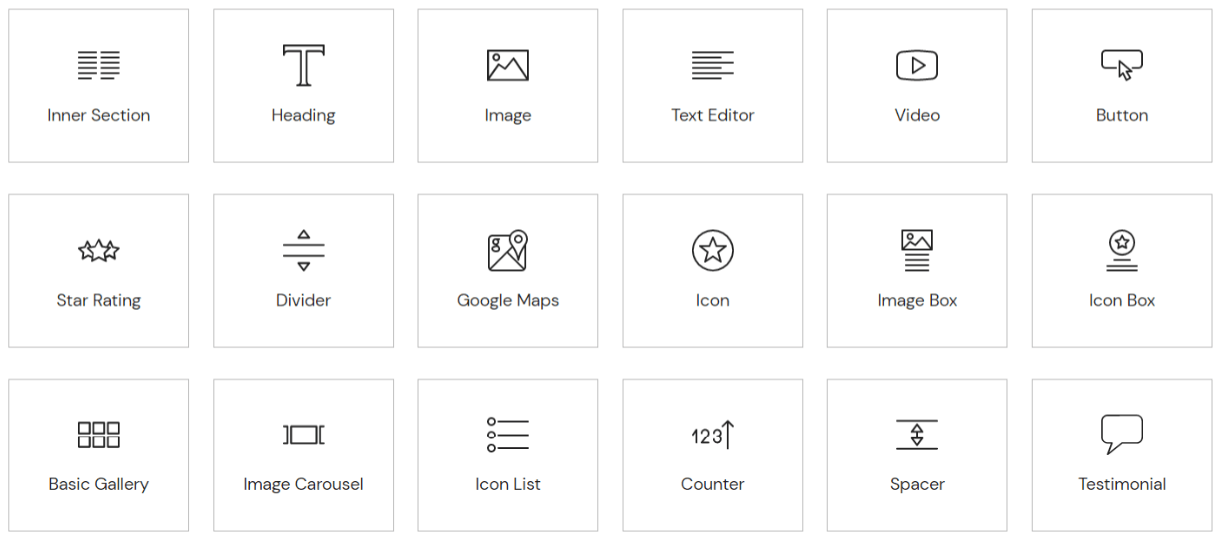
You will find almost all the necessary widgets in the Lite version necessary to create a basic-functioning website. You can create unlimited design possibilities with them. First, you have to drag and drop them on your webpage and then customize them as your wish. Here is a snapshot of those free widgets.
#Responsive Editing
Elementor Lite allows you to switch the desktop view mood to mobile and tablet screen size. Accordingly, you can customize your web pages and see the changes live on your screen. This will make sure the same user experience for all device holders who love to visit your site.
#Template Library
Elementor library has 2000+ stunning ready templates of different pages, blocks, posts, and niches. You won’t get access to all these elements till you upgrade to the Pro version. But don’t get frustrated. Yet there’re many free templates in it that are enough to give an impressive look to your website right at the beginning.
#Elementor Canvas
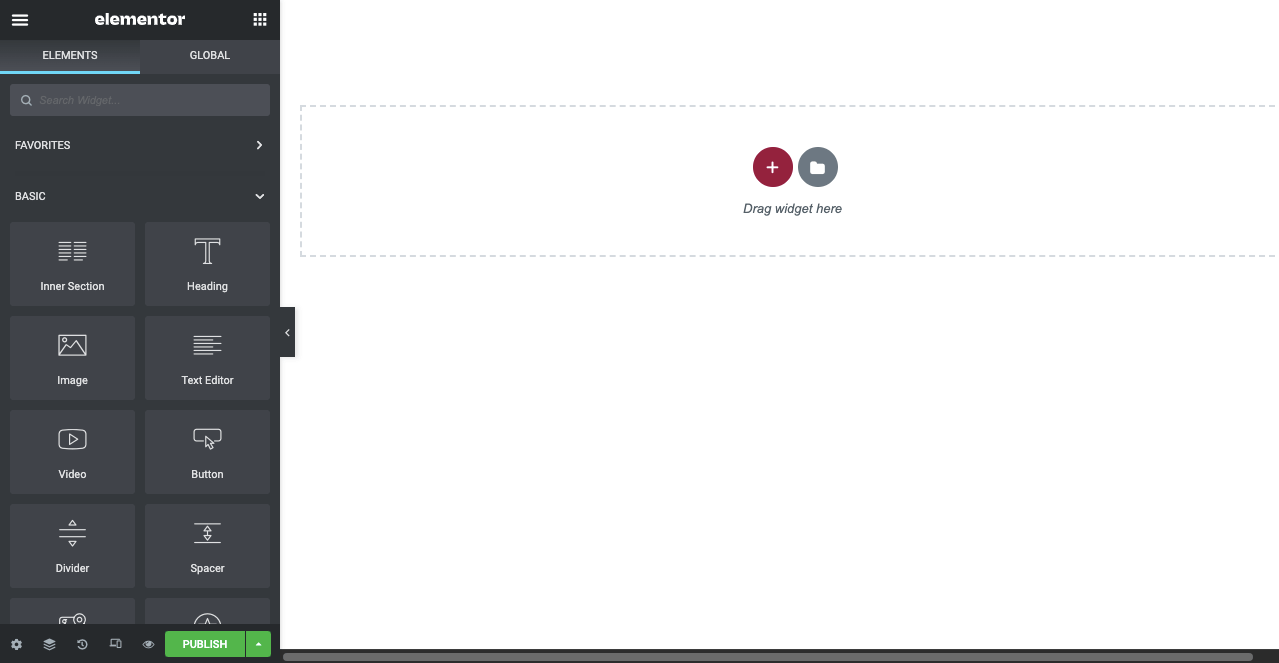
Elementor Canvas is a native blank page. It lets you design a completely blank page of the full-width layout by removing all the elements (header, footer, sidebars) on it. Those who want to design a whole landing page from scratch as per their choice will love this feature.
#Change Background Style
If you want to change the background appearance of your website, you will get this option available in the Lite version. It will let you add videos and impressive colors to the background and make your website visually more appealing to the users.
#RLT and Translation Ready
Creating a multilingual website is super easy today with Elementor. It offers full-scale support both for LTR and RTL languages. To date, this plugin is able to translate your website into 23 different languages. And this number is going up over time.
2. Elementor Premium Features and Widgets At a Glance
Elementor Pro works as an addon/extension to the Free version. It will allow you to customize each and every part of your theme and enhance more options.
- Unlocks Full Access to Template Library
- WooCommerce Integration
- Advanced Web Functionality
- Form Builder
- Live Custom CSS
- Embed Anywhere
- Global Settings
- Enhanced Elements and Theme Builder
- Add Custom Font
- Premium Support
Let’s explore them.
#Unlocks Full Access to Template Library
Elementor Pro will give you the ultimate access to its template library. You will also get 200+ ready web templates in it, covering every single niche you can think of. Such as Blogs, eCommerce, newspapers, Business, Health, Lifestyle, and more. So, within just several clicks, you can create a full-functioning website right away.
#WooCommerce Integration
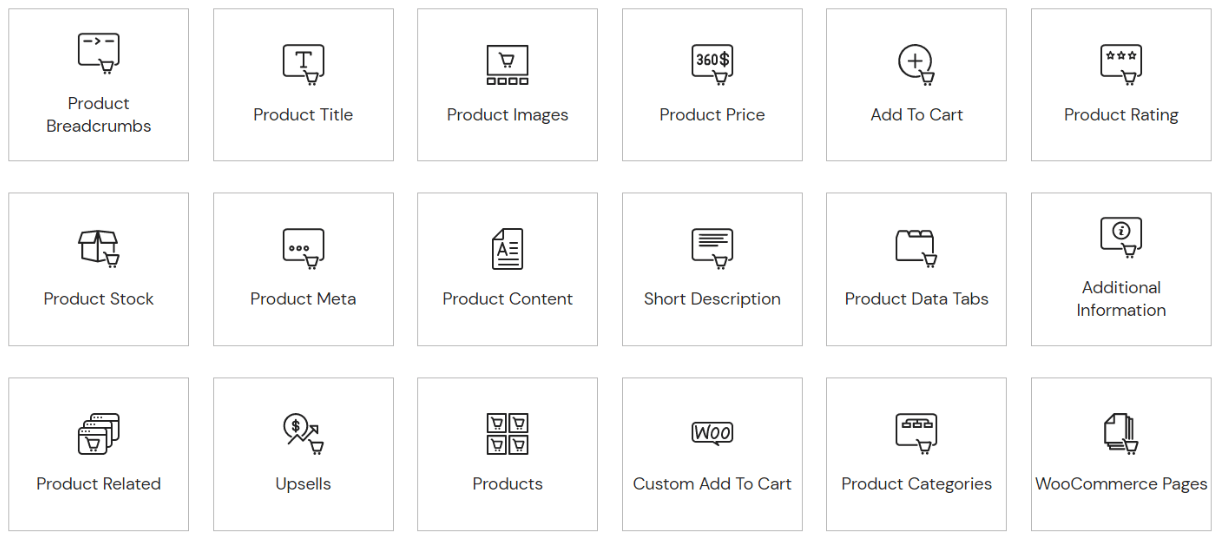
If you have an eCommerce website and want to customize it, you will get 24 WooCommerce widgets in the Pro version. They can help you add more functionalities to your website and hook up new potential customers.
#Advanced Web Functionality
If you are an agency, small business, marketing firm, or freelance web designer, you need more advanced widgets alongside the basics to support the increasing workflows. And you will get them available in the Pro version. It has 30 impressive widgets by which you can further customize your website.
#Form Builder
Creating web forms is a great way to collect valuable information about leads and traffic. It also helps the visitors make contact with the website owner, query, ask for catalogs, and book orders. This is why websites today need different types of forms to create engagement with audiences. Such as contact forms, subscription forms, registration forms, eCommerce checkout, and appointment booking forms.
The Elementor Form Builder has 20 different form fields. Using them, you can create beautiful custom forms and integrate them with any marketing and CRM tool.
#Live Custom CSS
If you are a developer or have enough knowledge about coding, this feature is only for you. Sometimes, you may want to modify the elements (blocked, widgets, templates) available on Elementor. This feature will allow you to add custom CSS to those elements and see the changes live on your screen.
#Embed Anywhere
Suppose you have created a form, popup, or widget. You want to place it on other pages or a particular part (footer, sidebar) of your website. How will you do that? Elementor Pro will help you generate shortcodes for each of your widgets. Then wherever you paste this code, your desired widget, banner, popup, or form will be shown there.
#Global Settings
Sometimes, you may want to show the same popup, form, banner, and widget on multiple pages. Using the shortcode, you can do it in a blink of an eye. But things become difficult if you cannot centrally control and edit them. You have to visit all the places one by one to edit this widget or element where you have added them.
However, the Global Settings feature enables Elementor Pro users to customize all the widgets from a single location. Also, it ensures the same effect on other pages. This really saves a lot of time and us from a tiresome job.
#Enhanced Elements and Theme Builder
When you look to give your website a unique standout in the market, you must work on each of its elements. Such as header, footer, navigation, visual, pages, and structure. Here again, you need the Pro version. It has enhanced theme elements to let you further customize your website.
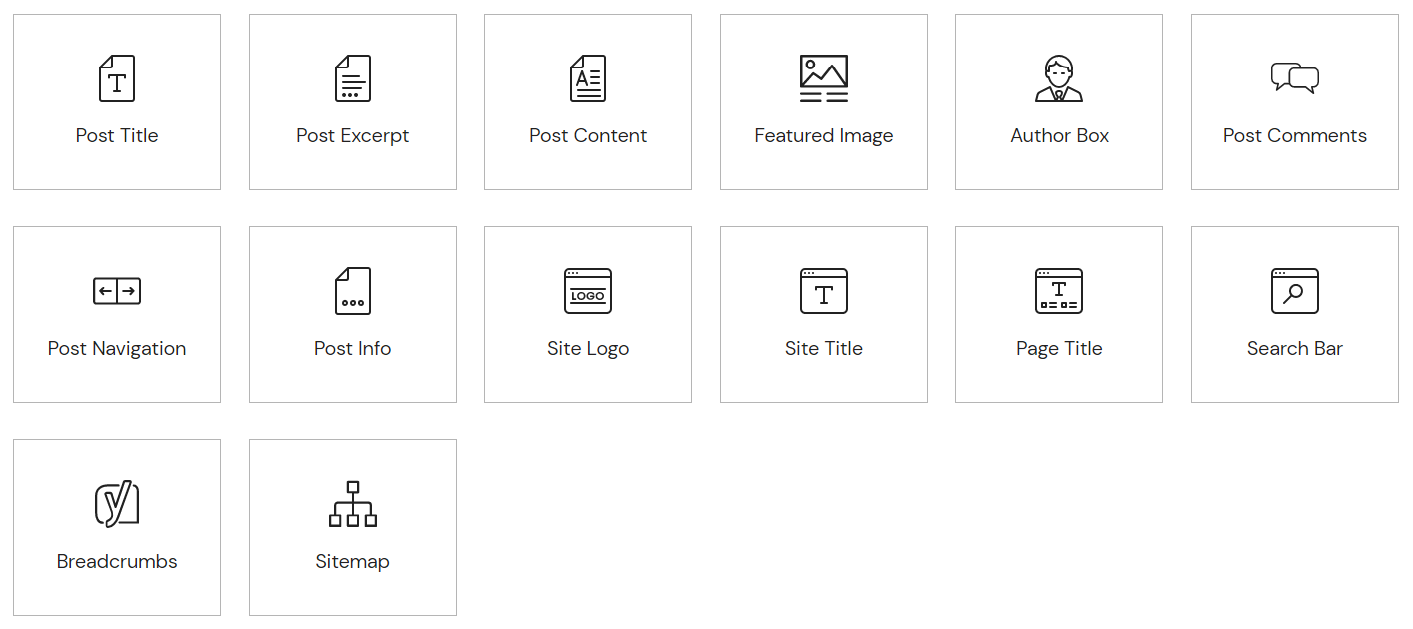
You will feel its importance if you run an IT agency or have multiple business websites. Below are those additional theme elements. Check out how to create a sticky transparent header with Elementor.
#Add Custom Font
Elementor uses Google fonts in all of its library elements. But if you want to add self-hosted custom fonts to create your brand language, the Elementor Pro version will let you do it. You don’t have to approach a developer. Check how to add self-hosted custom fonts.
#Premium Support
Elementor has a team of professionals that offers 24/7 premium support to Elementor Pro users. If you have a valid license (meaning Pro user), log in to your account and send them a support ticket. It takes them one day on average to answer your question.
Alongside, they have VIP support for the Studio and Agency Plan holders. The VIP support team takes only 30 minutes to answer your questions and allows you real-time chatting.
3. Elementor vs Elementor Pro: Things to Consider before Choosing Free or Pro Version
There is no specific rule on which versions you can use and which cannot. But a closer look will reveal that both have a definite set of audiences based on usability. Let’s explore them with examples.
#Casual Uses
There are some basic elements found in all websites, such as headings, images, videos, text editors, inner sections, and icons. If you wish to customize these elements and give an impressive look to your website, the Lite version will be enough to handle that. Once your website starts growing and needs more functionalities, you can think of upgrading to the Pro version.
#Create eCommerce Websites
WooCommerce integration is a must if you want to create an online store on WordPress. There are some must-have elements without which no eCommerce website is ever complete. Such as product page, shopping cart, add to cart, checkout, etc.
Elementor Pro has a great number of WooCommerce widgets by which you can customize these elements and give a better shopping experience to your customers.
#Create Beautiful Popups
Most WordPress users usually rely on plugins to create interactive popups. But the Element Pro has a wonderful popup builder of its own. It has ten ready-to-use templates. Using them, you can easily create varieties of exciting banners, subscription forms, and social share buttons in no time.
#Create Engaging Forms
Forms allow visitors to get connected with your website. You can use it to increase subscribers and exchange valuable information to boost eCommerce sales and revenue. Elementor Pro has a Form widget as well. You can use it to create powerful-engaging forms for collecting leads, orders, queries, information, and many more.
In addition to these, you can do more interesting things with the Pro version. Hopefully, now you understand where the Pro version is mandatory and when the Free version is good enough.
Elementor Pro Pricing
In addition to the Lite version, Elementor Pro has three different pricing plans. Below is a short snapshot of these plans. Better you start your journey with the Lite version at first. Once you start understanding its ecosystem, you can upgrade to a suitable Pro version according to your needs.
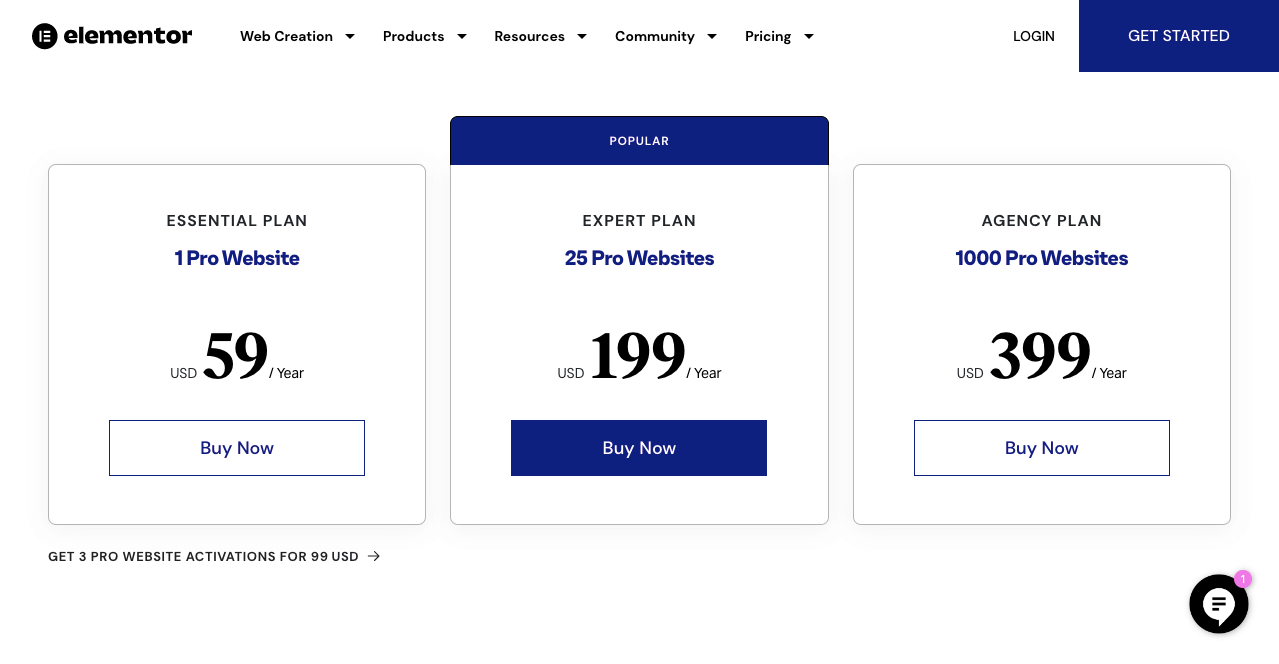
Note: The pricing of the Elementor agency plan was $999 before. But now this price has been updated to $399 without compromising the features and benefits. If you are already using this agency plan, you’ll be able to enjoy this updated price from the next renewal.
Elementor Cloud Hosting and Pricing
Elementor was known only as a page-building solution for a long time. But today, Elementor offers an end-to-end solution to web creators. It includes premium managed hosting alongside the premium page builder plugin, a free custom domain connection, the hello theme installed, and premium support.
This package is useful for users with limited technical knowledge in setting up a website. The Elementor managed hosting provides an SSL certificate, daily backups, protection from DDoS attacks, and extra security built-in. So you don’t have to use any additional plugins for these services.
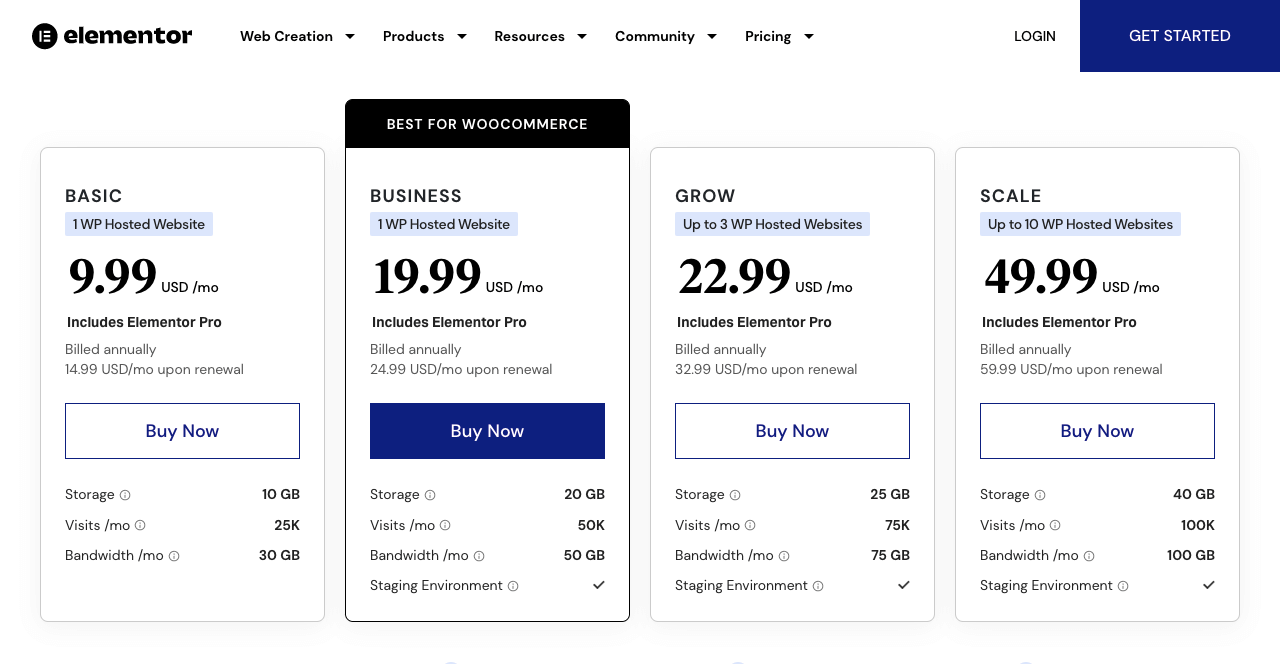
Elementor hosting has four different plans. The lowest is the Basic Plan which starts from $9.99/month. Check out all the pricing plans of Elementor hosting below.
Bonus Point: Try Happy Addons to Enrich Your Elementor Widgets Library
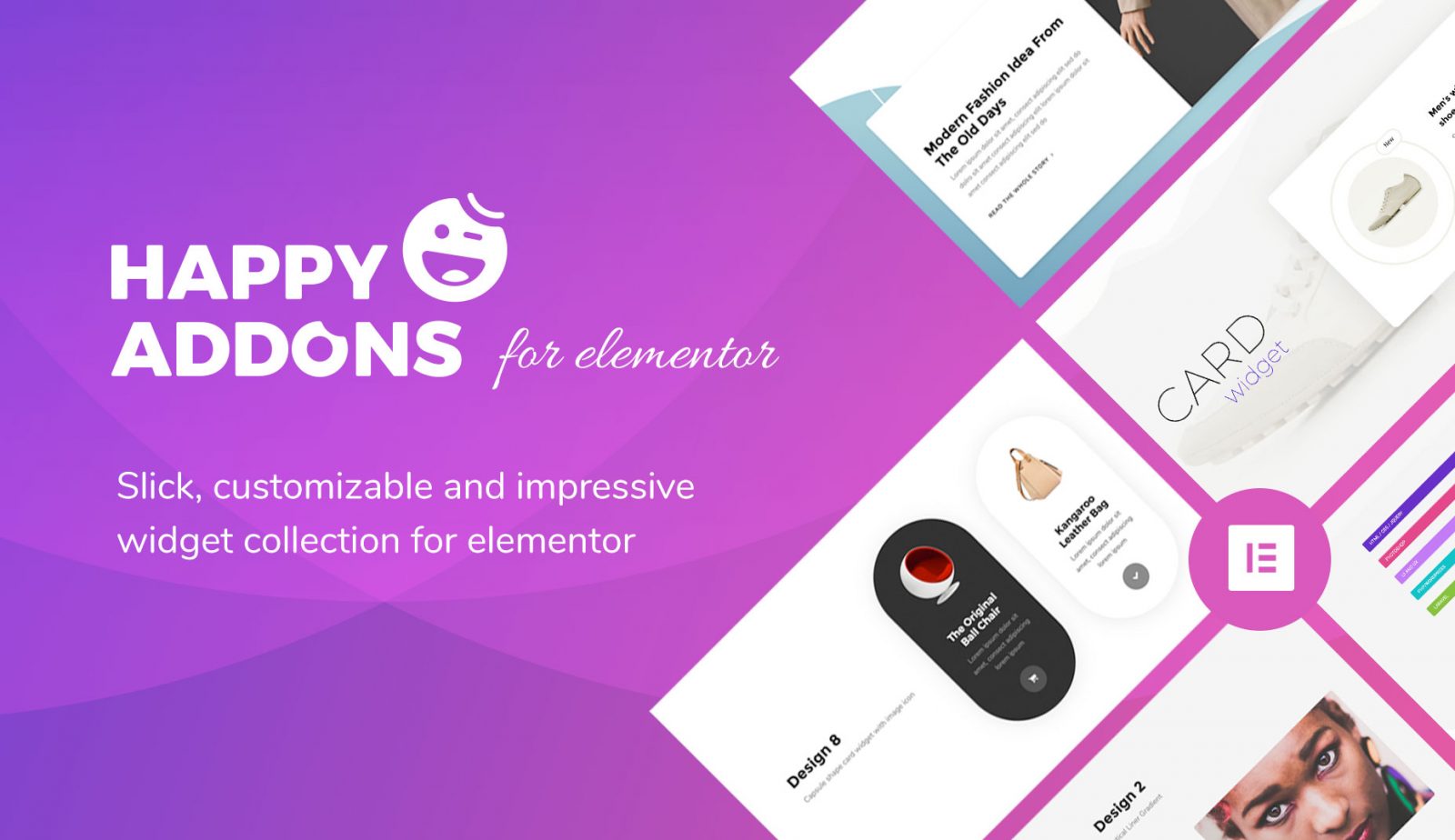
If you think Elementor alone isn’t enough for you, you can try out the HappyAddons plugin. This is currently one of the best Elementor addons for WordPress users. You can add more functionalities to your website using its additional features and widget. Such as floating effects, present, animation, live copy-paste, etc.
You will find so many features and widgets in its Lite version that you will get confused about whether they are Free or Premium sooner! Here is a quick overview of how this plugin will enhance your page-building experience overnight.
60+ Free Widgets
HappyAddons Lite version is a bag full of surprises for you. At present, it is offering 62 free widgets in nine different categories. They are:
- General (20 free widgets)
- Creative (10 free widgets)
- Slider and Carousel (2 free widgets)
- Social Media (3 free widgets)
- Marketing (1 free widget)
- Chart (1 free widget)
- Post (3 free widgets)
- Forms (8 free widgets)
Here is a snapshot of some of its free widgets.
Needless to say, most of these widgets you will never get free in any other addon or extension of Elementor. Besides, it has 42+ premium widgets by which you can further power up the functionality of your website.
Unique and Exclusive Features
HappyAddons comes up with 21 exclusives and exciting features to gear up the core of your Elementor page builder. The good news is that fourteen of them are completely free for any user. Below is a snapshot of all these features.
400+ Exciting Page Templates
In Elementor, you will get only a few page templates for free. But this number is quite high in the case of HappyAddons. If you want more varieties to curate beautiful web-designing, HappyAddons page templates can meet your needs.
Stylish Page Blocks
You will find tons of block items in the HappyAddons web block section by which you can customize any particular section of your website. Thus, you can produce more unique styles and appearances for your web pages.
If you have a web agency and are looking for suitable extensions to power up the Elementor core, you must keep HappyAddons on top of your checklist.
FAQ on Elementor vs Elementor Pro

Here we are going to cover some most frequently asked questions related to Elementor vs Elementor Pro.
-
What is the difference between Elementor and Elementor Pro?
The Elementor Lite version gives you limited options to customize your website (mainly the content part). But with the Pro version, you can customize every single part of your website.
-
Do I need Elementor and Elementor Pro?
If you want to customize only the basic parts of your website, Elementor will be enough to serve your needs. But if you are an agency, small business, or software company, you must also integrate the Pro version. Otherwise, you will fall short of adding up the necessary functionalities to your website.
-
Do I need to install Elementor before Elementor Pro?
Remember, Elementor Pro is an extension of Elementor. This means without Elementor, you cannot run or install the Elementor Pro version. Also, if you want to use any other third-party addon like HappyAddons on it, having Elementor is a pre-requisite.
-
Does Elementor slow down your site?
Due to its number of features, widgets, templates, and other elements, you may think its heavy weight will slow down your website. But the fact is Elementor doesn’t have any notable negative on your web speed.
-
Can I use Elementor Pro for more than one website?
Elementor Pro has multiple pricing plans. Expert, Studio, and Agency plans will let you use the Pro version on multiple websites at a time.
Elementor vs Elementor Pro: Which One to Go For
If you have read this article so far, you already know well which version of this plugin you need and when. Just start with the Lite version and be familiar with its ecosystem. Once you get used to you can easily upgrade to the Premium version in no time.
However, if you want to explore more free widgets, you can also try the HappyAddons Lite version. There is no complicated setup wizard or configuration process. Most importantly, this won’t cause you to lose any of your work.
Hope you have loved this article and got answers to your many questions from this analysis. Subscribe to us for more interesting articles like this one. And follow us on Facebook and Twitter for regular updates.
Subscribe to our newsletter
Get latest news & updates on Elementor
[yikes-mailchimp form=”1″]

![Black Friday and Cyber Monday are around the corner, and people are waiting for these festivals to grab the best product deals. That is why giving an attractive look to your website during this festive season is very necessary. But, creating a whole new landing page might be difficult in a short period of time. Don't worry. By using Happy Elementor Addons Black Friday and Cyber Monday Landing Page templates, you can easily develop a whole new landing page in a few minutes. In this today's blog, we are going to show how to boost your website design using HappyAddons templates during this festival season. Before that, we'll talk a bit about these two festivals and why they are important to online business communities. What are Black Friday and Cyber Monday? Black Friday is the immediate following of the famous Thanksgiving day. This is when people start shopping to celebrate the Christmas festival. Since the late 1980s, retail sales on this day have constantly been suppressing the past volumes. See the graph below. Source: Salecycle.com The first Monday following Thanksgiving day each year is called Cyber Monday. It was first introduced in 2005 by the USA National Retail Federation to encourage people to buy online. Though this festival originated in the USA, it is celebrated globally today. See the stats below. Source: Salecycle.com It indicates customers' buying behavior around this day is growing up over time. Many customers today keep a budget to buy products on these two days. So, why won’t you prepare a Cyber Monday landing page if you have an online store? Importance of Designing Landing Pages for Black Friday and Cyber Monday Festival Having a well-design website is one of the major checklists if you are running an online business. Most importantly, you have to make sure that your website remains up-to-date to boost your sales. That is why you need to redesign your website or make a new landing page during the Black Friday and Cyber Monday festivals. Because most online product & service-based businesses promote special deals during these two festivals. Here are some remarkable ways dedicated landing pages during these festivals can positively impact the performance of your online business. Boosts your product salesIncreases conversion rateOpportunity to collect potential email leadsGrabs users' attention toward your siteReduces bounce rateIncreases website visitors. Elementor Black Friday New Seasonal Kit is Already Here! Source: Elementor To make this Black Friday more enjoyable, Elementor has launched a New Seasonal Kit that includes landing pages, sections, pop-ups, and vector assets. All these design elements are made by the Elementor team so that one can easily use them on their website to ensure more sales and conversions. New Elementor Black Friday Seasonal Kit offers: 3 Landing pages6 Sections 6 Popups A collection of stickers & animations You can only get these ready-made Black Friday landing pages and sections if you have Installed Elementor Pro on your site. However, if you are looking for templates that are outside of the box, you can go with Happy Addons, the fastest Elementor Addons on the market. It's very easy to use, flexible and has tons of advanced features and widgets that can ease your website design journey. Also, you'll get several festival landing page templates & blocks. Moreover, you can use free Black Friday and Cyber Monday design blocks and templates to decorate your site. Most importantly, these templates and blocks are easy to customize and can be used for multiple purposes. Now let's see how you can use the Happy Addons templates to design your website according to the Black Friday theme. Pre-Requisites to Use HappyAddons Templates to Design Black Friday and Cyber Monday Landing Pages You must have the following plugins installed on your site to get access to the HappyAddons Template library. Make sure you’ve installed and activated the Happy Addons Free & Premium version of your website. Elementor (Free)Happy Addons (Free)Happy Addons Pro If you are new to Elementor, check this Step By Step Guide For Beginners. If you want to explore the readymade templates of HappyAddons before installing these plugins, you may visit by clicking on the button below. Check out Happy Addons Templates How to Design Black Friday Landing Page on Your Website Once you have the plugins (mentioned above) installed, your website is ready to follow the tutorial guide explained in this section. Get ready now! Step 1: Open a New Page with Elementor Create a new page or open the existing page with Elementor. Next, you have to select the Elementor Canvas option.Unless you select Elementor Canvas, you may watch the header, footer, and unnecessary other texts on the page. These might be irritating to you.Once you open the page with Elementor Canvas, your page will be completely clean. Watch the video below on how to do it. Step 02: Go to HappyAddons Library Click on the HappyAddons Library Icon. It will open up a modal popup. Here you'll find numerous stunning premade Blocks and Pages created by the Happy Addons team. Kindly explore them to create a list of your favorite items. Step 03: Import a HappyAddons Black Friday Template Go to the Page tab on the modal popup.Select Black Friday from the left-side filter option.You will several good-looking templates on your screen.Take your cursor on the one you like and hit on the INSERT button. Wait for a while to finish the installation process. You will get the template on your screen with editable sections and options. Step 04: Set the Black Friday Campaign Deadline A deadline creates a sense of urgency in customers' minds. So, better if you add a deadline section on the page to show your Black Friday deals. The good thing is that if you select the template as we did, you will automatically get a deadline or countdown option. You have to customize it as you want. Step 05: Show Image Carousel Slider on Your Black Friday Landing Page Using the Image Carousel, you can slide show demonstrating discounts on your product categories. Drag and drop the Image Carousel widget on any landing page section. Next, from the Elementor panel, you can add photos and text to the widget. Do it accordingly. Thus, you can add more sections and options on the landing page. Hope you can do it yourself. Step 06: Make the Black Friday Landing Page Mobile Responsive Making a web page mobile responsive with Elementor is super easy. You'll get the mobile responsive option on the Elementor footer section. Clicking on it will open up the option to view your landing page on different device screens. We have explained the process in the video below. Note: Don't delete any widget or section while customizing your landing page for any particular device. Because if you delete a widget or section on any device screen, it will also be applied on other devices. However, you may change their position or alignment or hide them. It won't make any impact on other devices. Step 07: Final Preview of Our Landing Page Here is the final interface of our Elementor Black Friday landing page that we've designed using the Happy Addons' ready-made Template. Get Happy Addons to Add a Black Friday Theme Landing Page on Your Website How to Design Cyber Monday Landing Page on Your Website You will require the same prerequisites (Elementor and HappyAddons Plugins) to design the Cyber Monday landing page on your website. Hope you have them ready on your website. Now, let's get into the tutorial part. Step 01: Import a Cyber Monday Readymade Landing Page Template Go to the HappyAddons Template library.Choose the Cyber Monday template you like.Click on the INSERT button. Wait for a while to finish the installation process. You'll get a page design like the following image below. Step 02: Edit Different Sections of the Page In the first tutorial, you saw the deadline/countdown option was already embedded in the template. But this template doesn't have it. So, you can bring it to your page? Very simple. Create a new section by clicking on the plus icon.Type Countdown on the Elementor search bar.Drag and drop the widget on the section. Customize the Countdown section from the Content and Style tabs of the Elementor panel. Using the Heading widget, we have added the FLASH DEALS text next to the countdown to make it more meaningful. Thus, you can use other exciting widgets on the template to make your landing page super gorgeous. Step 03: Promote Products on the Landing Page Promotional landing pages usually include a section to showcase some hot-selling products to generate instant sales. Using the Image and Button widgets, we have created this section under the FLASH DEALS.You may customize it more as you wish. Step 04: Make it Mobile Responsive We already showed you the process in the first tutorial on making a mobile web landing page responsive. Hope you can do it here as well, following the same guideline. Click on the Responsive Mode icon and do the rest yourself. Bonus: Black Friday and Cyber Monday Landing Page Design Key Considerations Whenever you design a landing page, you need to consider why you need to design this page and what elements they should keep on the page. Because if you are not adding all the necessary features to your page, it will not serve its purpose. This is why you need to focus on a few things before designing your Black Friday landing page. Here are some points you must consider in designing Black Friday and Cyber Monday landing pages. Add Black Friday textSet deals deadlineShow your best-discounted productsAdd coupon code Focus on responsive page designMake your page visually appealingImprove your page user experience or page structureSet a proper website navigation FAQ on Black Friday and Cyber Monday Landing Page Design Now, we'll answer some common questions on Black Friday and Cyber Monday Landing page designs commonly found online. How much does it cost to design a landing page?The cost of designing a landing page varies depending on the complexity of the design, the level of customization required, and whom to hire for the page. A simple landing page can be designed for as little as $25, while a more complex design with multiple customizations can cost upwards of $2,00.However, if you have Elementor and HappyAddons installed, you can design unlimited landing pages at a minimal cost. But like any other tool, you must have a kind of enterprise on them. As they are drag-and-drop builders and their numerous tutorials and documentation are available, they won't take you more than a month to be used to. Check out some wonderful YouTube tutorials on these two plugins. Hope you will enjoy them.How many hours does it take to design a landing page?It mainly depends on the level of design complexity and your web design skill. However, both in Elementor and HappyAddons, you will get countless readymade templates and block sections. You can design a beautiful landing page in 3-5 hours by making a proper combination of them.Can I design Black Friday and Cyber Monday Landing pages with Elementor and HappyAddons free versions?Surely, you can design Black Friday and Cyber Monday Landing pages with Elementor and HappyAddons free versions. But only with the pro versions, you can't add too many exciting features to your pages. For example, free versions will give you access to only a limited number of readymade templates.If you are just a beginner-level designer, free versions are enough. But if you are a professional designer or have a web designing agency, pro versions are a must. Are You Ready To Design Your Black Friday and Cyber Monday Landing Page? Customers look forward to this kind of occasion to buy their favorite products at a minimum price. Naturally, they are drawn to websites that look good and give a festive vibe. That is why adding a Black Friday and Cyber Monday landing page during the festival season will give you an extra edge over the competitors. The above guide shows how to design your Elementor Black Friday Landing page using the Happy Addons' Black Friday Templates and how it can help boost your holiday sales. So if you have any queries regarding this blog, you can comment on us in the below box. If you like this post, then share it on your social channel. Don't forget to subscribe to our newsletter. Also, follow our Facebook and Twitter channels for regular updates. Subscribe to our newsletter Get latest news & updates on Elementor [yikes-mailchimp form="1"] ":36560} /--](https://happyaddons.com/wp-content/uploads/2021/11/How-to-Design-Black-Friday-and-Cyber-Monday-Landing-Page-300x188.png)

One Response
thanks for the information