







With another trip around the sun coming full circle, it’s time to share HappyAddons year in review-2020. Let’s explore together how we made it so far and enable everyone regardless of their prior technical expertise to design a highly functional website in no time flat.
We are truly thrilled and excited after ending a year successfully by accomplishing the biggest milestone! Yesss!!! now we are a big family of 100,000 active users. A big thanks to all our users, well-wishers, and site owners to choose us as their web development platform.
To enhance the web development experience for Elementor users- HappyAddons started its journey in the middle of 2019.
It was quite challenging for us to make our first year actual effective despite the on-going pandemic. However, this past year has been quite a significant one for us in terms of launching many new and exciting features, as well as the expansion of the existing team.
Here’s a quick look at some remarkable facets from 2020 by-the-numbers:
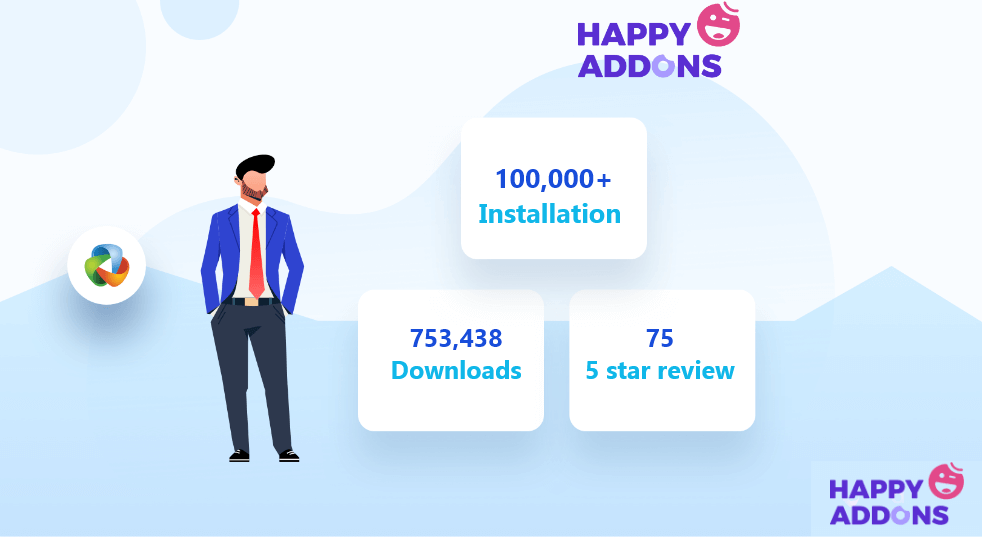
- 90,000+ active users (3x growth rate compared to 30,000 last year)
- Launched 40+ releases
- 75 five-star reviews, and counting…
- PRO: 7 new features and 24 new widgets released
- FREE: 3 new features and 26 new widgets released
- Wrote 100+ blogs & 35+ docs
- Replied more than 3,000+ tickets
- Established a Facebook community of 1500 members
Let’s shed some light on our major updates and achievements that we celebrated this past year.
HappyAddons 2020 in a Flash!
Elementor is an easy-to-use and flexible WordPress page builder plugin. Here you can easily drag and drop elements, edit them, and preview everything in real-time. It enables you to create a perfect website without writing any code. Plus, it allows developers to help Elementor grow faster. This is how the idea of HappyAddons came out.
HappyAddons is a third party Elementor addon that makes your hands more powerful to design a professional website instantly. And extends the customization options even further.
The main motto of Happy Elementor Addons makes your development process smoother by adding additional features, widgets, and extensions. You will find all your desired functionalities here to build stunning websites. It includes a bunch of advanced features like Animated text, Motion Effects, Trendy Blocks, Display Conditions, Social Media Feed, and so forth.
Latest version: 2.16.0
Last updated: 4th December 2020
5 Star Rating: 75+
Currently, HappyAddons has 75+ widgets (35 free & 40 pro) and 15+ features. Two major additions of 2020 were- 200+ Happy Blocks and 400+ Happy Templates. Using these pre-made layouts you can accelerate your workflow and create beautiful new designs in a flash!
The pricing of Happy Addons starts at $39/year which unlocks 50+ widgets, 500+ line icons, exclusive features like Live Copy, Display Condition, Preset, etc., and one year of updates with 24hr support response.
Our Journey from 0 to 100k+ Happy Members
Here’s a quick recap of our journey so far, and some milestones we have hit on the way.
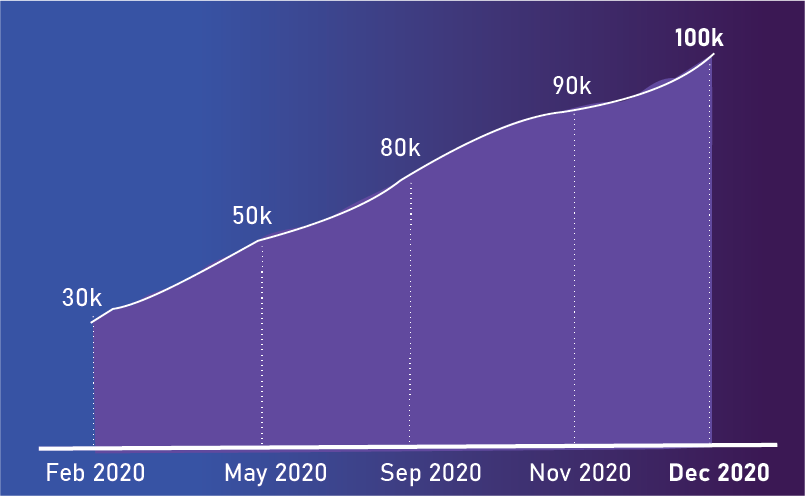
We’ve published the pro version of HappyAddons at the end of September 2019. After that, there is no looking back! We continue our journey with great force. As a result, we achieved our first success within six months only. We reached our first milestone of 30,000 active installs in March 2020.
Then within the next three months, we crossed another benchmark of 50,000. We are so lucky to get this much love and support from the entire Elementor community.
We were really worried about the next milestone. As we all are working remotely due to the COVID-19 pandemic. But HappyAddons ensures all the facilities keeping all the team members aligned. So that they can work together as a team from home.
That’s why the pace of growing never slows down. Rather it gets faster and we unlocked our biggest milestone of 2020. This December we’ve reached 100k active installations.
That means within 6 months, our user-base gets doubled in size.
How We Support People During Covid-19 Pandemic
It’s probably fair to say that 2020 has been a tough year for most of us. Our whole life might have been thrown upside down. Nearly half of the world’s 3.3 billion global workforces are at risk of losing their livelihoods. In this situation, we encouraged people to start their own online business.
During this pandemic, we inspired people to set up their online business using Elementor. For that, we introduced multiple WooCommerce widgets. Therefore, people can easily design their online shops and start earning money!
- How To Build WooCommerce Shop Pages Using Elementor
- Getting Bored Staying Home In COVID-19 Outbreak?
- How Businesses Should Survive In Tough Times Through Social Media Marketing
- How To Create A Medical Website Using WordPress & Elementor
Apart from this, we offered up to 40% OFF last summer to save our users’ pockets.
Most importantly, we’ve followed all of the directives and updates outlined by the World Health Organization (WHO) and the Center for Disease Control (CDC).
In this HappyAddons year in a review let’s highlight the new widgets and features from last year-
Happy Widgets That Will Definitely Blow Your Mind
Throughout 2020 we’ve introduced 25+ FREE widgets inside HappyAddons. Some important picks:
| Horizontal TimeLine widget | Social Share widget |
| Data Table widget | WP Fluent Forms widget |
| 360° Rotation widget | Taxonomy List widget |
| Post Tab widget | Post List widget |
| Twitter feed widget | Bar Chart widget |
| Social Icons widget | Fun Factor widget |
Throughout 2020 we’ve introduced 20+ PRO widgets inside HappyAddons. Some important picks:
| Modal popup widget | Advanced data table widget |
| Product Category Grid widget | Product Category Carousel widget |
| Post Grid widget | Sticky Video widget |
| Author List widget | Smart Post List widget |
| Post Tiles widget | Product Grid widget |
| Product Carousel widget | Post Carousel widget |
| Twitter Feed Carousel widget | Breadcrumb New widget |
| Pie & Doughnut Chart Widget | Line Chart Widget |
| Rader Chart Widget | Polar Area Chart Widget |
| HotSpots widget | Price Menu widget |
We regularly adding more and more widgets to meet your expectations.
Happy Features- Supercharge Your Website Building Experience
We’ve dished out the following features as hot as ever from January 2020 to December 2020-
Prime Free features added in 2020:
- Grid Layer feature for designer
- Wrapper Link feature for section, column, and widget
- WPML support for all widgets
- Twitter feed timestamp settings
Prime Pro features added in 2020:
- Display condition global feature (Works with all widgets, section, and column. Available inside advanced tab)
- Self Hosted Live Copy
- Section template inline editing
- Instagram New API integration
Extension we bring this year:
- Particle effect extension
- happyaddons/extensions/image_masking filter hook to disable image masking
- happyaddons/extensions/display_condition filter hook to disable display condition
- happyaddons/extensions/grid_layer hook to control Grid Layer
- happyaddons/extensions/background_overlay hook to control Background Overlay
- happyaddons/extensions/wrapper_link hook to control Wrapper Link
- happyaddons/extensions/happy_clone hook to control Happy Clone
- happyaddons/extensions/adminbar_menu hook to control Adminbar menu
- happyaddons/extensions/floating_effects hook to control Floating Effects
- happyaddons/extensions/css_transform hook to control CSS Transform
- happyaddons/extensions/on_demand_cache hook to control On Demand Assets
Besides adding new widgets & features, we fixed a lot of major issues and updated many functionalities too. Such as-
- Updated compatibility with WP 5.5.x
- Updated compatibility with Elementor 3.x.x
- Include 44 new Happy icons
- Instagram data cache system update
- Solved JS function backward compatibility issue
- Post Carousel compatibility with WPML
- On-Demand Assets Loading compatibility with WPML
- GravityForms widget issue causing Elementor editor continuous loading
- and many more
HappyAddons Exclusive Addition- Extend Your Imagination to Infinity
In 2020, we bring some extraordinary features to reduce your web development time:
400+ Happy Templates
These ready templates will accelerate your working speed up to 5-10 times faster. Using these premade layouts you can create beautiful designs in a flash.
200+ Happy Blocks
HappyAddons includes more than 200 ready-to-use blocks in different categories. So, no need to spend countless boring time just to get your desired look. Get everything instantly.
Like Happy Effects, these features also got a huge response from our users!
Happy Grand Giveaway- Token of Our Gratitude & Love for You!

We celebrated our 50k active installations quite grandly. We’ve arranged a grand giveaway to show our gratitude to all Happy users announcing a massive $35,000+ giveaway of WordPress products. It includes hundreds of WordPress Plugins, Themes, and Hosting plans.
The lucky winner won an iPad also.
Also, we offered several discounts and special packages on special occasions in 2020. Our biggest sale was announced last month on Black Friday- Up to 50% OFF on all premium packages.

Happy Community
What goes around come around!- We always try to work in favor of our users. To give all our users seamless response we established Happy Community on different social platforms.
1.2k likes on HappyAddons Official Facebook page
1.52k YouTube subscribers
Around 1500 members in HappyAddons Facebook Community
Check out the following profiles to join our Facebook or Twitter community:
Also subscribe to our YouTube channel to get the latest news, updates and detailed tutorials-
From these social platforms, you will get helpful resources regarding website development with Elementor, using different addons, etc. Also, you can help others by sharing your views and experience. Our support team members are also active there. So you’ll get a quick response to your queries without waiting in the queue.
Happy Resources
27 Videos Published
This year we made more video tutorials to make our users’ journey simpler. You will get individual video on almost every Happy widgets and features.
106 Blogs Written
Throughout 2020 we published more than 100 blogs covering different related topics of Elementor. These blogs help you to enhance your product knowledge.
35+ Docs Updated
With a new release of widget or feature we also update our documents. So that you may not face any problem with the new addition.
Happy Team at a Glance
30 Avengers (Employees)
There are 30+ employees in HappyAddons working in different departments. A project manager aligns all the project activities and goals with the strategic vision of our organization.
10 BIG Monsters (Developers)
Our expert development team is responsible for bringing new usable widgets and features. Having a deep understanding of users’ insights they always make the options and design process user-friendly.
5 Ninja (Support Team)
Our support team includes 5 supporters from around the world who speak 3 different languages, while our official language remains English.
We got 3k+ support tickets from 1.5k customers in 2020. It means we get an average of 10 support tickets every day. Most amazingly, 95% of our users are happy with the service they received from our support agents.
As we promised at the beginning of 2020 to provide 24/7 support- we successfully keep our promise and deliver high-standard customer service throughout the year.
Don’t Take Our Words! Hear What Our Customers Say
Our all plans build around Elementor users’ demand and their requirements. We’re proud and honored to have received plenty of positive comments and appreciations from our clients!
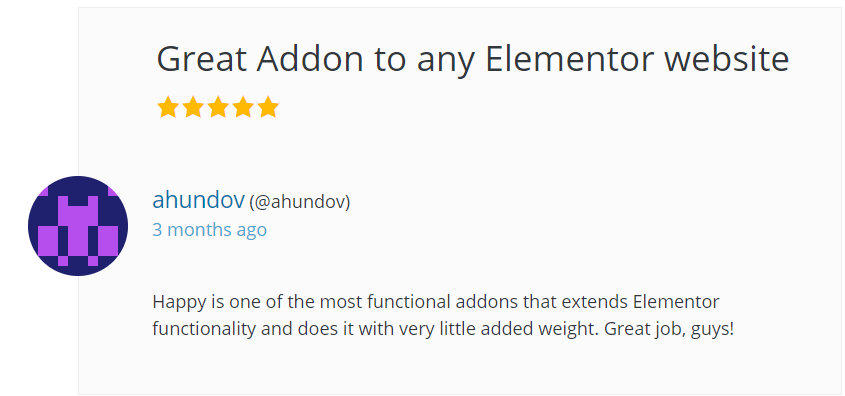
To date, we’ve earned 75+ 5-star reviews on WordPress.org. out of a total of 80 ratings with an average of 99% customer satisfaction.

We are always pumped to read our clients’ reviews. We go through each and every review and plan for our next strategies considering them. Here are some of our clients’ feedback from 2020:
As we mentioned above, we also provide support on different social platforms. Our responsible team members are always active there to respond & solve issues ASAP. Some snaps from our social community:

Another one where our representative respond immediately after getting query from an user:

Well, it’s difficult to keep track of all updates that HappyAddons experience in 2020. In this HappyAddons year in review- 2020, we just tried to spotlight all the significant areas of effort so far.
Web Design Made Easier with Happy Elementor Addons
HappyAddons is a faster and secure foundation for WordPress websites. In the spirit of moving forward and continuous improvements, we promise to continue this fantastic journey. We are committed to adding more value to the WordPress community.
Important to mention, a number of unique and advanced features make us popular among Elementor users within a short time period. Positive feedback from customers and hold a large family of around 100,000k members mostly strengthen this fact.
We’d like to express our sincere gratitude to each and every member of the HappyAddons community for supporting us.
A BIG Thank you to all Happy Users! ?
Here’s a big shout out to all our clients and partners who made 2020 memorable.
Happy New Year 2021 ??


![Black Friday and Cyber Monday are around the corner, and people are waiting for these festivals to grab the best product deals. That is why giving an attractive look to your website during this festive season is very necessary. But, creating a whole new landing page might be difficult in a short period of time. Don't worry. By using Happy Elementor Addons Black Friday and Cyber Monday Landing Page templates, you can easily develop a whole new landing page in a few minutes. In this today's blog, we are going to show how to boost your website design using HappyAddons templates during this festival season. Before that, we'll talk a bit about these two festivals and why they are important to online business communities. What are Black Friday and Cyber Monday? Black Friday is the immediate following of the famous Thanksgiving day. This is when people start shopping to celebrate the Christmas festival. Since the late 1980s, retail sales on this day have constantly been suppressing the past volumes. See the graph below. Source: Salecycle.com The first Monday following Thanksgiving day each year is called Cyber Monday. It was first introduced in 2005 by the USA National Retail Federation to encourage people to buy online. Though this festival originated in the USA, it is celebrated globally today. See the stats below. Source: Salecycle.com It indicates customers' buying behavior around this day is growing up over time. Many customers today keep a budget to buy products on these two days. So, why won’t you prepare a Cyber Monday landing page if you have an online store? Importance of Designing Landing Pages for Black Friday and Cyber Monday Festival Having a well-design website is one of the major checklists if you are running an online business. Most importantly, you have to make sure that your website remains up-to-date to boost your sales. That is why you need to redesign your website or make a new landing page during the Black Friday and Cyber Monday festivals. Because most online product & service-based businesses promote special deals during these two festivals. Here are some remarkable ways dedicated landing pages during these festivals can positively impact the performance of your online business. Boosts your product salesIncreases conversion rateOpportunity to collect potential email leadsGrabs users' attention toward your siteReduces bounce rateIncreases website visitors. Elementor Black Friday New Seasonal Kit is Already Here! Source: Elementor To make this Black Friday more enjoyable, Elementor has launched a New Seasonal Kit that includes landing pages, sections, pop-ups, and vector assets. All these design elements are made by the Elementor team so that one can easily use them on their website to ensure more sales and conversions. New Elementor Black Friday Seasonal Kit offers: 3 Landing pages6 Sections 6 Popups A collection of stickers & animations You can only get these ready-made Black Friday landing pages and sections if you have Installed Elementor Pro on your site. However, if you are looking for templates that are outside of the box, you can go with Happy Addons, the fastest Elementor Addons on the market. It's very easy to use, flexible and has tons of advanced features and widgets that can ease your website design journey. Also, you'll get several festival landing page templates & blocks. Moreover, you can use free Black Friday and Cyber Monday design blocks and templates to decorate your site. Most importantly, these templates and blocks are easy to customize and can be used for multiple purposes. Now let's see how you can use the Happy Addons templates to design your website according to the Black Friday theme. Pre-Requisites to Use HappyAddons Templates to Design Black Friday and Cyber Monday Landing Pages You must have the following plugins installed on your site to get access to the HappyAddons Template library. Make sure you’ve installed and activated the Happy Addons Free & Premium version of your website. Elementor (Free)Happy Addons (Free)Happy Addons Pro If you are new to Elementor, check this Step By Step Guide For Beginners. If you want to explore the readymade templates of HappyAddons before installing these plugins, you may visit by clicking on the button below. Check out Happy Addons Templates How to Design Black Friday Landing Page on Your Website Once you have the plugins (mentioned above) installed, your website is ready to follow the tutorial guide explained in this section. Get ready now! Step 1: Open a New Page with Elementor Create a new page or open the existing page with Elementor. Next, you have to select the Elementor Canvas option.Unless you select Elementor Canvas, you may watch the header, footer, and unnecessary other texts on the page. These might be irritating to you.Once you open the page with Elementor Canvas, your page will be completely clean. Watch the video below on how to do it. Step 02: Go to HappyAddons Library Click on the HappyAddons Library Icon. It will open up a modal popup. Here you'll find numerous stunning premade Blocks and Pages created by the Happy Addons team. Kindly explore them to create a list of your favorite items. Step 03: Import a HappyAddons Black Friday Template Go to the Page tab on the modal popup.Select Black Friday from the left-side filter option.You will several good-looking templates on your screen.Take your cursor on the one you like and hit on the INSERT button. Wait for a while to finish the installation process. You will get the template on your screen with editable sections and options. Step 04: Set the Black Friday Campaign Deadline A deadline creates a sense of urgency in customers' minds. So, better if you add a deadline section on the page to show your Black Friday deals. The good thing is that if you select the template as we did, you will automatically get a deadline or countdown option. You have to customize it as you want. Step 05: Show Image Carousel Slider on Your Black Friday Landing Page Using the Image Carousel, you can slide show demonstrating discounts on your product categories. Drag and drop the Image Carousel widget on any landing page section. Next, from the Elementor panel, you can add photos and text to the widget. Do it accordingly. Thus, you can add more sections and options on the landing page. Hope you can do it yourself. Step 06: Make the Black Friday Landing Page Mobile Responsive Making a web page mobile responsive with Elementor is super easy. You'll get the mobile responsive option on the Elementor footer section. Clicking on it will open up the option to view your landing page on different device screens. We have explained the process in the video below. Note: Don't delete any widget or section while customizing your landing page for any particular device. Because if you delete a widget or section on any device screen, it will also be applied on other devices. However, you may change their position or alignment or hide them. It won't make any impact on other devices. Step 07: Final Preview of Our Landing Page Here is the final interface of our Elementor Black Friday landing page that we've designed using the Happy Addons' ready-made Template. Get Happy Addons to Add a Black Friday Theme Landing Page on Your Website How to Design Cyber Monday Landing Page on Your Website You will require the same prerequisites (Elementor and HappyAddons Plugins) to design the Cyber Monday landing page on your website. Hope you have them ready on your website. Now, let's get into the tutorial part. Step 01: Import a Cyber Monday Readymade Landing Page Template Go to the HappyAddons Template library.Choose the Cyber Monday template you like.Click on the INSERT button. Wait for a while to finish the installation process. You'll get a page design like the following image below. Step 02: Edit Different Sections of the Page In the first tutorial, you saw the deadline/countdown option was already embedded in the template. But this template doesn't have it. So, you can bring it to your page? Very simple. Create a new section by clicking on the plus icon.Type Countdown on the Elementor search bar.Drag and drop the widget on the section. Customize the Countdown section from the Content and Style tabs of the Elementor panel. Using the Heading widget, we have added the FLASH DEALS text next to the countdown to make it more meaningful. Thus, you can use other exciting widgets on the template to make your landing page super gorgeous. Step 03: Promote Products on the Landing Page Promotional landing pages usually include a section to showcase some hot-selling products to generate instant sales. Using the Image and Button widgets, we have created this section under the FLASH DEALS.You may customize it more as you wish. Step 04: Make it Mobile Responsive We already showed you the process in the first tutorial on making a mobile web landing page responsive. Hope you can do it here as well, following the same guideline. Click on the Responsive Mode icon and do the rest yourself. Bonus: Black Friday and Cyber Monday Landing Page Design Key Considerations Whenever you design a landing page, you need to consider why you need to design this page and what elements they should keep on the page. Because if you are not adding all the necessary features to your page, it will not serve its purpose. This is why you need to focus on a few things before designing your Black Friday landing page. Here are some points you must consider in designing Black Friday and Cyber Monday landing pages. Add Black Friday textSet deals deadlineShow your best-discounted productsAdd coupon code Focus on responsive page designMake your page visually appealingImprove your page user experience or page structureSet a proper website navigation FAQ on Black Friday and Cyber Monday Landing Page Design Now, we'll answer some common questions on Black Friday and Cyber Monday Landing page designs commonly found online. How much does it cost to design a landing page?The cost of designing a landing page varies depending on the complexity of the design, the level of customization required, and whom to hire for the page. A simple landing page can be designed for as little as $25, while a more complex design with multiple customizations can cost upwards of $2,00.However, if you have Elementor and HappyAddons installed, you can design unlimited landing pages at a minimal cost. But like any other tool, you must have a kind of enterprise on them. As they are drag-and-drop builders and their numerous tutorials and documentation are available, they won't take you more than a month to be used to. Check out some wonderful YouTube tutorials on these two plugins. Hope you will enjoy them.How many hours does it take to design a landing page?It mainly depends on the level of design complexity and your web design skill. However, both in Elementor and HappyAddons, you will get countless readymade templates and block sections. You can design a beautiful landing page in 3-5 hours by making a proper combination of them.Can I design Black Friday and Cyber Monday Landing pages with Elementor and HappyAddons free versions?Surely, you can design Black Friday and Cyber Monday Landing pages with Elementor and HappyAddons free versions. But only with the pro versions, you can't add too many exciting features to your pages. For example, free versions will give you access to only a limited number of readymade templates.If you are just a beginner-level designer, free versions are enough. But if you are a professional designer or have a web designing agency, pro versions are a must. Are You Ready To Design Your Black Friday and Cyber Monday Landing Page? Customers look forward to this kind of occasion to buy their favorite products at a minimum price. Naturally, they are drawn to websites that look good and give a festive vibe. That is why adding a Black Friday and Cyber Monday landing page during the festival season will give you an extra edge over the competitors. The above guide shows how to design your Elementor Black Friday Landing page using the Happy Addons' Black Friday Templates and how it can help boost your holiday sales. So if you have any queries regarding this blog, you can comment on us in the below box. If you like this post, then share it on your social channel. Don't forget to subscribe to our newsletter. Also, follow our Facebook and Twitter channels for regular updates. Subscribe to our newsletter Get latest news & updates on Elementor [yikes-mailchimp form="1"] ":36560} /--](https://happyaddons.com/wp-content/uploads/2021/11/How-to-Design-Black-Friday-and-Cyber-Monday-Landing-Page-300x188.png)
