







According to Business Research Insights, the global web design and development industry was worth around $5.6 billion in 2021 and is expected to reach $13 billion in 2032. As a result, web design and development has become an effective means of earning a living for many people.
Just visit some popular freelancing websites. You will see that numerous people are looking for professionals to design their websites.
One easy way to design websites is using a tool like Elementor. It is a great and super-powerful page builder plugin by which you can take your web designing skills to a whole new level.
Not only can it enhance your efficiency but also help complete many web design projects in less time. It will enable you to earn a huge amount of money by working with many clients. In this blog post, we’ll explain in detail why you should consider Elementor when building a website for a client.
We will also cover some exciting topics about Elementor that will surely expand a new horizon before you. Keep reading to explore with us!
What Is Elementor?
Elementor is a popular drag-and-drop page builder plugin with 100+ powerful widgets for WordPress. It allows you to create custom website designs without needing to write any code. And, the features enable you to customize the widgets, create dynamic content, add animation effects, and more to make your web pages lively.
Elementor was launched in 2016 and has experienced rapid growth since then. It quickly became one of the most popular page builder plugins for WordPress due to its user-friendly interface, extensive features, and constant updates.
Currently, it has 10+ million active installations which speaks volumes about its wide acceptance among WordPress users.
In a nutshell, with Elementor, you can easily drag and drop various elements like text, images, buttons, and more to create your desired layout. It offers a wide range of pre-designed templates and customization options, making it a powerful tool for both beginners and experienced web designers.
Why Should You Select Elementor When Building a Website For a Client?
There are countless reasons why you should choose Elementor for website design. This is a plugin in which you can get all the tools and features you need to design a modern website. As a result, you don’t have to rely on different tools/plugins separately.
Let’s explore some key reasons why you should consider Elementor when building a website for a client.
1. Drag-and-Drop Editor
The drag-and-drop editor is an interactive visual interface that allows you to create and customize your web page layouts without depending on any coding. When you open a page with Elementor, you’ll see the interface in two parts – a widget panel and a canvas.
The drag-and-drop feature lets you select and drag the widgets you need and drop them on the canvas. After that, you can customize their height, width, color, padding, margin, and more, by which you can create all the necessary sections and display content.
Here’s a detailed review of the Elementor plugin.
2. Over 100 Powerful Widgets
Elementor has 100+ powerful widgets. We have already mentioned the roles of Elementor widgets above. They can help you add functionalities to your sites. Different widgets come up with different sets of functionalities. You have to choose the widgets according to your design needs.
Some of the most popular Elementor widgets are Heading, Image, Text Editor, Button, Icon Box, Image Box, Video, Spacer, Divider, Google Maps, Progress Bar, Counter, Testimonials, Accordion, Tabs, Form, Icon List, Gallery, Posts, and Menu Anchor.
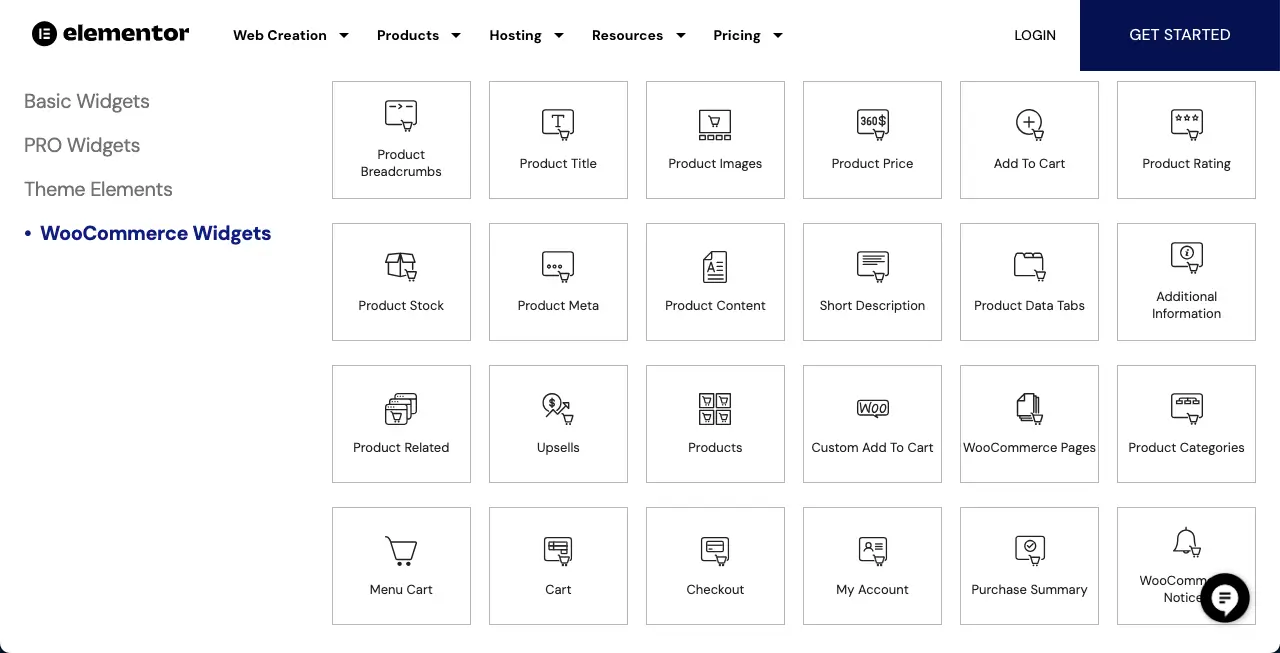
Elementor is integrated with WooCommerce. The page builder offers 25+ WooCommerce widgets, which can take your eCommerce website to a whole new level.
3. A Robust Template Library
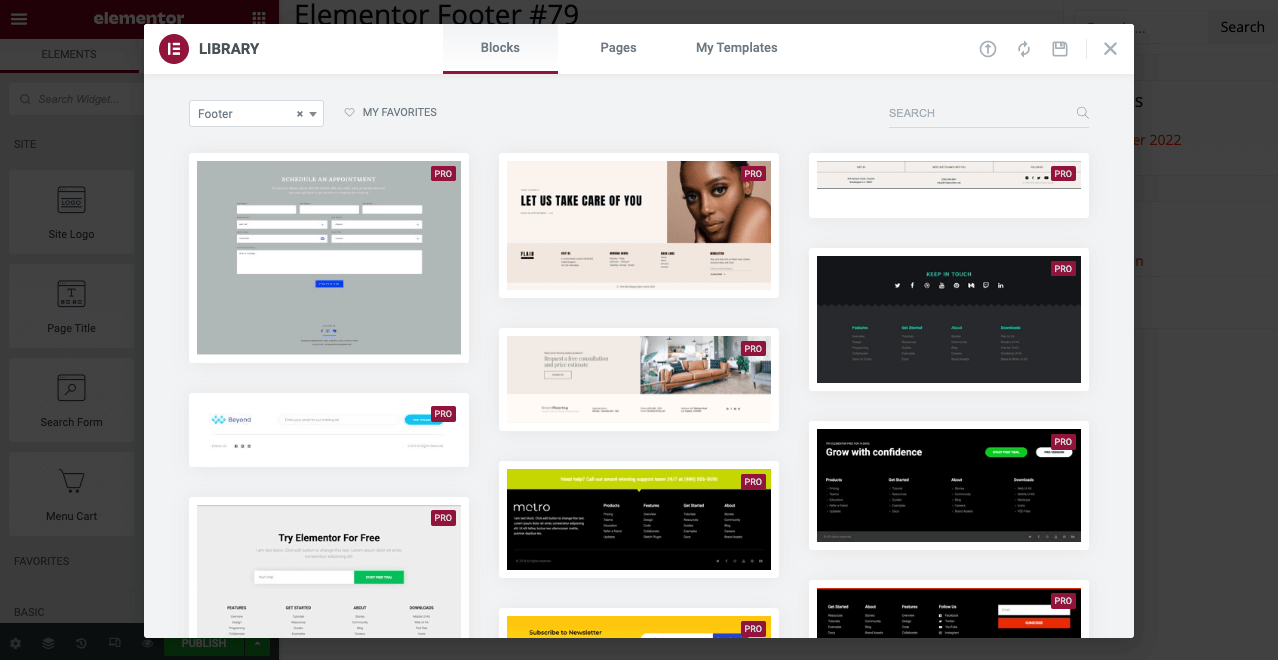
Elementor has a robust template library with 200+ full design packs. Types of templates you’ll find in its library are landing pages (home pages, about pages, contact pages, service pages), portfolio pages, blog pages, eCommerce pages, 404 pages, coming soon pages, headers & footers, popups, call to action sections, team sections, gallery sections, testimonials, etc.
You can easily insert those templates into your site and customize their content. We have already covered a detailed tutorial post on how to use Elementor templates. Check it.
4. Header and Footer Builder
No website is meaningful without a header and a footer. A header is the top section of a website that includes elements like a logo, a navigational menu, and often a search bar. It may also include social icons and contact information.
On the other hand, a footer is the bottom-most section of a website where users typically display links to the important pages, copyright information, and contact details. However, some websites also include the newsletter subscription in the footer.
Elementor has a powerful header and footer builder. Moreover, you can use its readymade templates for inspiration. You can create different types of headers with the plugin. For example, explore the tutorial posts mentioned below.
- How to create header and footer in Elementor for free
- How to create an Elementor sticky transparent header
5. Theme Builder
The Theme Builder is a comprehensive of Elementor. We usually use WordPress themes for a complete website layout, including each page. However, it’s not always possible to fine-tune every section of a website. In this case, Elementor can help you overcome this limitation.
Creating the header and footer is also a key feature of the Theme Builder. In addition, you can create a single blog post template, archive pages, 404 error pages, WooCommerce pages, and more. As a result, you don’t have to depend on any feature-rich theme.
All you need to do is install a lightweight theme on your site. In this case, our suggestion is the Hello Elementor theme. The rest of the customizations can be done with the Elementor page builder.
6. Conditional Settings
The conditional settings feature lets you configure rules for when your specific web templates or posts should be displayed on the frontend. You can use conditions to show/hide templates based on the following criteria:
- Page type
- User role
- Date and time
- Categories and tags
You can even create multiple blog post templates and set them for different post categories.
7. Popup Builder
A popup is a web element that is automatically triggered and opens as a modal view on a website when users complete certain actions. Popups are used to display important information like promotional content, coupons, codes, etc. You may also use popups in your lead generation projects.
You’ll find lots of popup builder plugins online. Most WordPress sites tend to use a separate builder to create and enable popup options. But if you have Elementor, you don’t need to depend on any additional plugin to do this. You can create popups for a wide range of purposes with the plugin.
Enjoy its advanced targeting and triggering options. You can set specific conditions for when the popup should be displayed. Elementor offers over 50+ animation effects. By adding any animation effect to the popup, you can make it more exciting.
In addition to all this, Elementor provides several ready-made popup templates, which you can use for inspiration and to save time when designing your own. Check how to create popups with Elementor.
8. Form Builder
If you want to grow your website from small to bigger, there is no alternative to exciting form building. You may need to create separate forms targeting different campaigns and specific pages and post content to properly differentiate the subscribers.
And there is no substitute for a dedicated form plugin for all these tasks. However, Elementor currently has a mighty form builder widget. With it, you can do everything that a form could do for you. You can save each form with a different name and check on the backend how many users have subscribed against them.
Elementor Form integrates various email marketing tools, like weMail. Check how to create a contact form with Elementor.
9. Mobile Responsiveness
Making a website mobile responsive is a must if you want to reach a wide range of audiences. Today, around 30%- 50% of traffic for any website is generated from mobile and tablet users. So, unless your website is accessible from mobile devices, you will likely miss out on a lot of traffic.
With Elementor, you can easily customize your website for mobile devices. The plugin lets you view your website on desktop, tablet, and mobile devices. You can customize your site’s layout individually for each screen size.
10. Generative AI

Over the last few years, generative AI tools have taken over the world like a storm. Today, no web development tool is perfect without AI support. Hence, Elementor added several generative AI features to the plugin in 2024. Take a look at all the AI features of Elementor.
Elementor offers you basically three types of AI support. They are text generation, image generation, and Custom CSS generation. You just have to write a prompt; Elementor will do the rest. Among them, the most exciting one is the Custom CSS generator.
Because if you ever want to make acute modifications to any of your web elements, which isn’t possible with the defaultation customization options, you can do it with Custom CSS. No matter if you are a no-code user. Just write a correct prompt. The AI will do the rest.
11. Lots of Powerful Addons
Suppose you ever feel that the available features and widgets of the Elementor plugin aren’t enough for your web design. In that case, you can install any addon to activate many new features and widgets. You’ll find lots of powerful addons for Elementor. In this post, we have discussed 12+ top Elementor addons you can consider in your checklist.
For example, HappyAddons is a powerful addon among them. We’ll introduce you to the plugin after covering this section. So, keep reading.
12. Integrates with Many Popular Tools
Elementor has integrations with many popular tools like WooCommerce, Mailchimp, Yoast, Rank Math, CRM systems, social media platforms, etc. As a result, you can create various multipurpose websites flexibly with this plugin.
The plugin has 25+ dedicated widgets for WooCommerce. Using them, you can create stunning eCommerce sites. Plus, you can run and measure various sales campaigns by integrating with CRM systems like HubSpot, Mailchimp, and Salesforce.
13. Countless Tutorials and Documentation
You will surely need various guides and tutorials whenever you consider using a new plugin. And if it’s a comprehensive plugin, such a guide is even more necessary. And in the case of Elementor, you will get these things in abundance, and you don’t have to worry about them.
Not only is the Elementor official website but many affiliate marketers cover guides and tutorials in addition to promotional content. Besides, addon makers also cover various helpful guides, videos, and blog posts on Elementor.
For example, go to YouTube and type ‘how to create a website with Elementor.’ You will find so many tutorials on this topic that it is impossible to count them. Also, as Elementor constantly makes itself more developed, feature-rich, and user-friendly, its guides have become more helpful recently.
Use HappyAddons with Elementor to Further Power Up Your Site
We have already discussed HappyAddons a bit above that it’s a robust addon of the Elementor plugin. This plugin is already used by 400,000+ active users right now and has been downloaded millions of times. It includes 135+ widgets (30+ are dedicated to WooCommerce) and 25+ features.
In addition, HappyAddons includes 70+ full-page Elementor templates and 500+ template blocks. It covers the powerful Theme Builder feature for free, which is a premium feature in Elementor. With Theme Builder, you can create the header, footer, single post template, and archive page for your site.
Like Elementor, HappyAddons also has a free version by which you can stunningly create a basic version of your desired website. Once you need advanced features, you can subscribe to its premium version. HappyAddons has four pricing plans and each plan has annual and lifetime subscription options.
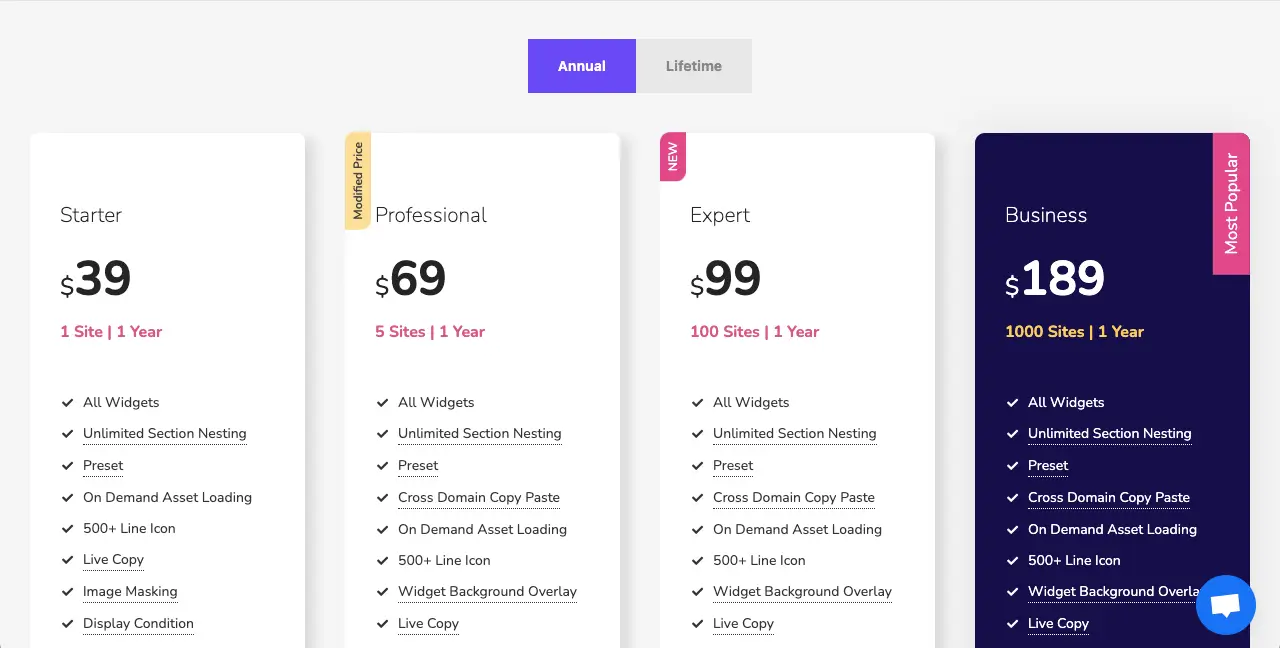
As a result, you can choose a suitable option that fits your budget and needs. For example, if you are a professional or freelance web developer, you can purchase the Business Plan. Because you can use the same license on 1000 websites, which can save you a big amount of money.
Closing Up
Selecting Elementor for building a website for a client will lead you to remarkable outcomes and help you scale up productivity and efficiency. Its intuitive interface and powerful features will empower you to design stunning websites that exceed client expectations.
By leveraging its versatile integrations, customizations, and responsive design capabilities, you can craft a unique online experience for your clients. Hope you enjoyed this post. If you want to know more about Elementor and HappyAddons, feel free to contact us through the comment box below or live chat.

![Black Friday and Cyber Monday are around the corner, and people are waiting for these festivals to grab the best product deals. That is why giving an attractive look to your website during this festive season is very necessary. But, creating a whole new landing page might be difficult in a short period of time. Don't worry. By using Happy Elementor Addons Black Friday and Cyber Monday Landing Page templates, you can easily develop a whole new landing page in a few minutes. In this today's blog, we are going to show how to boost your website design using HappyAddons templates during this festival season. Before that, we'll talk a bit about these two festivals and why they are important to online business communities. What are Black Friday and Cyber Monday? Black Friday is the immediate following of the famous Thanksgiving day. This is when people start shopping to celebrate the Christmas festival. Since the late 1980s, retail sales on this day have constantly been suppressing the past volumes. See the graph below. Source: Salecycle.com The first Monday following Thanksgiving day each year is called Cyber Monday. It was first introduced in 2005 by the USA National Retail Federation to encourage people to buy online. Though this festival originated in the USA, it is celebrated globally today. See the stats below. Source: Salecycle.com It indicates customers' buying behavior around this day is growing up over time. Many customers today keep a budget to buy products on these two days. So, why won’t you prepare a Cyber Monday landing page if you have an online store? Importance of Designing Landing Pages for Black Friday and Cyber Monday Festival Having a well-design website is one of the major checklists if you are running an online business. Most importantly, you have to make sure that your website remains up-to-date to boost your sales. That is why you need to redesign your website or make a new landing page during the Black Friday and Cyber Monday festivals. Because most online product & service-based businesses promote special deals during these two festivals. Here are some remarkable ways dedicated landing pages during these festivals can positively impact the performance of your online business. Boosts your product salesIncreases conversion rateOpportunity to collect potential email leadsGrabs users' attention toward your siteReduces bounce rateIncreases website visitors. Elementor Black Friday New Seasonal Kit is Already Here! Source: Elementor To make this Black Friday more enjoyable, Elementor has launched a New Seasonal Kit that includes landing pages, sections, pop-ups, and vector assets. All these design elements are made by the Elementor team so that one can easily use them on their website to ensure more sales and conversions. New Elementor Black Friday Seasonal Kit offers: 3 Landing pages6 Sections 6 Popups A collection of stickers & animations You can only get these ready-made Black Friday landing pages and sections if you have Installed Elementor Pro on your site. However, if you are looking for templates that are outside of the box, you can go with Happy Addons, the fastest Elementor Addons on the market. It's very easy to use, flexible and has tons of advanced features and widgets that can ease your website design journey. Also, you'll get several festival landing page templates & blocks. Moreover, you can use free Black Friday and Cyber Monday design blocks and templates to decorate your site. Most importantly, these templates and blocks are easy to customize and can be used for multiple purposes. Now let's see how you can use the Happy Addons templates to design your website according to the Black Friday theme. Pre-Requisites to Use HappyAddons Templates to Design Black Friday and Cyber Monday Landing Pages You must have the following plugins installed on your site to get access to the HappyAddons Template library. Make sure you’ve installed and activated the Happy Addons Free & Premium version of your website. Elementor (Free)Happy Addons (Free)Happy Addons Pro If you are new to Elementor, check this Step By Step Guide For Beginners. If you want to explore the readymade templates of HappyAddons before installing these plugins, you may visit by clicking on the button below. Check out Happy Addons Templates How to Design Black Friday Landing Page on Your Website Once you have the plugins (mentioned above) installed, your website is ready to follow the tutorial guide explained in this section. Get ready now! Step 1: Open a New Page with Elementor Create a new page or open the existing page with Elementor. Next, you have to select the Elementor Canvas option.Unless you select Elementor Canvas, you may watch the header, footer, and unnecessary other texts on the page. These might be irritating to you.Once you open the page with Elementor Canvas, your page will be completely clean. Watch the video below on how to do it. Step 02: Go to HappyAddons Library Click on the HappyAddons Library Icon. It will open up a modal popup. Here you'll find numerous stunning premade Blocks and Pages created by the Happy Addons team. Kindly explore them to create a list of your favorite items. Step 03: Import a HappyAddons Black Friday Template Go to the Page tab on the modal popup.Select Black Friday from the left-side filter option.You will several good-looking templates on your screen.Take your cursor on the one you like and hit on the INSERT button. Wait for a while to finish the installation process. You will get the template on your screen with editable sections and options. Step 04: Set the Black Friday Campaign Deadline A deadline creates a sense of urgency in customers' minds. So, better if you add a deadline section on the page to show your Black Friday deals. The good thing is that if you select the template as we did, you will automatically get a deadline or countdown option. You have to customize it as you want. Step 05: Show Image Carousel Slider on Your Black Friday Landing Page Using the Image Carousel, you can slide show demonstrating discounts on your product categories. Drag and drop the Image Carousel widget on any landing page section. Next, from the Elementor panel, you can add photos and text to the widget. Do it accordingly. Thus, you can add more sections and options on the landing page. Hope you can do it yourself. Step 06: Make the Black Friday Landing Page Mobile Responsive Making a web page mobile responsive with Elementor is super easy. You'll get the mobile responsive option on the Elementor footer section. Clicking on it will open up the option to view your landing page on different device screens. We have explained the process in the video below. Note: Don't delete any widget or section while customizing your landing page for any particular device. Because if you delete a widget or section on any device screen, it will also be applied on other devices. However, you may change their position or alignment or hide them. It won't make any impact on other devices. Step 07: Final Preview of Our Landing Page Here is the final interface of our Elementor Black Friday landing page that we've designed using the Happy Addons' ready-made Template. Get Happy Addons to Add a Black Friday Theme Landing Page on Your Website How to Design Cyber Monday Landing Page on Your Website You will require the same prerequisites (Elementor and HappyAddons Plugins) to design the Cyber Monday landing page on your website. Hope you have them ready on your website. Now, let's get into the tutorial part. Step 01: Import a Cyber Monday Readymade Landing Page Template Go to the HappyAddons Template library.Choose the Cyber Monday template you like.Click on the INSERT button. Wait for a while to finish the installation process. You'll get a page design like the following image below. Step 02: Edit Different Sections of the Page In the first tutorial, you saw the deadline/countdown option was already embedded in the template. But this template doesn't have it. So, you can bring it to your page? Very simple. Create a new section by clicking on the plus icon.Type Countdown on the Elementor search bar.Drag and drop the widget on the section. Customize the Countdown section from the Content and Style tabs of the Elementor panel. Using the Heading widget, we have added the FLASH DEALS text next to the countdown to make it more meaningful. Thus, you can use other exciting widgets on the template to make your landing page super gorgeous. Step 03: Promote Products on the Landing Page Promotional landing pages usually include a section to showcase some hot-selling products to generate instant sales. Using the Image and Button widgets, we have created this section under the FLASH DEALS.You may customize it more as you wish. Step 04: Make it Mobile Responsive We already showed you the process in the first tutorial on making a mobile web landing page responsive. Hope you can do it here as well, following the same guideline. Click on the Responsive Mode icon and do the rest yourself. Bonus: Black Friday and Cyber Monday Landing Page Design Key Considerations Whenever you design a landing page, you need to consider why you need to design this page and what elements they should keep on the page. Because if you are not adding all the necessary features to your page, it will not serve its purpose. This is why you need to focus on a few things before designing your Black Friday landing page. Here are some points you must consider in designing Black Friday and Cyber Monday landing pages. Add Black Friday textSet deals deadlineShow your best-discounted productsAdd coupon code Focus on responsive page designMake your page visually appealingImprove your page user experience or page structureSet a proper website navigation FAQ on Black Friday and Cyber Monday Landing Page Design Now, we'll answer some common questions on Black Friday and Cyber Monday Landing page designs commonly found online. How much does it cost to design a landing page?The cost of designing a landing page varies depending on the complexity of the design, the level of customization required, and whom to hire for the page. A simple landing page can be designed for as little as $25, while a more complex design with multiple customizations can cost upwards of $2,00.However, if you have Elementor and HappyAddons installed, you can design unlimited landing pages at a minimal cost. But like any other tool, you must have a kind of enterprise on them. As they are drag-and-drop builders and their numerous tutorials and documentation are available, they won't take you more than a month to be used to. Check out some wonderful YouTube tutorials on these two plugins. Hope you will enjoy them.How many hours does it take to design a landing page?It mainly depends on the level of design complexity and your web design skill. However, both in Elementor and HappyAddons, you will get countless readymade templates and block sections. You can design a beautiful landing page in 3-5 hours by making a proper combination of them.Can I design Black Friday and Cyber Monday Landing pages with Elementor and HappyAddons free versions?Surely, you can design Black Friday and Cyber Monday Landing pages with Elementor and HappyAddons free versions. But only with the pro versions, you can't add too many exciting features to your pages. For example, free versions will give you access to only a limited number of readymade templates.If you are just a beginner-level designer, free versions are enough. But if you are a professional designer or have a web designing agency, pro versions are a must. Are You Ready To Design Your Black Friday and Cyber Monday Landing Page? Customers look forward to this kind of occasion to buy their favorite products at a minimum price. Naturally, they are drawn to websites that look good and give a festive vibe. That is why adding a Black Friday and Cyber Monday landing page during the festival season will give you an extra edge over the competitors. The above guide shows how to design your Elementor Black Friday Landing page using the Happy Addons' Black Friday Templates and how it can help boost your holiday sales. So if you have any queries regarding this blog, you can comment on us in the below box. If you like this post, then share it on your social channel. Don't forget to subscribe to our newsletter. Also, follow our Facebook and Twitter channels for regular updates. Subscribe to our newsletter Get latest news & updates on Elementor [yikes-mailchimp form="1"] ":36560} /--](https://happyaddons.com/wp-content/uploads/2021/11/How-to-Design-Black-Friday-and-Cyber-Monday-Landing-Page-300x188.png)
