




The Background Hover Effect in HappyAddons lets you change the background of a Container when a visitor hovers over it. You can use a different color or image on hover and enhance the interaction with transition, text color, animation, and CSS filter options.
Note: Background Hover Effect works only on Containers. It is not available for other Elementor elements.
How to Enable Background Hover Effect
- Select the Container you want to customize.
- Go to Style → Background.
- Select the Hover tab.
- Choose a Background Type and customize the hover effect.
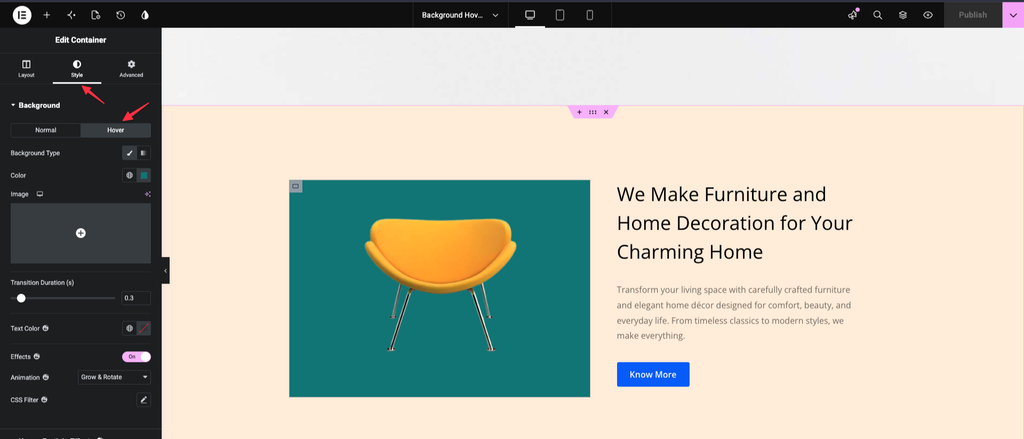
Background Hover Options
Background Type
Choose the type of background you want to display when the container is hovered.
You can use:
- Classic – Add a solid background color or image.
- Gradient – Create a gradient background for the hover state.
Color
Choose the background color that appears when the container is hovered.
Image
Add a background image to display on hover. You can upload or select an image from the WordPress Media Library.
Transition Duration
Control how quickly the container changes from its normal background to the hover background.
A higher value creates a slower and smoother transition, while a lower value makes the transition faster.
Text Color
Set the text color for the container’s hover state. This allows you to change the appearance of text when visitors hover over the container.
Effects
Enable Effects to add an animation when the container is hovered.
After enabling it, choose an available animation effect from the Animation dropdown.
CSS Filter
Apply additional CSS filter effects to customize the appearance of the container’s background or hover content.